Accolent ERP records up to four different costs for each product in each warehouse. The four product costs are referred to as: Standard Cost, Alternate Cost, Special Cost and Average Cost and are used for different purposes. Standard Cost is typically used for recording the overhead-burdened business cost of a product. Alternate Cost is typically used for the purchasing cost or replacement cost of the product. Special Cost is used for user-defined special costing needs. The General Ledger posting is always based only on Average Cost. Unlike Standard, Alternate and Special Cost which are entered by users, Average Cost is maintained by the system and should not be changed by the user. In addition, Accolent ERP maintains Landed Costs (e.g., freight, insurance, customs tariffs, clearing fees), related to a Purchase Order that are treated as direct product costs under US GAAP and capitalized into Average Cost.
Overview
- Accolent ERP allows for four costs for each product by warehouse.
- Standard Cost, Alternate Cost and Special Cost are business costs and are entered by the user.
- Each of these three business costs maintain a full history of when the costs were last changed and the user who made the changes.
- Average Cost is the cost for accounting purposes and is calculated and maintained automatically by the system and used as the basis for all GL Postings in the system.
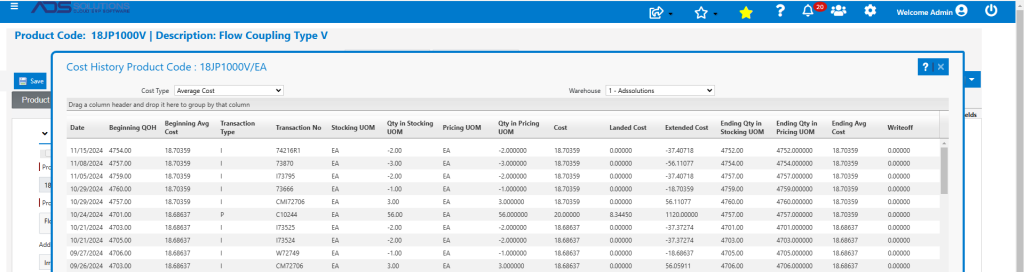
- The system maintains the full Average Cost history that is updated for each transaction.
- In addition, Accolent ERP maintains Landed Costs that are the direct costs (e.g., freight, insurance, customs tariffs, clearing fees), related to a Purchase Order that are capitalized into products’ Average Cost in accordance with US GAAP.
- Landed Costs are entered when a PO is received and are allocated to the Average Cost of the product by Extended Cost, Weight or Cubes.
Standard Cost
- Standard Cost typically represents the business cost of a product and often includes some loading for estimated direct costs of the product (e.g., freight, handling) as well as some indirect warehouse costs (e.g., storage, inventory shrinkage).
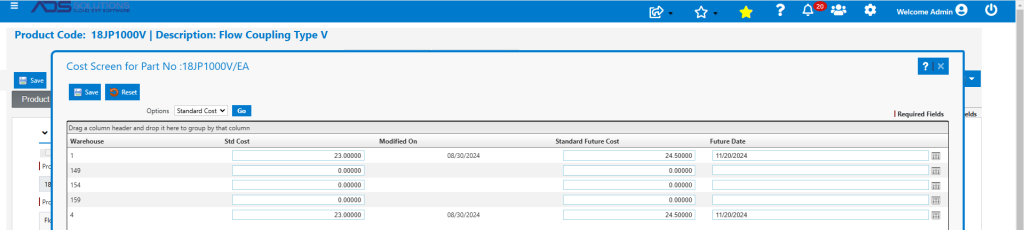
- Standard Cost is typically used to manage the business to assess profitability and to pay commissions.
- Standard Costs don’t typically bounce around with vendor price changes and/or landed costs, and so represent reasonably stable bases for making business decisions.
- Standard Costs are typically reassessed periodically to ensure they reflect current business conditions.
- Go to Inventory/Products > Products, select a product > Actions > Cost to see current Standard Costs and to enter a future Standard Cost that will take effect on a specified future date.
Alternate Cost
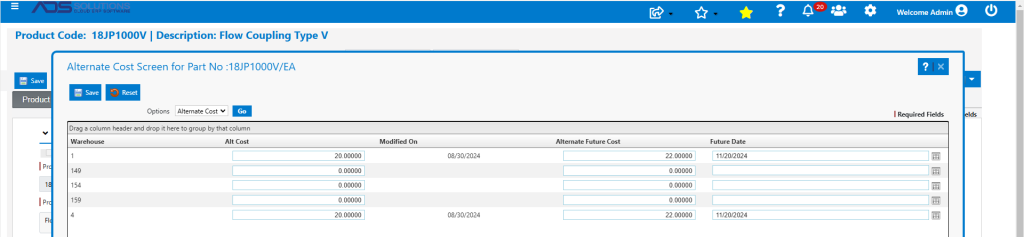
- Alternate Cost typically represents the replacement or the most recent PO cost of the product.
- On Application Default V102-1, Alternate Cost can be set up to be the default cost entered on a PO.
- If a cost that differs from the current Alternate Cost is entered into a PO, there are options to automatically update Alternate Cost and/or List Price, if desired, for one or all warehouses.
- Go to Inventory/Products > Products, select a product > Actions > Cost to see current Alternate Costs and to enter a future Alternate Cost that will take effect on a specified future date.
Landed Cost
- Landed Costs are those incidental costs (e.g., freight, insurance, customs tariffs, clearing and port fees) associated with receipt of a Purchase Order.
- In accordance with US GAAP, Landed Costs are considered direct costs of products and must be allocated to the products on the PO and capitalized into inventory to be amortized to expense through COGS.
- The Landed Cost screen allows Landed Costs to be allocated by (1) Extended Price, (2) Weight or (3) Cubes.
- See this wiki: Landed Costs.
Special Cost
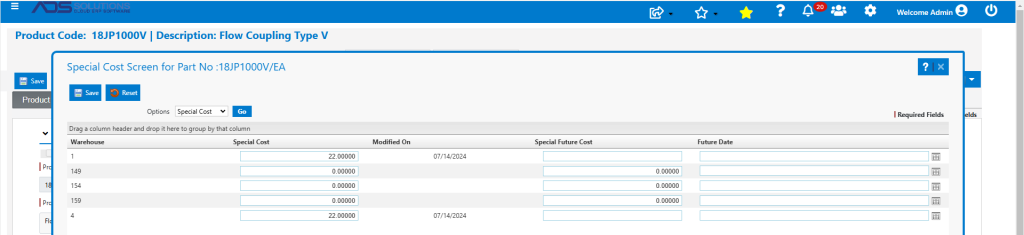
- Special Cost is not often used but can be used for a variety of special costing needs.
- For example, Special Cost may represent a one-off cost for that product that won’t be replicated and/or reflects only a limited close-out quantity.
- Go to Inventory/Products > Products, select a product > Actions > Cost to see current Special Costs and to enter a future Special Cost that will take effect on a specified future date.
Average Cost
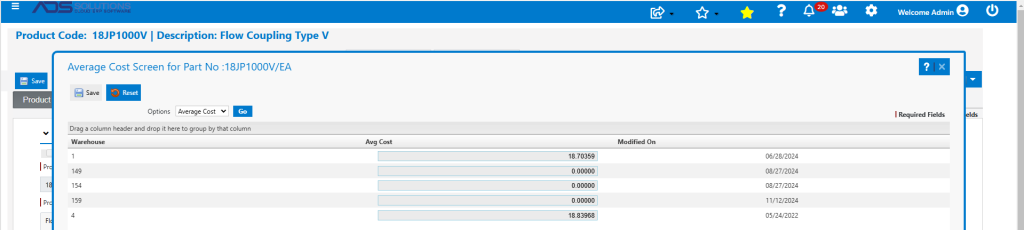
- Average Cost is the true accounting cost of the product and reflects all transactions that affect the product.
- The Average Cost of a product is calculated automatically by the system any time a transaction is recorded that affects the cumulative cost of the inventory of a product or the quantity of the product.
- Receipt of POs and incurrence of Landed Costs allocated to a product increase/decrease the Average Cost of a product.
- Inventory shrinkage and/or damaged inventory typically do not affect the Average Cost of a product; instead, the shrinkage or damage is by default recorded as a period expense.
- See this wiki: Average Cost Calculations.
- Go to Inventory/Products > Products, select a product > Actions > Cost to see the current Average Cost.
Cost History
- To see the history of cost changes, go to product > Actions > Cost History.
- This is particularly useful to recreate the history of the transactions that affected the Average Cost for the product.
Future Costs
- Each of the business costs allows for the setting of a future date on which cost increases will take effect.
- On a daily basis, a scheduled SQL Job reads the future dates and updates the costs on the dates specified.
Commissions Reports
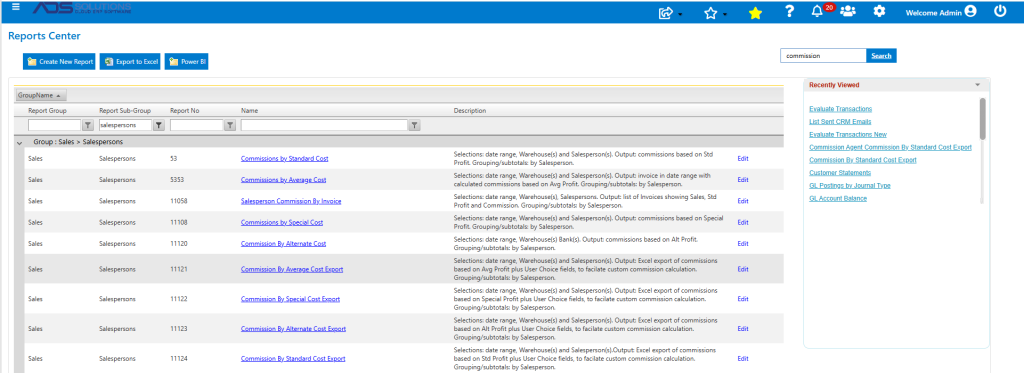
- There are reports that calculate sales commissions based on each of Standard, Alternate, Special and Average Cost.
- Each of these reports also have an “Export” version designed to be exported to Excel so that customized commissions structures can be created.