
Accolent ERP’s physical inventory system allows you to take a physical count of your inventory by Cycle Counts or a Full Count by product. The physical inventory system involves a number of sequential steps that must be performed in order. This wiki posting is the second of six on the process of Inventory Counting.
Sequence of Wiki Posts
- The Physical Inventory system is explained in 6 wikis that lay out the sequential series of steps involved. Read the wikis in this order:
Full Count or Cycle Count
- First select whether this is a Full Count or a Cycle Count.
- A Full Count is of all products while a Cycle Count is for a selection of products only.
Full Count
- For a Full Count, the count will be of all products so there is no Select By choice.
- There is a Sort By choice which will determine how the Count Sheets will be prepared. The options are to Sort By: Product, Category, Vendor or Location.
- The Full Count requires a selection of the Warehouse.
- For example, do a Full Count for Warehouse 1-Adssolutions and Sort Count Sheets by Category.
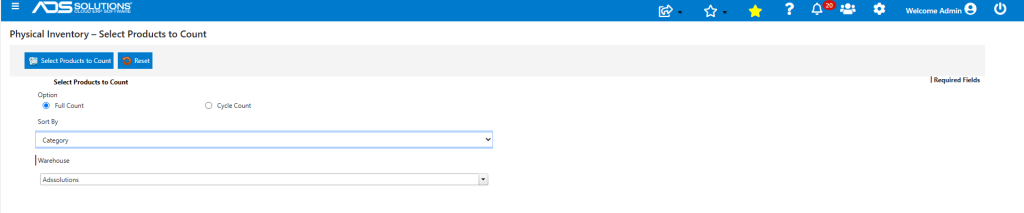
Cycle Count
- For a Cycle Count, there will be a Select By choice to determine which products to count. The Select By choices are Product, Vendor, Group, Category, Location, Lots.
- The Select By choice will also be the Sort By choice used to prepare the Count Sheets.
- Typically, the Select By: Product choice with the entry of a list of product codes is used only for very small and targeted counts, when an inventory discrepancy is suspected.
- As with the Full Count, the Cycle Count requires a selection of the Warehouse.
- For example, do a Cycle Count for Category BULKCHEM for Warehouse 1-Adssolutions.
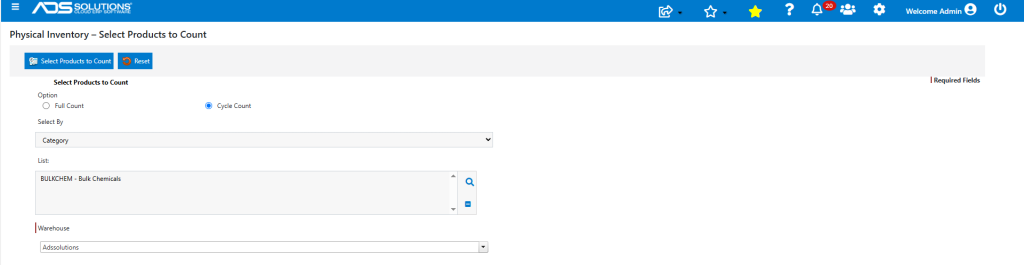
- Note: Selecting a Cycle and a Warehouse more than once (e.g., select a vendor for a specific warehouse, then select that vendor as part of another cycle for the same warehouse), will give a warning that the Cycle already exists and then will delete the prior Cycle if user elects to proceed.
Select Products to Count
- When selection is complete, click on the Select Products to Count button.
- If this is a Cycle Count you will receive a Cycle Number — record this number as it will later be required.
- If you selected a Full Count, a Cycle Number will not be created.
- For example, Select Products to Count for the Category BULKCHEM and create Cycle No 545.
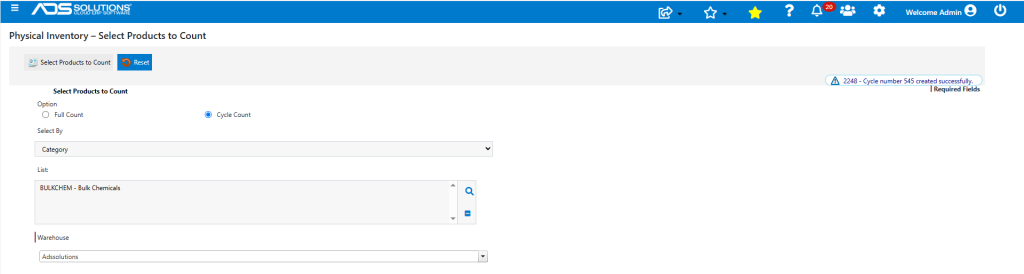
Products Already on an Active Cycle
- If after creating a Cycle Count (but prior to creating the Batch), the same products are put on another Cycle Count, the system will warn that the original Cycle Count is Still active.
- The user will have the option to continue with the new Cycle Count and delete the original Cycle Count.
Products Already on an Active Batch
- Any products already on an active Batch cannot be put a new Cycle Count, since counting may already have started
- If a new Cycle Count needs to be started the active Batch will first have to be cancelled.