
Accolent ERP includes comprehensive functionality for short-term equipment rentals. In accordance with FAS13 and US GAAP, Accolent ERP accounts for short term equipment rentals as operating leases in which the lessor retains legal and accounting ownership of the rental equipment. Rental items are treated as fixed assets on the lessor’s Balance Sheet and costs are recorded periodically through depreciation expense. Rental items are always non-inventory items and may be serialized or not serialized.
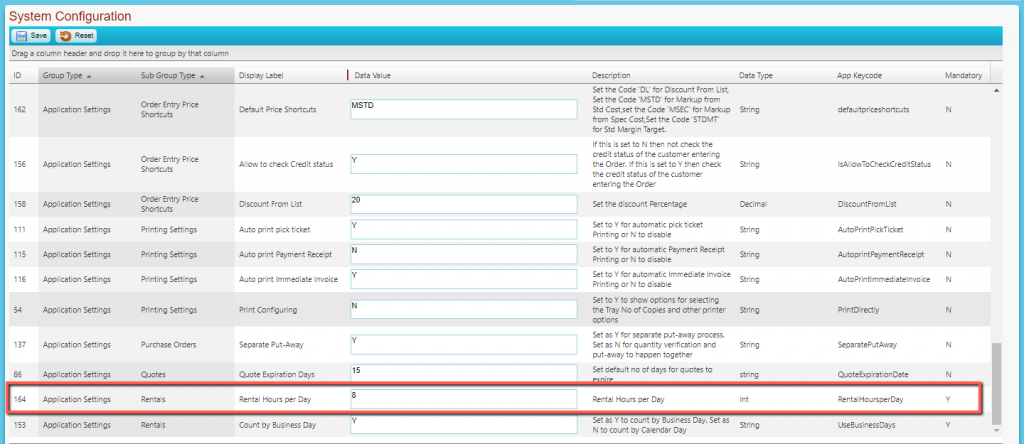
Set Rental Hours Configuration
- Accolent ERP allows a configurable number of Rental Hours per day
- Go to Settings > System Configuration and set Config ID 164 to enter 8 Rental Hours per Day
Set Up Rental Product
- Rental Product HRE_01 is rented by the day (EAD) or by the hour (EAH)
- The default selling UOM is EAD priced at $124.00 per day; rental by EAH priced at $18.60 per hour
- Stocking and PO UOMs are EA
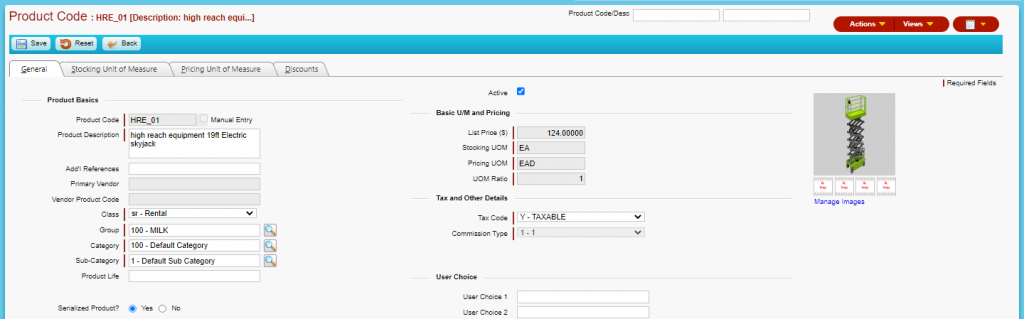
- Stocking UOM tab setup

- Pricing UOM tab setup

Rental Products Status
- Rental Products Status screen shows 3 on-hand

Create an Hourly Rental Order
- Go to Sales > Rentals > Create Rentals
- Create Rental Order 11011
- Select UOM of EAH

- Click on the icon in the grid to open the Rental Details pop-up
- Enter start date (e.g., 9/2/21) and start time (e.g., 8:00 am)
- The end date will be the same as the start date since UOM is EAH
- Start time is 8:00 am and enter the end time of 12:00 pm for a 4 hr rental
- Rental Periods calculate based on start time and end time and this calculated value will override whatever was previously entered for Rental Periods
- Select from Serial Nos that are On Hand

- Save then click Release Rental
- The extended price is 4 Hrs x $18.60 for a total before sales tax of $74.40
- Order is on the List Rentals screen with the status of shipping

- The order stays in Shipping status until the rental equipment is returned
- Rental Products Status screen now shows Qty on Hand of 2

- When the rental equipment is returned, the order can be invoiced
- When returned, the user can use the Rental Details pop-up to adjust the return date to reflect the actual time on the rental
- Open Order 111011 and use the Rental Details screen to record the actual end date and end time
- If the item is returned after the scheduled end time but on the same end date, the system will compute the additional hours up to the configured rental hours per day, for example:
- if the end time is 2:00 pm, 6 hrs will be charged
- if the end time is 6:00 pm, only 8 hrs will be charged
- If the end date is greater than the scheduled end date, the system will charge for a full 8 hours in addition to the difference between end time and start time, for example:
- If the end date is increased by 1 day and the end time is 12:00 pm, 12 hrs will be charged
- Record a return on 9/2/21 at 2:00 pm for a 6 hr rental (say)
- Click the checkbox to verify the return

- Then invoice for 6 hrs at $18.60 per hr for a total before sales tax of $111.60

- Rental Products status reverts to a Qty on Hand of 3

- View Transactions link shows the hourly rental on 11011
