
Accolent ERP provides the ability to associate product codes with barcodes that can be scanned by barcode readers to identify the product. Manufacturers’ products will typically already have GS1-registered barcodes. Custom barcodes (i.e., not GS1-registered) can also be created. Once a barcode is received or created, and associated with a product code, Accolent ERP will recognize the product code from the scanned barcode. Users can create product, bin and shelf labels that contain barcodes as well as human readable information. By affixing these barcode labels to products or bins, warehouse personnel can identify the products picked, put-away or counted for physical inventory, by using barcode scanners. This cuts down on errors and reduces processing time.
Using Barcodes
- Barcodes are machine-readable graphical symbols consisting of bar/space patterns.
- There are numerous types of barcode languages and most readers can handle a wide range of these, which can be linear (like UPC-A) or two-dimensional (like QR codes).
- Once barcodes are set up on products, they can be scanned rather than entered or found through a lookup – this can greatly speed up order entry, picking, put-away, etc.
- Using barcodes also significantly cuts down on data entry errors – published studies have found that manual entry results in about one error every 250 keystrokes compared to scanning barcodes that has an error rate of one in every 5,000 to 36 trillion characters scanned (depending on the type of barcode).
- Also, with the addition of Accolent Wireless WMS handheld devices may be used to perform all warehouse operations (including picking, packing, shipping, PO receiving and put-away and physical inventory counts) improving productivity.
- The Accolent Wireless WMS handheld devices can be either tablets with paired Bluetooth scanners or all-in-one handhelds.
Getting Barcodes
- Most products acquired from established manufacturers will already have GS1-registered UPC barcodes, and these will typically be provided with the PO delivery documentation.
- GS1 barcodes are unique globally recognized barcodes.
- Unless selling on Amazon or to large retailers, GS1-registered barcodes may not be required.
- If GS1 barcodes are not required, custom barcodes can be created in multiple barcode formats by Accolent ERP or using other barcode generators.
Scanning Barcodes
- Scanning barcodes is a capability handled automatically by barcode readers.
- Most barcode readers can recognize and scan multiple barcode bar/space formats and translate these into multi-digit alphanumeric strings.
- Entering the multi-digit strings into Accolent ERP as product synonyms will, when scanned, let Accolent ERP recognize these as product codes.
Supported Barcode Types
- Accolent ERP supports a wide range of barcode types.
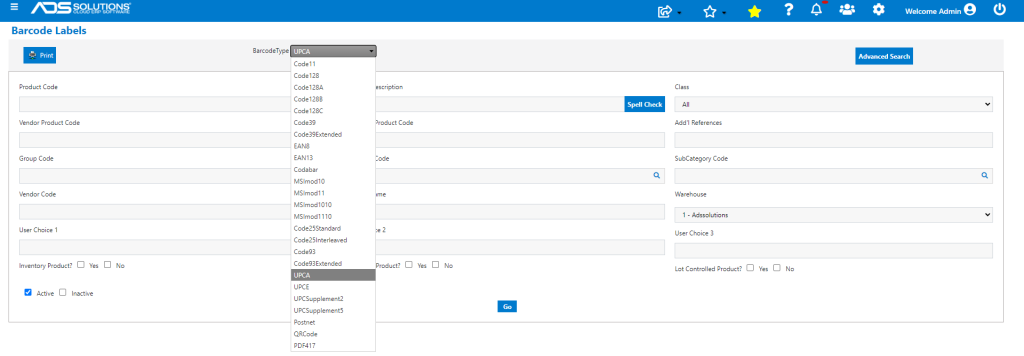
Standard Barcode Types
- The most common barcodes types are UPC (universal product codes) or EAN (European article number).
- Almost all scanners read both UPC and EAN type barcodes.
- Barcodes can be linear, stacked linear, and two-dimensional (or 2D).
| Barcode Type | Description |
| UPC-A (GTIN-12) | This is a 12-digit number used primarily in North America and includes a GS1 Company Prefix and Item Reference |
| UPC-E | This is an 8-digit number used when available space is too small for a UPC-A barcode |
| EAN/UCC-8 (GTIN-8) | This is an 8-digit number used predominately outside of North America |
| EAN/UCC-13 (GTIN-13) | This is a 13-digit number used predominately outside of North America |
| Code 128 | This is the most versatile symbology and can be used to encode any type of data. However, it is more complex than other symbologies |
| Code 39 | This is a popular symbology for encoding alpha-numeric data |
Printing Barcodes
- Accolent ERP can print barcode labels in a variety of barcode formats to create product labels and/or bin or shelf labels.
- Once barcodes have been set up as product synonyms, users can create a population of products for which to print the barcode labels.
Other Wikis
- See these wikis: