
Accolent ERP allows for a rental product that has a status of on hand to be marked as damaged. If the damage results from a rental, the rental order must first be invoiced to get the product back to a status of on hand, then the product can be recorded as damaged. The effect of recording a rental product as damaged will be to move the product out of rental equipment into inventory at its then depreciated cost. The inventory product may then be charged (i.e., “sold”) to the customer that damaged it or sold for residual value or written-off.
Rental Products Status
- Go to Rental Products Status screen and filter for Skid Steer
- Shows 5 on hand of ROC1000 Skid Steer Wheeled

- List of Serial Nos for this product

Rent the Item
- Create rental order 10719 to rent Serial No ROC417259 to customer Drip Works
- On List Rentals screen, creates transaction 10719 with the status of Order

- Click Release Rental to release the item to the customer
- Order 10719 is on the List Rentals screen with the status of Shipping
- Subsequently, assume the customer reports that the item was seriously damaged in a construction site accident
Damaged Rental Product
- To record a damaged product, the user should complete these steps:
- Complete rental invoice to close out pending transaction,
- Mark rental product as Damaged
- Then the customer may be charged for the damage by “Selling” the damaged product to the customer
Complete Rental
- First, close out the rental transaction by invoicing the rental
- Rental product moves from status of On Rental to status of On Hand
Mark as Damaged
- Go to Rental Products > Damaged Rental Product
- Select product and Serial No, then Save and the following entries will be made automatically:
- Rental Products Status screen will no longer show the damaged item
- Rental Products Depreciated Cost screen will no longer show the damaged item
- A new non-serialized, Inventory product ROC1000_D1 will be created with only the stocking UOM and Price and Average Cost equal to the current Depreciated Cost of the damaged item
- A GL Posting to debit Inventory and credit Rental Equipment for the amount equal to the current Depreciated Cost of the damaged item will be made

- Records the product as damaged
- Rental Products Status screen shows only 4 on hand

- Serial Nos list excludes ROC417259

- The Depreciated Cost of Rental Products screen also excludes ROC417259

- The process automatically created the damaged rental product as an inventory product
- Go to Inventory/Products > Products to see the damaged rental product moved to inventory as ROC1000_D1 which is Class S, non-serialized, inventory product
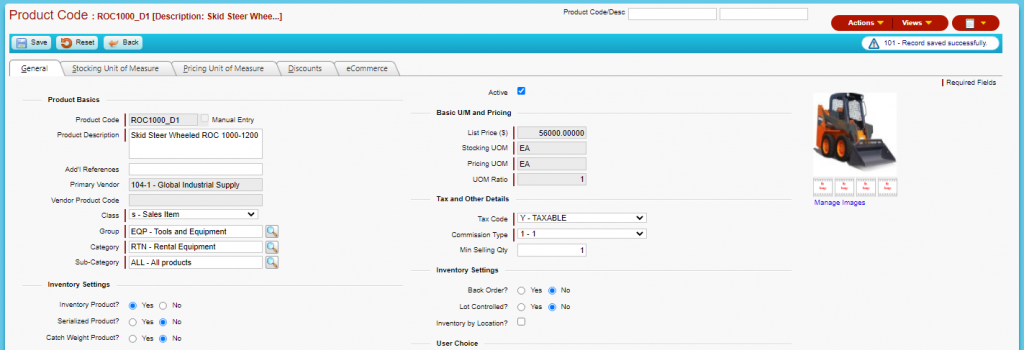
- ROC1000D_1 does not have any rental UOMs; only the EA Stocking UOM remains
- Pricing is equal to the then-current value of Rental Depreciated Cost of $56,000
- Average Cost is equal to the then-current value of Rental Depreciated Cost of $56,000

- Ledger card for ROC1000D_1 shows the item moved into inventory

- Go to Inventory/Products > Products > Serialized Product
- Serial No ROC417259 is marked as damaged

- Serial Record details for ROC417259 shows the product marked as Missing/Damaged
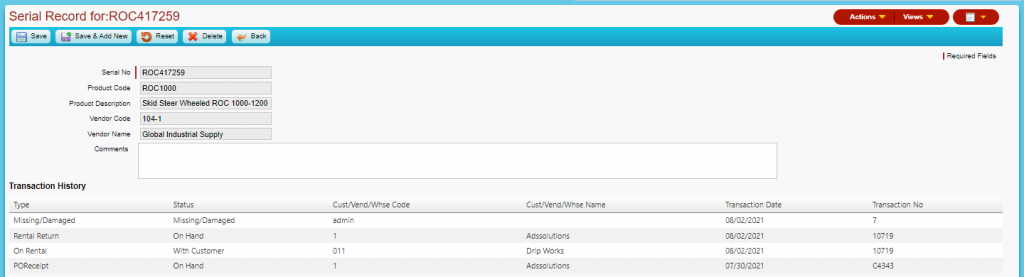
- Go the GL > Manage GL > Evaluate Transactions to see the General Journal posting entry

Charge Customer for Damage
- Using the damaged item ROC1000_D1 in inventory, enter a sale transaction to charge the customer for damage
- The user can edit the price to markup the Depreciated Cost as desired
- Then invoice the customer for the damaged item
Retired Rental Products
- This same process may be followed to remove rental items from active service
- Then these retired rental items may be sold for residual value