
Accolent ERP provides a set of CSV data Import Templates that can be used for the initial loading of your data. Some of these Import Templates may also be used for importing data while in live operation. See this wiki for which Import Templates can be used for which type of operation: Sequence of Intial Data Imports. Included below is a summary of all of the available CSV templates together with a description of the purpose of each import. Each Import Template has a related wiki that provides field-by-field instructions for entering data into that template. Once the Import Templates are populated they should be saved as Zip files and can then be imported. The import screen will report on any Exceptions to the import which can be exported to CSV, corrected and reimported. There is also a very specific order in which data imports should be done: Value Lists (e.g., Customer Types), Sub-Master Records (e.g., Salespersons), Master Records (e.g., Customers), Transactions (e.g., Invoices).
Data Restrictions
- Accolent ERP runs in a load-balanced environment in the Amazon Web Services public Cloud – this accommodates medium size data imports (up to 5,000 records).
- However, large data imports will cause a problem as the system will continually redirect to other servers to automatically balance the data load.
- Please contact ADS Solutions if you are planning to do large data imports and we will provide you with access to a stand-alone (i.e., not load-balanced) data import server.
Selecting the Import Templates
- Accolent ERP provides a number of CSV data Import Templates that can be used to import data into the system.
- Included below is an index of all the CSV templates and what they are used for.
- Each CSV Import Template has a wiki that provides field-by-field instructions on how to format the data for the Import Template.
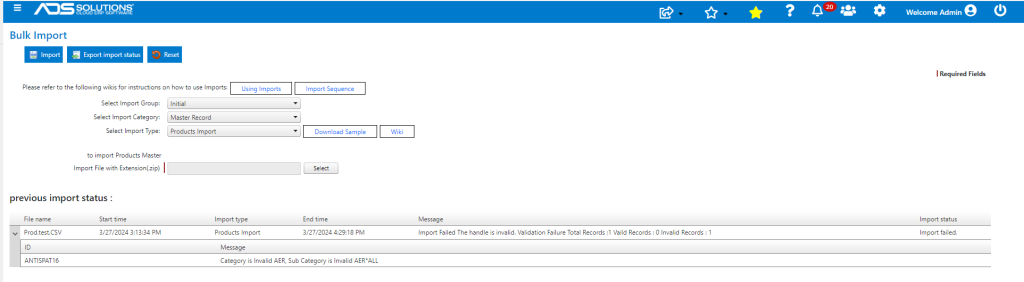
- Go to Utilities > Imports > Bulk Imports to access the available CSV imports.
- Select an Import Template and click on the Download Sample button to get the CSV template.

Populating the Import Templates and Uploading
- Once downloaded, the CSV template can be populated with the data you want to import into Accolent ERP.
- Please review the Import Template Instructions carefully before populating the CSV templates.
- Please also read the wiki: Reserved and Invalid Characters which details restrictions on the use of special characters.
- The second row of the import templates provides sample data – this row should be deleted before finalizing the data to be imported.
- Once the Import Template is fully populated, it should be saved as a Zip file anywhere on your network.
- Then from the import screen, select the Zip file to be uploaded and click on the Import button to upload.
Error Reporting
- The import screen will provide details of all the Exceptions encountered.
- This can be exported to a CSV file. The failed data records can then be corrected and the file re-imported.
List of CSV Import Template Instructions
| Wiki Name | Wuki URL | Import Template Used for |
| Import Template Instructions-AP Open Items | https://help.accolent.net/import-template-instructions-ap-open/ | Importing AP Open Items |
| Import Template Instructions-AR Open Items | https://help.accolent.net/import-template-instructions-ar-open-items/ | Importing AR Open Items |
| Import Template Instructions-Banks | https://help.accolent.net/import-template-instructions-banks/ | Importing Banks |
| Import Template Instructions-Commission Types | https://help.accolent.net/import-template-instructions-commission-types/ | Importing Commission Types |
| Import Template Instructions-Contacts | https://help.accolent.net/import-template-instructions-contacts/ | Importing Contacts |
| Import Template Instructions-Contract by Category | https://help.accolent.net/import-template-instructions-contract-by-category/ | Importing a Contract specifying pricing by Category |
| Import Template Instructions-Contract Header | https://help.accolent.net/import-template-instructions-contract-header/ | Importing the general details for a pricing Contract |
| Import Template Instructions-Contract by Product | https://help.accolent.net/import-template-instructions-contract-by-product/ | Importing a Contract specifying pricing by Product |
| Import Template Instructions-Contract by Sub-Category | https://help.accolent.net/import-template-instructions-contract-by-sub-category/ | Importing a Contract specifying pricing by Category |
| Import Template Instructions-Contract by Vendor | https://help.accolent.net/import-template-instructions-contract-by-vendor/ | Importing a Contract specifying pricing by Vendor |
| Import Template Instructions-Cost and Inventory Settings | https://help.accolent.net/import-template-instructions-cost-inventory-settings/ | Importing Product Costs and Inventory settings |
| Import Template Instructions-Credit Statuses | https://help.accolent.net/import-template-instructions-credit-statuses/ | Importing Credit Statuses |
| Import Template Instructions-Customer Contracts | https://help.accolent.net/import-template-instructions-customer-contracts/ | Assigning Contracts to Customers |
| Import Template Instructions-Customer Types | https://help.accolent.net/import-template-instructions-customer-types/ | Importing Customer Types |
| Import Template Instructions-Customer_Vendor Product Codes | https://help.accolent.net/import-template-instructions-customer-vendor-product-codes/ | Importing Customers’ and/or Vendors’ Product Codes |
| Import Template Instructions-Customers | https://help.accolent.net/import-template-instructions-customers/ | Importing Customers |
| Import Template Instructions-Delete Codes | https://help.accolent.net/import-template-instructions-delete-codes/ | Importing Delete Codes |
| Import Template Instructions-Delivery Routes | https://help.accolent.net/import-template-instructions-delivery-routes/ | Importing Delivery Routes |
| Import Template Instructions-Department Codes | https://help.accolent.net/import-template-instructions-department-codes/ | Importing Department Codes |
| Import Template Instructions-Email/Fax Defaults | https://help.accolent.net/import-template-instructions-email-fax-defaults/ | Importing Email/Fax Defaults |
| Import Template Instructions-GL Chart of Accounts | https://help.accolent.net/import-template-instructions-gl-chart-of-accounts/ | Importing GL Chart of Accounts |
| Import Template Instructions-Inventory Avg cost and QOH | https://help.accolent.net/import-template-instructions-inventory-avg-cost-and-qoh/ | Importing Inventory Avg cost and QOH |
| Import Template Instructions-Invoice Headers | https://help.accolent.net/import-template-instructions-invoice-headers/ | Importing Invoice general information |
| Import Template Instructions-Invoice Lines | https://help.accolent.net/import-template-instructions-invoice-lines/ | Importing Invoice line items |
| Import Template Instructions-Kit Components | https://help.accolent.net/import-template-instructions-kit-components/ | Importing Kit Components |
| Import Template Instructions-Locations | https://help.accolent.net/import-template-instructions-locations/ | Importing Locations |
| Import Template Instructions-Lots | https://help.accolent.net/import-template-instructions-lots/ | Importing Lots |
| Import Template Instructions-Manual Invoices | https://help.accolent.net/import-template-instructions-manual-invoices/ | Importing Manual Invoices |
| Import Template Instructions-PO Header | https://help.accolent.net/import-template-instructions-po-header/ | Importing PO general information |
| Import Template Instructions-PO Lines | https://help.accolent.net/import-template-instructions-po-lines/ | Importing PO line items |
| Import Template Instructions-Price Lists | https://help.accolent.net/import-template-instructions-price-lists/ | Importing Price Lists |
| Import Template Instructions-Pricing Tiers | https://help.accolent.net/import-template-instructions-pricing-tiers/ | Importing Pricing Tiers |
| Import Template Instructions-Product Accessories | https://help.accolent.net/import-template-instructions-product-accessories/ | Importing Product Accessories |
| Import Template Instructions-Product Alternates | https://help.accolent.net/import-template-instructions-product-alternates/ | Importing Product Alternates |
| Import Template Instructions-Product Categories | https://help.accolent.net/import-template-instructions-product-categories/ | Importing Product Categories |
| Import Template Instructions-Product Groups | https://help.accolent.net/import-template-instructions-product-groups/ | Importing Product Groups |
| Import Template Instructions-Product Locations | https://help.accolent.net/import-template-instructions-product-locations/ | Importing Locations and Quantities associated with Products |
| Import Template Instructions-Product Sub-Categories | https://help.accolent.net/import-template-instructions-product-sub-categories/ | Importing Sub-Categories |
| Import Template Instructions-Product UOMs | https://help.accolent.net/import-template-instructions-product-uom/ | Importing the UOM table for Products with multiple UOMs |
| Import Template Instructions-Products | https://help.accolent.net/import-template-instructions-products/ | Importing Products |
| Import Template Instructions-Quantity Breaks | https://help.accolent.net/import-template-instructions-quantity-breaks/ | Importing Quantity Breaks |
| Import Template Instructions-Quote_Order_Back Order_Shipping Header | https://help.accolent.net/import-template-instructions-quote-order-bo-shipping-header/ | Importing Quote/Order/Back Order/Shipping general information |
| Import Template Instructions-Quote_Order_Back Order_Shipping Lines | https://help.accolent.net/import-template-instructions-quote-order-bo-shipping-lines/ | Importing Quote/Order/Back Order/Shipping line items |
| Import Template Instructions-Sales Routes | https://help.accolent.net/import-template-instructions-sales-routes/ | Importing Sales Routes |
| Import Template Instructions-Salespersons | https://help.accolent.net/import-template-instructions-salespersons/ | Importing Salespersons |
| Import Template Instructions-Salespersons Commissions | https://help.accolent.net/import-template-instructions-salespersons-commissions/ | Importing Salespersons Commissions |
| Import Template Instructions-Serial Numbers | https://help.accolent.net/import-template-instructions-serial-numbers/ | Importing Serial Numbers |
| Import Template Instructions-Ship Vias | https://help.accolent.net/import-template-instructions-ship-vias/ | Importing Ship Vias |
| Import Template Instructions-Split-Tax Jurisdictions | https://help.accolent.net/import-template-instructions-split-tax-jurisdictions/ | Importing Tax Jurisdictions |
| Import Template Instructions-States | https://help.accolent.net/import-template-instructions-states/ | Importing States |
| Import Template Instructions-Synonyms | https://help.accolent.net/import-template-instructions-synonyms/ | Importing Synonyms |
| Import Template Instructions-Tax Codes | https://help.accolent.net/import-template-instructions-tax-codes/ | Importing Tax Codes |
| Import Template Instructions-Tax Jurisdictions | https://help.accolent.net/import-template-instructions-tax-jurisdictions/ | Importing Tax Jurisdictions |
| Import Template Instructions-Terms | https://help.accolent.net/import-template-instructions-terms/ | Importing Terms |
| Import Template Instructions-UOM List | https://help.accolent.net/import-template-instructions-uom-list/ | Importing UOM List |
| Import Template Instructions-Vendor GL Allocations | https://help.accolent.net/import-template-instructions-vendors-gl-allocations/ | Importing Vendor GL Allocations |
| Import Template Instructions-Vendors | https://help.accolent.net/import-template-instructions-vendors/ | Importing Vendors |
| Import Template Instructions-Vendor Price Updates | https://help.accolent.net/vendor-price-updates/ | Importing Vendor Price Updates |
| Import Template Instructions-Voucher GL Allocations | https://help.accolent.net/import-template-instructions-voucher-gl-allocations/ | Importing Voucher GL Allocations |
| Import Template Instructions-Warehouses | https://help.accolent.net/import-template-instructions-warehouses/ | Importing Warehouses |