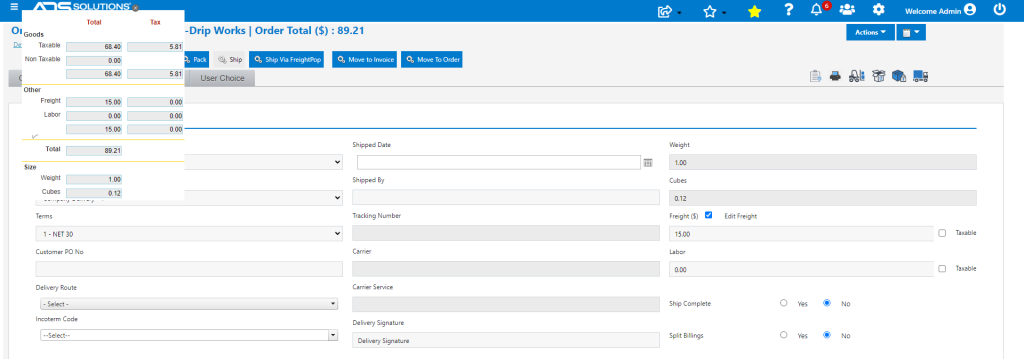
Accolent ERP allows entry of a freight amount without going through the steps of boxing an order, selecting a carrier and freight type then entering the weight of each box to get the freight charge and tracking number for the box. This is often used where delivery is by Company trucks. To enter a freight amount for the whole order, select the order from List Fulfillments screen, add the freight amount then Save the record. The freight amount can be subsequently edited if needed prior to the order being confirmed as shipped and invoiced.
Select the Order in Fulfillment
- Open Order No 65869 in Fulfillment.
- Click on the Shipping Details tab.
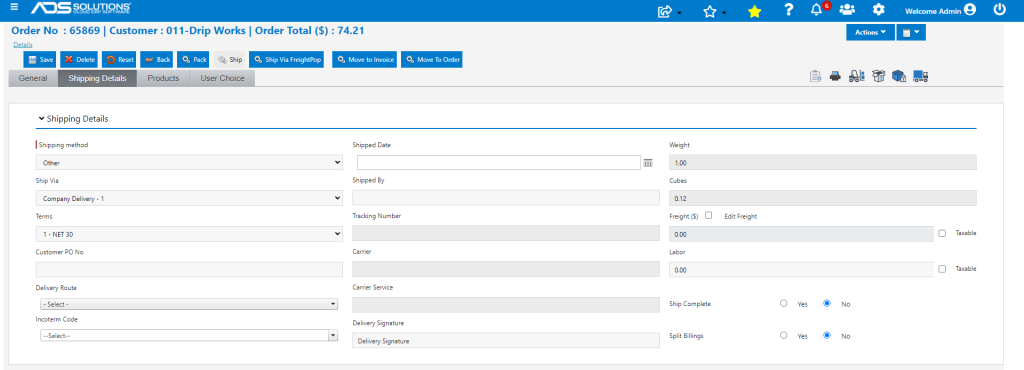
Add the Freight Amount
- Select the Edit Freight checkbox.
- Then enter the desired freight amount directly in Freight ($) field.
- Select the Taxable checkbox, if Freight is subject to Sales Tax.
- In this case, enter non-taxable freight of $15.00 and save; order is now updated with $15.00 of freight added.