
Accolent ERP automatically creates back orders for products that were ordered but unavailable to be shipped to the Customer. Back orders are not created for immediate invoices or for customers that do not have the “allow back orders” checkbox selected. Products that could not be shipped are split-off from the order and created as back orders when the order is moved to invoice. The exception is that special orders move to back orders when the order is moved to fulfillment. At any time, the back orders may be evaluated to determine which can be filled or partially filled based on stock levels. Back order items that can be filled may be moved to fulfillment. If a user believes that a back order can be filled even though the system doesn’t show the quantity available, the back order items can be “force processed” to move to order status. Once in order status the Qty on BO may be overwritten.
Quantity on Back Order
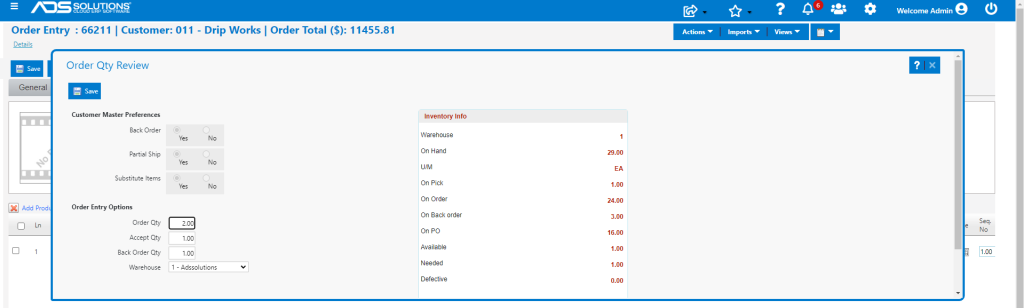
- When an order is created, the system automatically calculates the back order quantity (Qty on BO) based on the order quantity (Qty) and the quantity available (Q-Avail) in the system.
- The system calculation is: Qty on BO = Qty – Q-Avail.
- The user can overwrite the defaulted Qty on BO using the Edit BO checkbox.
- If the user selects the Edit BO checkbox, the user can specify the Qty on BO and Q-Avail will be allowed to go negative.
- For example, create Order 66211.
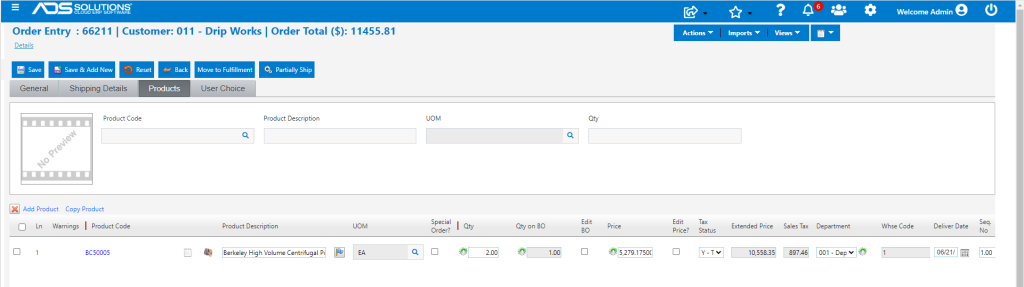
- Qty for product BC50005 is 2, but Q-Avail is 1
Creating the Back Order
- To allow for situations in which the quantities ordered are available, but the system has not been updated, back orders are created when orders are moved to invoice.
- So, when an order is taken, the Qty on BO is calculated, and the order is then moved to fulfillment.

- In fulfillment the warehouse can pick the items available and, if needed, overwrite the calculated Qty on BO. Then the order can be shipped, then moved to invoice.
- The back order items are split off and create a BO, when the shipped items are invoiced.
- Note: there are two exceptions to this rule that are dealt with in separate articles: Ship Complete orders and Special Orders.
- When the order is moved to shipping then invoiced: the products that can be supplied will create Invoice 66211, and the remaining products will be split off as BO 66211-1.

Evaluating and Processing BOs
- When Purchase orders are received, back orders may be evaluated and reported on.
- Select a population of back orders and click Evaluate BOs and they will be marked as “Can be Filled,” Can be Partially Filled” or “Cannot be Filled.”

- If a back order either “Can be Filled” or “Can be Partially Filled,” it can be Processed which means moved to fulfillment and the pick ticket printed.
- For example, 66211-1 can be processed to fulfillment as order 66211-2 and then shipped and moved to invoice.
Force Processing BOs
- If a back order “Cannot be Filled” and is not a Special Order, then it can be Force Processed back to an order and the Qty on BO can be overwritten.
- This would happen typically if the user was aware that stock had been received but not yet updated to the system.
- The force processed order could then be fulfilled and shipped and invoiced.
Back Order Numbering
- The numbering process for BOs follows these general rules:
- An order that is partially filled will create an invoice with the same number as the original order and a BO with a -1 suffix, and
- Filling of the -1 BO will create an invoice with a -2 suffix and, if there are remaining items, a new BO with a -3 suffix, and so on.
- Note that there will be gaps in the numbering of the suffices.
- Using the search on the Transaction Locate screen will identify all transactions in the sequence.
