
Accolent ERP allows printing or auto printing of pick tickets either by user’s warehouse or by order warehouse. Printing pick tickets by order warehouse is particularly important if orders entered in one warehouse are regularly split between 2 or more warehouses.
Printing or Auto Printing by User Warehouse
- A User is associated with a specific warehouse and printer group that defines the default printer for pick tickets.
- Typically, the User’s printer group will include only printers in the User’s warehouse.
- For example, User Admin is associated with Warehouse 1 and Printer Group 1.
- Printer Group 1 specifies the Warehouse 1 default pick ticket printer 9 – Canon MB5400.
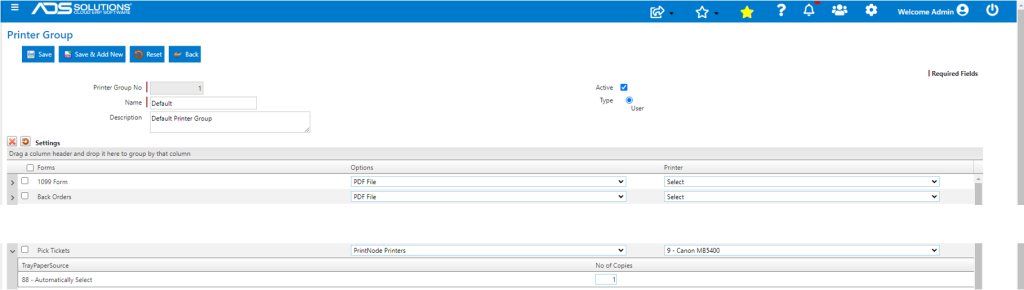
- So, any pick ticket printed by User Admin either manually or using the Auto Print functionality, goes to printer 9 – Canon MB5400 — even if the order is for Warehouse 4.
- It is possible to allow Users to manually print to remote warehouses:
- The printer group would be set up to include printers in different warehouses,
- Then the User in Warehouse 1 could manually select the right pick ticket printer for an order in Warehouse 4,
- However, this will not work with the Auto Print functionality.
Printing or Auto Printing by Order Warehouse
- To allow printing pick tickets by order warehouse, first set Configuration ID 216 to Y.

- Then go to Inventory/Products > Warehouses select a Warehouse, then, on the General tab, select the pick ticket printer from printers assigned to that Warehouse.
- For example, set the Warehouse 1 Pick Ticket Printer as 9 – Cannon MB5400 and set the Warehouse 4 Pick Ticket Printer as ADS DELL PRINTNODE.
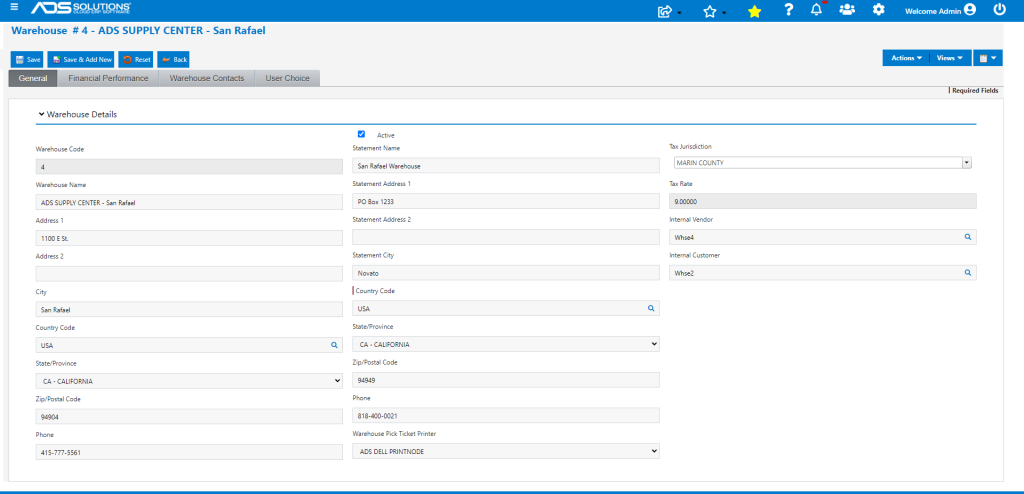
- With Configuration ID 216 set to Y, the system will get the default pick ticket printer from the order warehouse rather than the User’s printer group.
- Any pick ticket printed either manually or using the Auto Print functionality, would first read the order warehouse and then go to the default pick ticket printer set up for that warehouse, irrespective of the User’s printer group.