
Accolent ERP has a very comprehensive pricing system. One of the less frequently used pricing features is Warehouse discounts, which applies a discount level to a specific warehouse. To use Warehouse discounts, first set up the Warehouse Discount. Then once set up, the Warehouse Discount can be applied to a specific product, multiple products or multiple categories of products. Warehouse discounts are sometimes used in conjunction with Price Lists and Quantity Breaks. In these cases, the Pricing Tier also specifies the “method” used to combine these discounts.
Warehouse Discounts Overview
- A Warehouse Discount specifies discounts that apple to specific warehouses.
- Once set up, a Warehouse Discount can be assigned to a product, multiple products or multiple categories.
- Warehouse Discounts are sometimes used in conjunction with Price Lists and Quantity Breaks; if this is intended, there are 4 “methods” which specify how these different discounts are combined and these are specified by Pricing Tier.
Set up Warehouse Discounts
- Go to Settings > Value Lists > Other Value Lists (M – Z) > Warehouse Discounts.
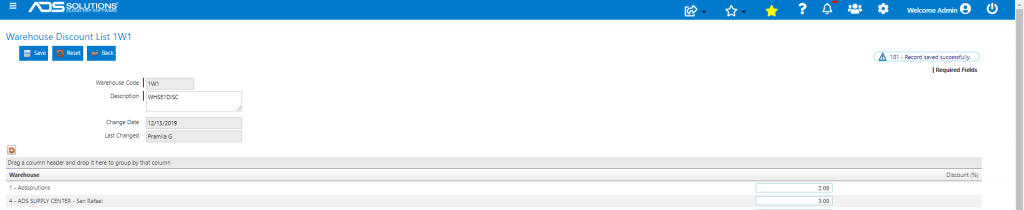
- Create a Warehouse Discount that specifies discounts by Warehouse.
- Click on the Save button and the Warehouse Discount can then be linked to any product or categories or sub-categories of products.
- Create Warehouse Discount 1W1.
Assign a Warehouse Discount to a Product
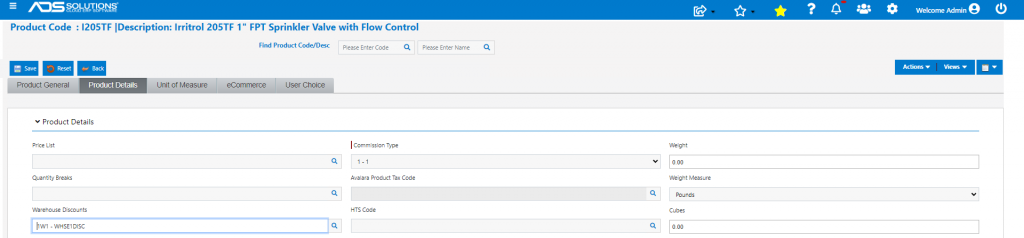
- Select product I205TF.
- Assign Warehouse Discount 1W1 to Product I205TF.
- To verify pricing, go to Views > Price Quote.
- Get Price Quote for Customer 011 in Pricing Tier 3-Gold Level.
- Customer 011 also has a Special Pricing overall discount of 1%.
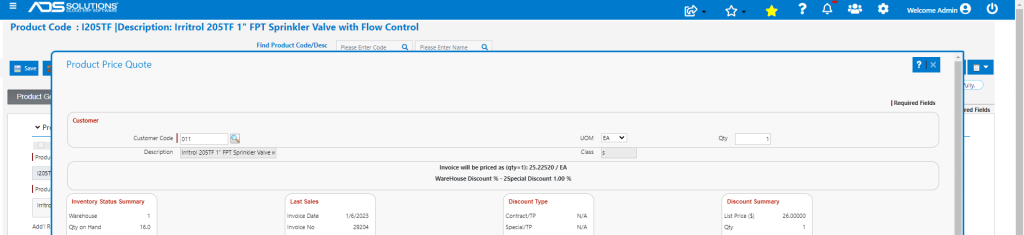
- Price reflects the 2% Warehouse discount for warehouse 1, plus a Special Pricing overall discount of 1% on Customer 011.
- Net price is List Price of $26.00 x (100% – 2%) x (100% – 1%) = $25.22520.
Combining Price Lists, Warehouse and Qty Break Discounts
- A Warehouse Discount may be the only discount offered on the product, or it may work in conjunction with Price Lists and Qty Break discounts.
- If a Warehouse Discount is the only discount, it will be applied to the List Price of the product.
- If a Warehouse Discount is used in conjunction with Price Lists and Qty Break discounts, Accolent ERP provides 4 “methods” by which the discounts are combined.
- The 4 methods available are:
- Combine discounts from Price Lists and Warehouse discounts then apply, then apply Quantity Breaks,
- Combine discounts from Price Lists and Warehouse discounts then apply, ignore Quantity Breaks,
- Combine discounts from Price Lists and Warehouse discounts then apply only the higher of this discount or the Quantity Breaks, and
- Combine discounts from Price Lists and Warehouse discounts then apply only the lower of this discount or the Quantity Breaks.
- The method to be used is defined on the customer Pricing Tier.

- See this wiki: Using Price Lists to see examples of how multiple product level discounts are combined using these methods.