
Accolent ERP allows user to specify a discount for purchases from a specific warehouse, or from all warehouses. Common uses of warehouse discounts are “grand openings” or closing a location. Certain warehouses may also have products that sell better or worse than at other locations. Warehouse Discounts may be the only discount method, or can work in conjunction with the pricing matrix and quantity breaks. If used in conjunction with the pricing matrix, the warehouse discount is applied to the calculated price based on the Pricing Matrix.
Warehouse Discounts
- Go to Settings > Value Lists > Value Lists (M-Z) > Warehouse Discounts, to see a list of warehouse discount tables , edit a warehouse discount table, or create a warehouse discount table
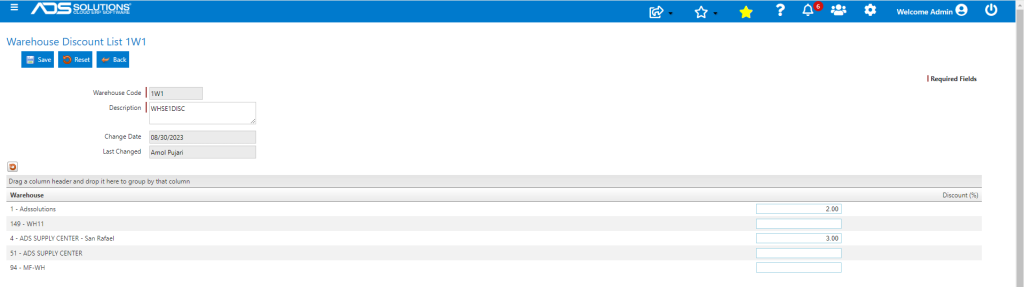
Warehouse Fields
- Warehouse Code: Enter up to three numeric characters.
- Description: Enter description.
- Discount %: Enter the discount associated with this line. which will be applied to the List Price of the product. If the product also has a Price List defined, the warehouse discount will be applied to the result of the pricing matrix calculation.
- Save to complete.
- Assign a warehouse discount to a Product from the Product Master – Discounts tab.