
Accolent ERP allows users to select from the 11 Incoterms® (International Commercial Terms), published by the International Chamber of Commerce and accepted by governments and legal authorities around the world. Using the Incoterms table, users can modify the standard incoterms to reflect other negotiated trade terms, if desired.
Creating the Incoterms Table
- Go to Settings > Value Lists > Other Value Lists (A-L) > Dynamic Lookup
- The Dynamic Lookup allows you to create drop-down selections for your Incoterms parties
- There are 2 Lookup Types already created:
- IncotermsParty, that defines the parties involved: Buyer, Seller, 3rd Party (if necessary)
- Transfer of Risk, that defines when the risk is transferred: Seller’s Premises, Buyer’s Transport, Alongside Ship, On Board Vessel, At Carrier, At Named Place, At Named Place Unloaded


- To create a new drop-down choice (e.g., 3rd Party), click on the New button
- Search for the lookup type (IncotermsParty)
- Then enter the Lookup Code and Description
- The Description will then appear in the dropdown

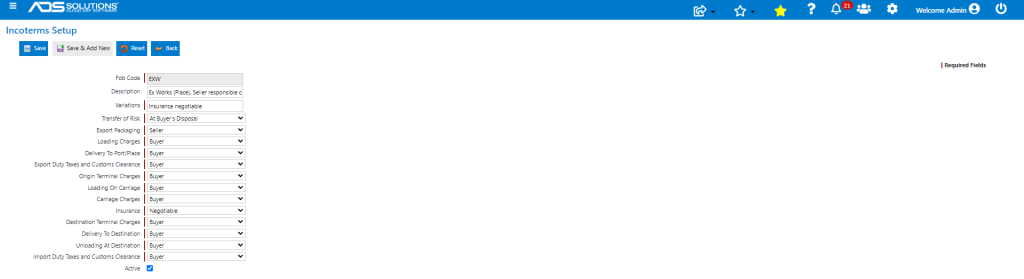
- Now go to Settings > Value Lists > Value Lists (A-L) > Incoterms to allocate the cost and risk profile
- Select from the dropdown where the Transfer of Risk occurs
- Allocate between the parties, the Costs of Export Packaging, Loading Charges, Delivery to Port/Place, Export Duty & Charges, Origin Terminal Charges, Loading on Carriage, Carriage Charges, Insurance, Destination Terminal Charges, Delivery to Destination, Unloading at Destination and Import Duty & Charges
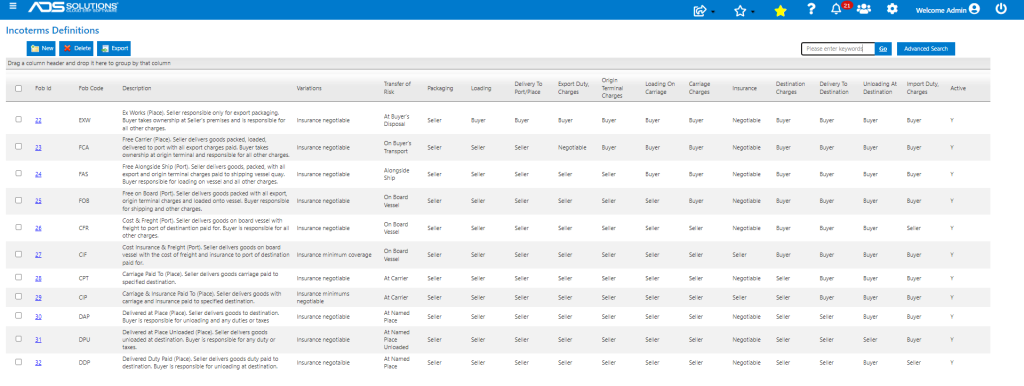
- The 11 standard Incoterms used in International Trade have already been created
Assigning Incoterms to Vendors
- Then select a Vendor (e.g., Taiwan Heavy Industries)
- On the Purchasing/Receiving tab select from the Incoterms Codes set up
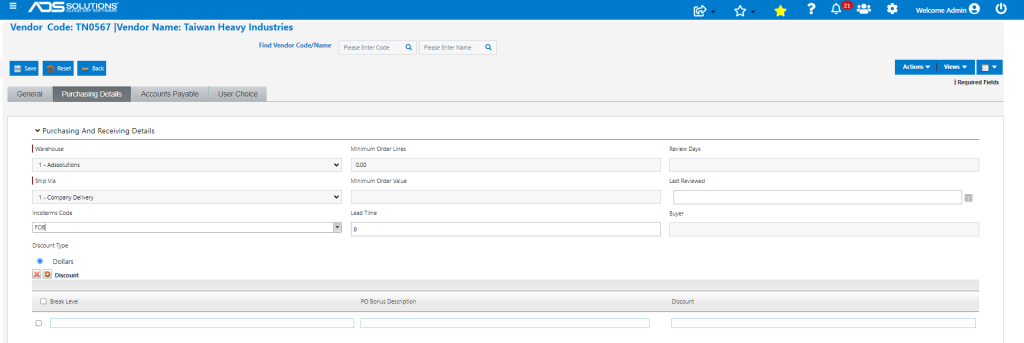
- The Incoterm FOB (Port of Kaohsiung to be specified) will now apply to this vendor
Assigning Incoterms to Customers
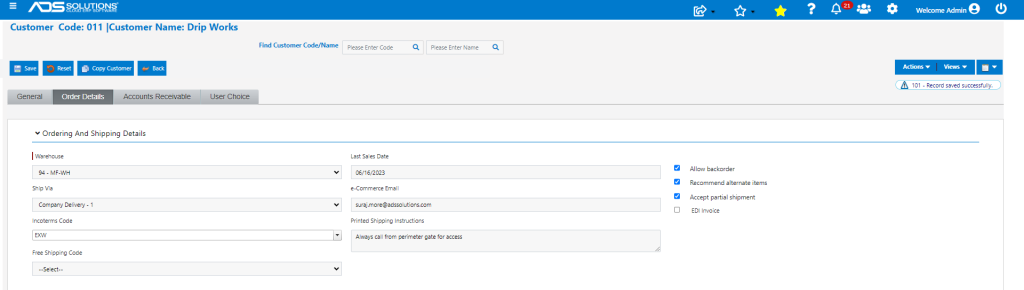
- Similarly, select customer and on the Order Details tab, select the Incoterms that will apply to that particular customer
- For Customer 011 select Incoterms Code EXW (ADS Solutions Warehouse to be specified) and save
- This will apply to all transactions with Customer 011
More Details on Incoterms
- For more details on internationally-recognized Incoterms, see this link: International Trade Association