Accolent ERP includes integrations with UPS, USPS and FedEx, which allow for freight rates from different providers to be looked up when entering a customer’s order. The freight rate for the freight vendor and service selected can be added automatically to the order together with a surcharge if desired.
Create an Order
- Create order 65893.
- From the Actions dropdowns, select the Freight Rate Look Up menu.
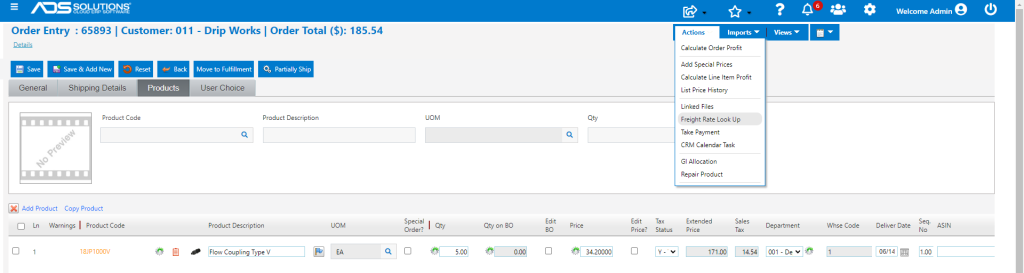
- Enter Weight and Cubes for the order.
- If there are Weights and Cubes on the products, the totals on the order will be automatically calculated.
Select Freight Provider and Service
- Select the Freight Provider(s) to get rates from, and click on the Get Rates button.
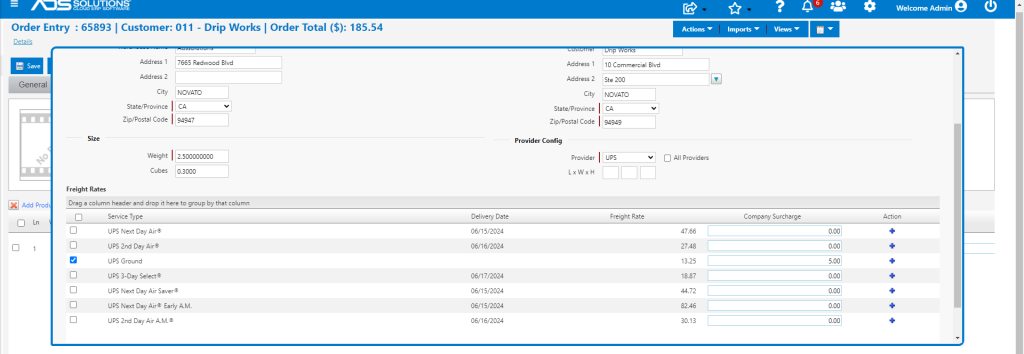
- Based on the Ship-From and Ship-To addresses the weight and cubes, the lookup will show available services and rates from the Freight Providers selected.
- Enter a surcharge, if desired, then click on the + button to select a service and rate.
- For example, choose UPS Ground and add a $5.00 handling surcharge.
Add Freight to Order
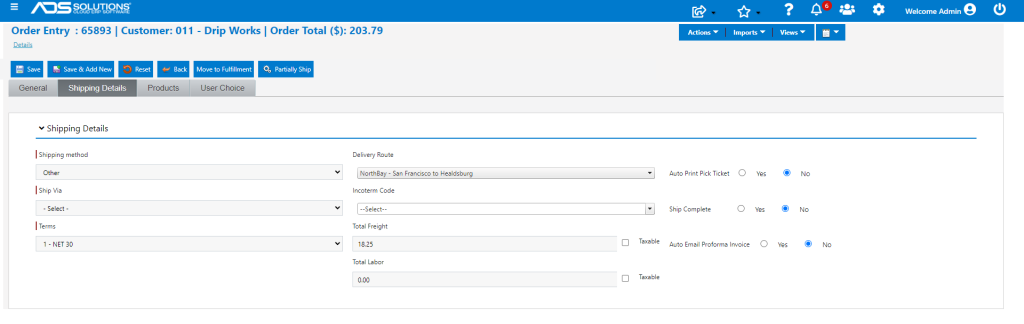
- A freight total of $18.25 ($13.25 plus a $5.00 surcharge) will be added to the order.