Accolent ERP uses the Min/Max reordering methodology. The Min value represents the reorder point, and the Max value represents the targeted stock after reordering. The difference between the Max and the Min is sometimes referred to as the EOQ (Economic Order Quantity). The Min and Max values may be maintained manually or automatically by the system. The Min and Max values are used by the Accolent ERP Inventory Replenishment report to identify products that need to be reordered together with suggested reorder quantities.
Using the Automated Min/Max Parameters
- To set Accolent ERP to automatically maintain the Min and Max Quantities, first, set the Automatic EOQ Parameters? configuration to Y.

- With this turned on, the Min Qty and Max Qty will be calculated based on the underlying Lead Time, Safety Stock and Use Rate/Day parameters.
- Initial values should be entered for Lead Time, Safety Stock and Use Rate/Day parameters.
- If the initial values are left blank, they will default as follows:
- Lead Time will be set to the Lead Time value in days set on the Vendor.
- Safety Stock will default to 50% of the Lead Time quantity.
- Use Rate/Day will default to a value of 1.0 (in the Stocking UOM) per day.
- Then these initial values can be tested against actual results.
- The Product Sales and Safety Stock Analysis for a particular date range, compares the estimated Use Rate/Day and estimated Safety Stock with actuals based on sales over the period and can automatically update these values.
- The Vendor Lead Time Analysis for a particular date range compares the estimated Lead Time with actuals based on POs received over the period and can automatically update these values.
Product Sales and Safety Stock
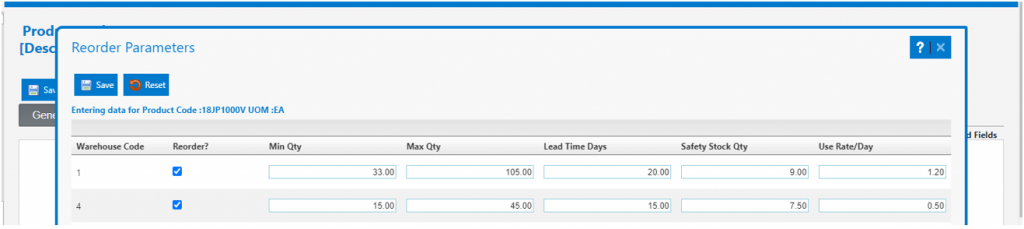
- For product 18JP1000V, the initial default values for the reorder parameters are Lead Time of 15.00 days (from Vendor), Safety Stock Qty of 7.50 EA (equal to 50% of Lead Time Qty), and a Use Rate/Day of 1.0 EA/Day.
- The Review cycle of 60.00 Days is set on the Purchasing and Receiving Details section on the Vendor.
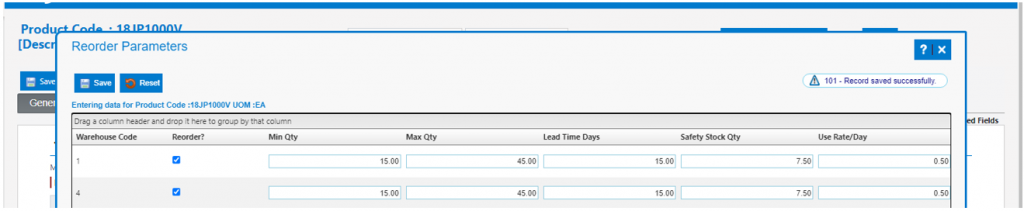
- Manually changing the Use Rate/Day to 0.5 EA/Day and then Save, changes Min Qty from 22.50 EA to 15.00 EA, and Max Qty from 82.50 EA to 45.00 EA.
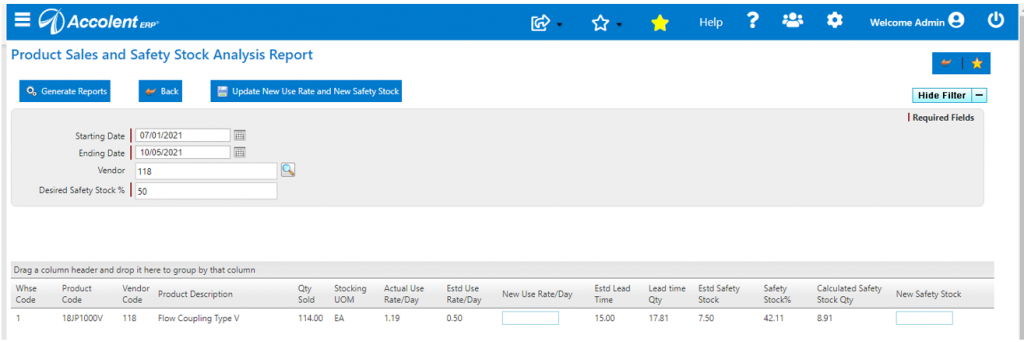
- Go to Purchasing/Vendors > Inventory Replenishment > Product Sales & Safety Stock Analysis.
- Select the date range 7/1/21 – 10/5/21 (say), select Vendor 118 and set Safety Stock Target to 50% then run the analysis.
- Verify the Qty Sold of 18JP1000V in Warehouse 1 of 114 EA.
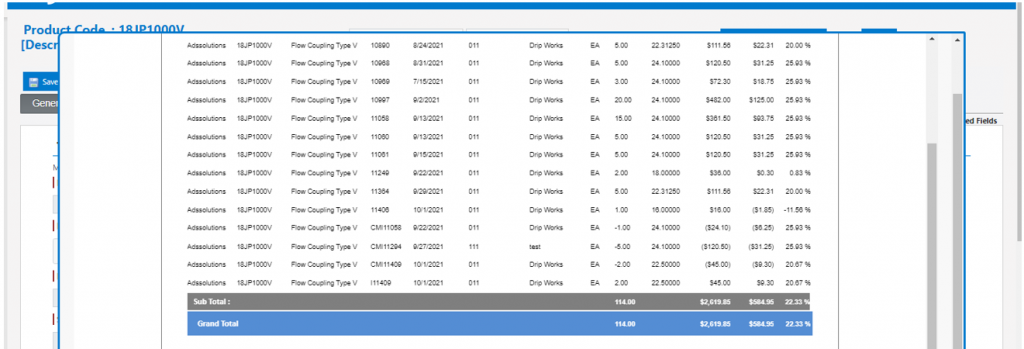
- Number of Days = 96 Days, so Daily Use Rate = 114/96 = 1.19 EA/Day.
- From Reorder Parameters screen:
- Lead Time = 15.00 Days.
- Safety Stock = 7.50 EA.
- Use Rate/Day = 0.50 EA/Day.
- Lead Time Qty = Lead Time x Use Rate/Day = 15 Days x 1.1875 EA/Day = 17.81 EA.
- Safety Stock % = Safety Stock / Lead Time Qty = 7.50 EA / 17.81 EA x 100 = 42.11%.
- Calculated Safety Stock Qty = Lead Time Qty x Safety Stock % = 17.81 EA x 50% = 8.91 EA.
- Enter New Use Rate of 1.20 EA/Day and New Safety Stock of 9.00 EA.
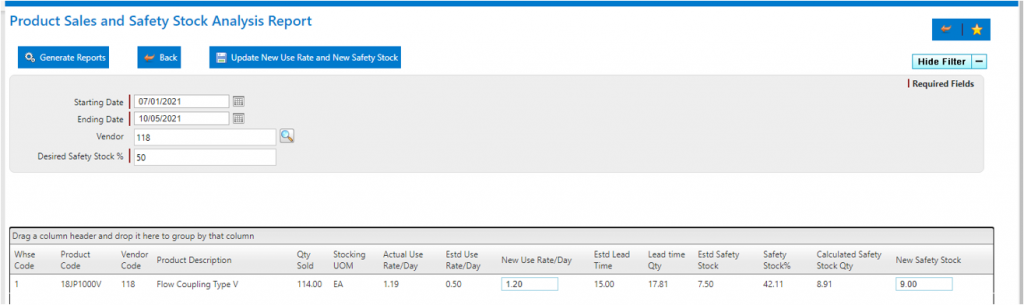
- Click Update to change the Use Rate and Safety Stock Qty values.
- Estimates for Use Rate/Day and Safety Stock were updated.
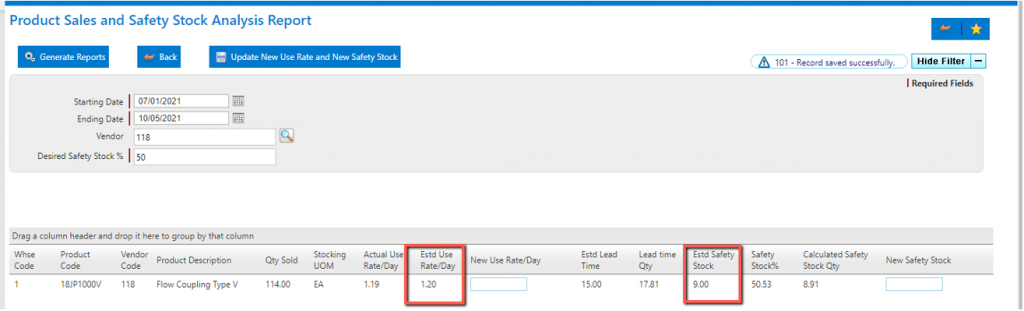
- The Min and Max values are now updated based on the new inputs.
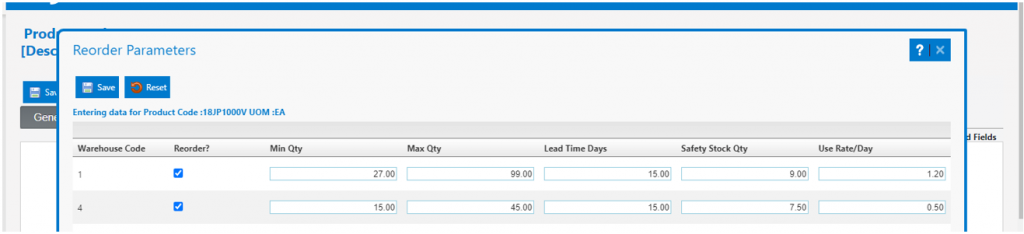
- New Min = [(Lead Time x Use Rate) + Safety Stock = [(15 Days x 1.20 EA/Day) + 9.00 EA] = 27.00 EA.
- New Max = [Min + (Review Days x Lead Time)] = [27.00 EA + (60 Days x 1.20 EA/Day)] = 99.00 EA.
Reviewing/Updating Lead Time
- Run Vendor Analysis Report.
- The Vendor Analysis Report shows that 3 POs were received in the date range.
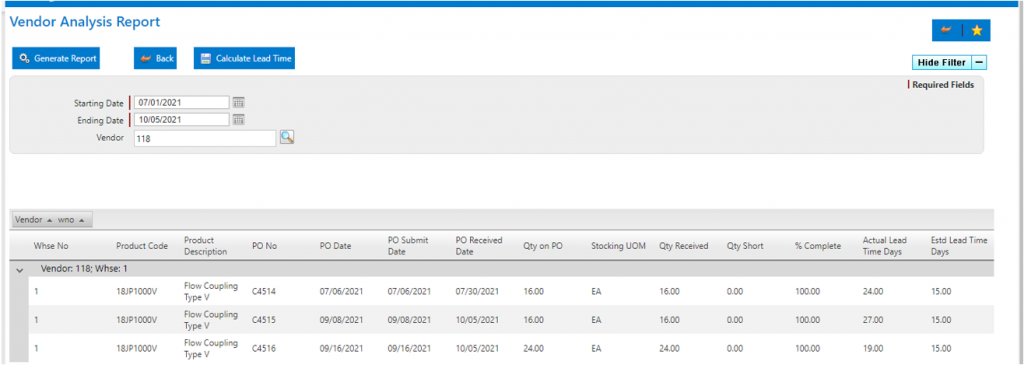
- Verify POs for product 18JP1000V in the same time frame (7/1/21 – 10/5/21).
- 3 POs were Received C4514, C4515, and C4516 in the date range.
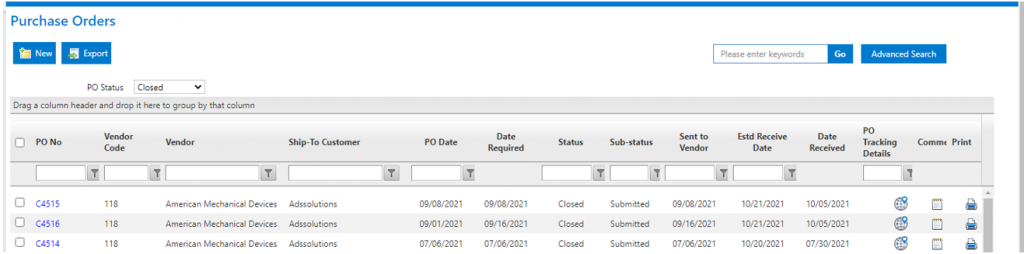
- On the Vendor Analysis screen, click Calculate Lead Time which will average these POs.
- The average Actual Lead Time Days for these 3 POs is 23.33 days.
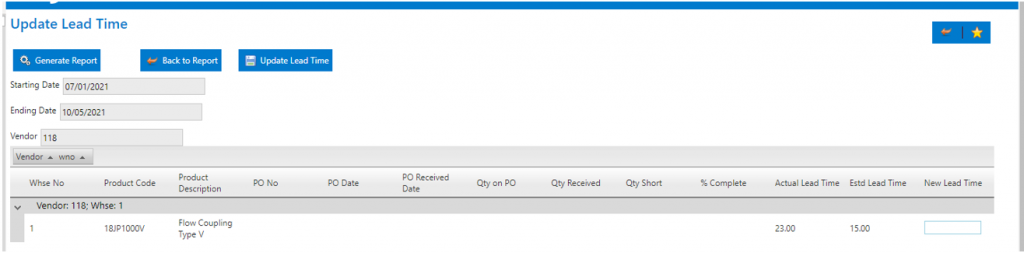
- Enter a new Lead Time Days of 20.00 Days.
- Click the Update Lead Time button which will change the Estimated Lead Time Days from 15.00 to 20.00 Days.
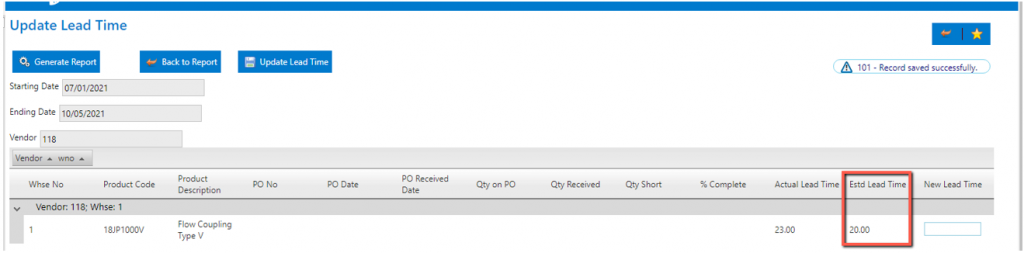
- The changed Estd Lead Time Days has been updated on the product Reorder Parameters screen for Warehouse 1.