
Accolent ERP allows for the use of Manual Invoices to create Credit Memos in situations where there are no inventory items on the original invoice being returned for credit. This may have application in certain scenarios. For example, a Customer needs a refund of freight overcharged in error, and user wants this refund to debit the Freight Income recorded on the original transaction. In this case a typical Credit Memo cannot be used, so use a Manual Invoice.
Create a Credit Memo
- Typically, to create the Credit Memo, import the original Invoice and record the products returned.
- However, in this case, since no products are returned the Credit Memo cannot be created.
Use a Manual Invoice instead of a Credit Memo
- An alternative that can be used is to create a negative Manual Invoice to refund the amount overcharged.
- Go to Receivables > Payment Receipts > Manual Invoice and click on New button.
- Create a Manual Invoice to refund the $21.42 in Freight charged in error on Invoice 65869.
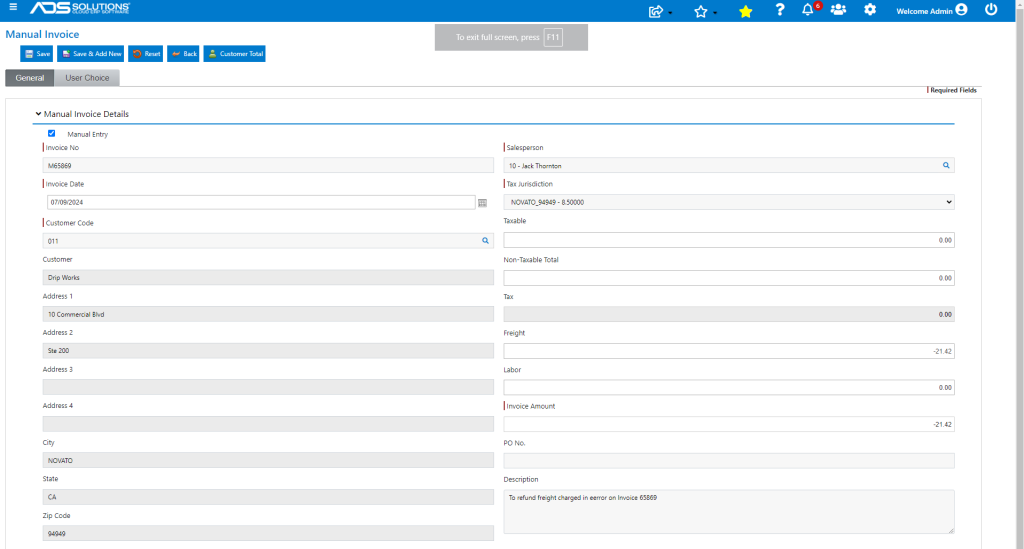
- Save to create Manual Invoice M48961 which will show up on Customer’s account and reduce the AR due.

- Review the GL posting of the transaction.
- Posting of the refund is to Freight Income as intended.
