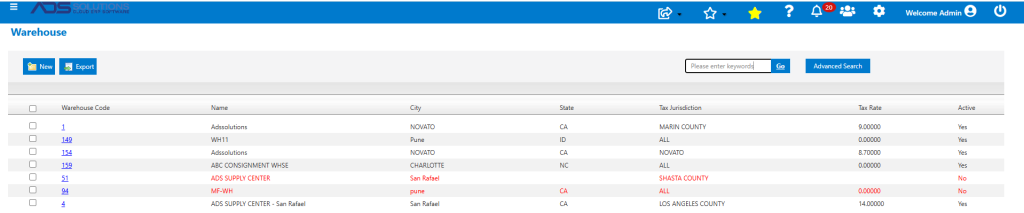
Accolent ERP allows Users, when set up, to be associated with specific warehouses. Once this association is made, the most commonly used screens will default the warehouse for a specific User. Other less commonly used screens will default the first warehouse on the Warehouse master list. In all cases, though, the default can be overridden by selecting from the Warehouse dropdown field.
Defaulting the User’s Warehouse
- Every User is associated with a specific Warehouse.
- When the User goes to most of the commonly used screens, the display will default to the User’s Warehouse: List Products, Ledger Card and Cost History.
- On other less commonly used screens are controlled by the Warehouse dropdown selector and will default to the first Warehouse in the list of Warehouses.
Set Up User
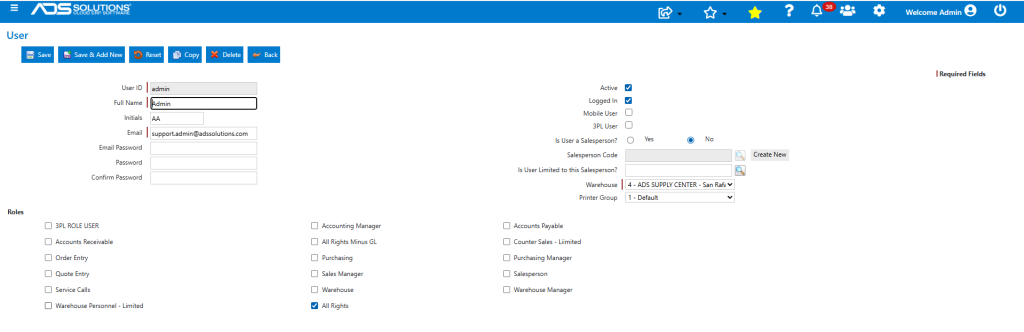
- To add a User, go to Settings > Users > List Users.
- From this screen, a new User can be added, or an existing User can be associated with a Warehouse.
- For example, for User Admin, select Warehouse 4 and Save the record.
List Products Screen
- Go to Inventory/Products > List Products.
- For this User, the List Products screen shows Qty on Hand, Qty Avail and Qty on PO for Warehouse 1.

- To see a different Warehouse, select the Warehouse using the Advanced Search filters.
- Select Warehouse 1 and click Go.
- The List Products screen now displays Qty on Hand, Qty Avail and Qty on PO for Warehouse 1.

Ledger Card
- Select product 18JP1000V and go to Views > Ledger Card.
- Displays Ledger Card for Warehouse 4 by default for this User.

- The Warehouse dropdown can be used to see data for a different Warehouse.
Cost History
- Select product 18JP1000V and go to Actions > Cost History and select a Cost Type (e.g., Average Cost).
- Displays Cost History for Warehouse 4 by default for this User.

Other Screen Defaults
- Other less commonly used screens will default to the first Warehouse entered on the Warehouse master.
- For example, go to Price/Cost > Change Cost/Price by Specified Margin.
- For this User, screen default is to Warehouse 1 rather than Warehouse 4.
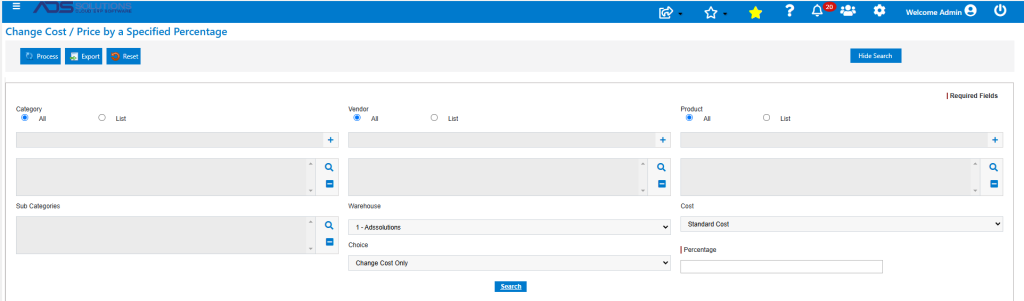
- This screen defaults to Warehouse 1 rather than Warehouse 4 because Warehouse 1 is the first Warehouse.