
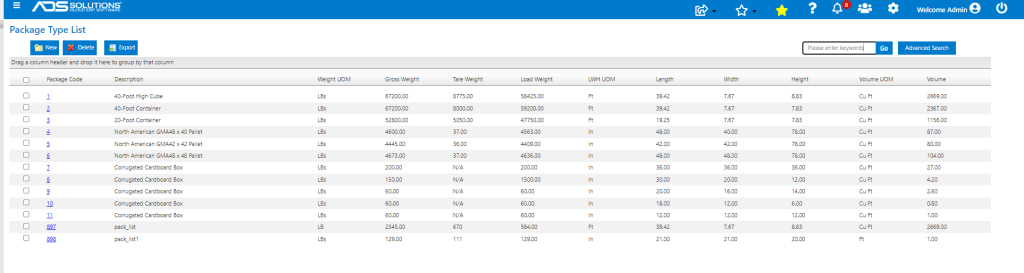
Accolent ERP supports multiple Package Types, including standard Containers and standard Pallet sizes. All Package Types are specified in the Package Type Value List. When loading incoming Containers or Pallets users can select lines from Open POs to be packed. The weights and cubes of the package contents selected will not be allowed to exceed the maximums specified in the Package Types Value List. When packed, incoming Containers can be pushed to FreightPOP to arrange inbound shipping and to track the Containers through the Supply Chain to your warehouses.
Package Type Value List
- Go to Settings > Value Lists > Other Value Lists (M to Z) > Package Types to see all package types including Containers.
Create Container
- Go to Purchasing/Vendors > Purchase Orders > Create Containers.
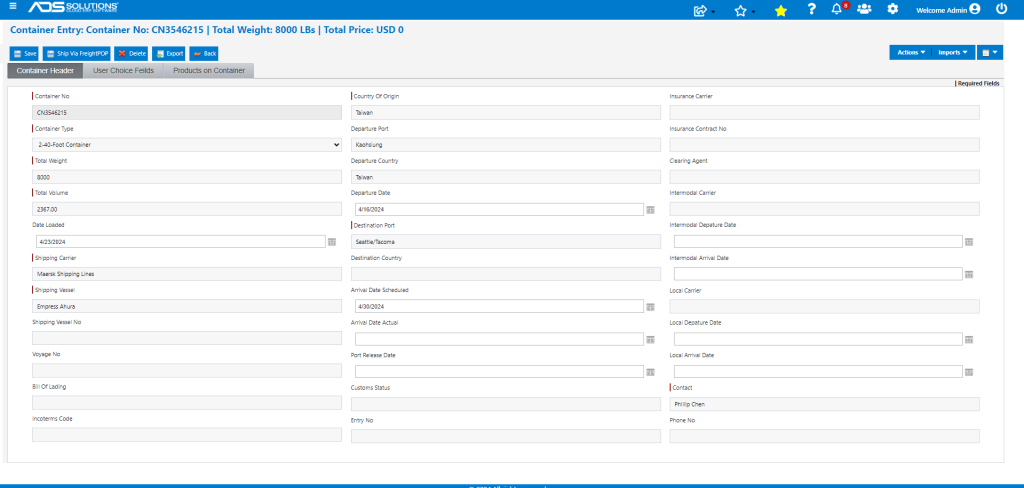
- Fill in only the required fields:
- Enter Container No 3546215 which is automatically prefixed with “CN.”
- Select Package Type=2, brings back “2-40-Foot Container” and populates Total Weight with Tare Weight=8,000 Lbs, Total Volume=2367 Cu Ft.
- Enter Shipping Carrier: “Maersk Shipping Lines.”
- Enter Shipping Vessel: “Empress Ahura.”
- Enter Country of Origin: “Taiwan.”
- Enter Contact: “Phillip Chen.”
- Additional shipping, insurance, clearing, etc. information can be filled in later when available.
- Go to Products on Container.
- Click Imports > Open POs. This allows for the import of Open PO Lines based on several possible filter criteria.
- For FCL (Full Container Load) shipping the Container will be packed at the Vendor’s location with PO Lines from that specific Vendor only. For LCL (Less than Container Load) shipping, goods from various Vendors can be selected by PO No and packed in a Container at a staging location.
- Search for POs for Vendor TN0567.
- The Import brings back 9 PO Lines on one PO C8692.
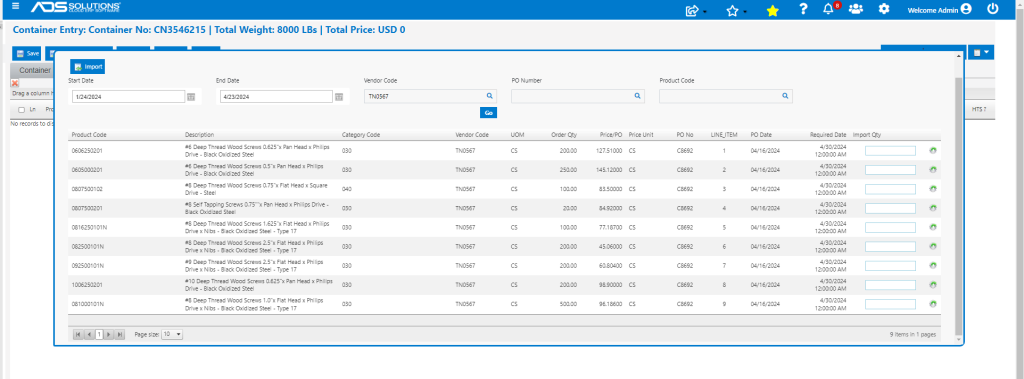
- Use gear icon on each line to import the full quantity of the PO Line into the Container. If a partial quantity is desired, the quantity can just be entered manually.
- Select the full quantities of all 9 PO Lines.
- Try to Save the Container and get the message that the “Allowed Load Weight is exceeded”. In this case, allowed Load Weight is 59,200 Lbs.
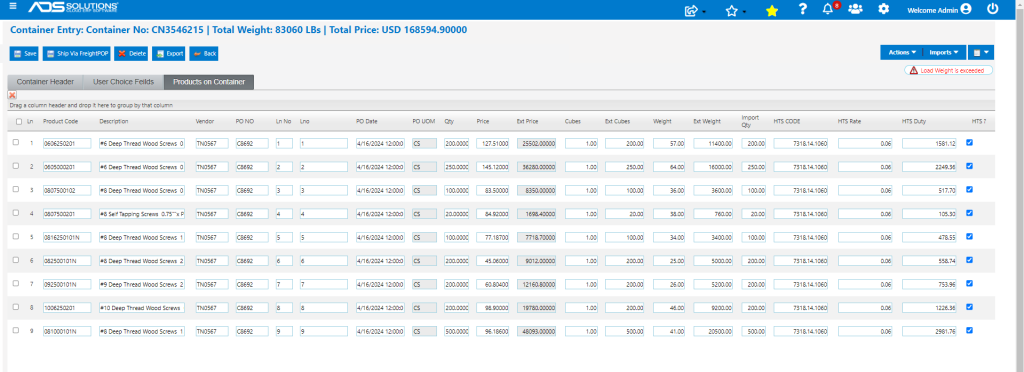
- Remove PO Line 9 which was 20,500 Lbs and PO Line 8 which was 9,200 Lbs.
- Now resave Container successfully.
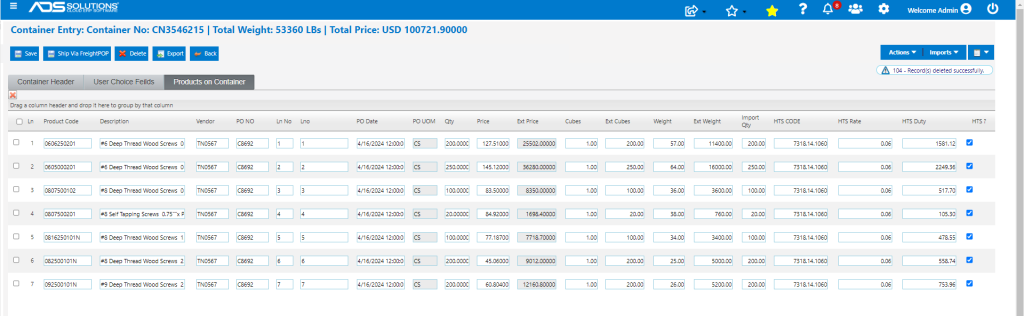
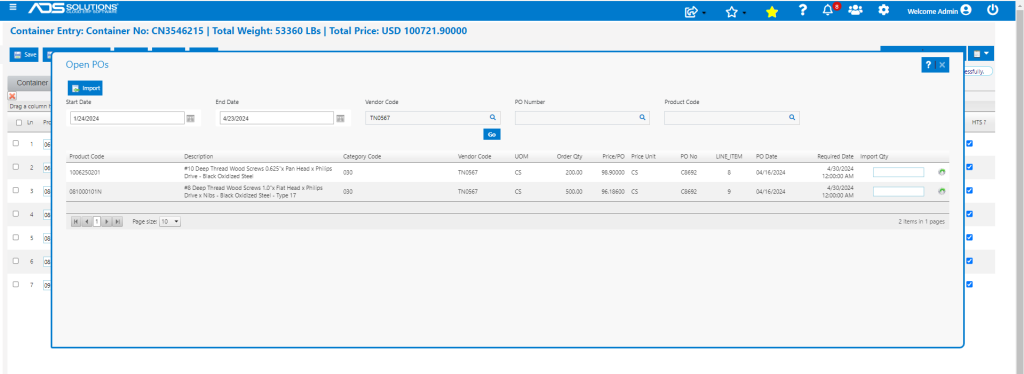
- Go back to Imports and look up Vendor TN0567.
- Shows the original PO Lines 8 and 9 that were not included in Container CN 3546215 and will have to be combined with the next Container shipped
- The Container is now complete.
- Load Weight is 45,360 Lbs and Tare Weight is 8,000 lbs for Gross Weight of 53,360 Lbs.

Arrange Shipping
- The completed Container may be pushed to FreightPOP to arrange incoming shipping.
- FreightPOP is an industry-leading full TMS (transportation management system) with links to hundreds of incoming and outgoing small parcel, FTL, LTL, Air and Ocean freight carriers.
- FreightPOP offers the ability to shop rates from multiple carriers and/or to take advantage of FreightPOPs volume rates.
- Using the Accolent ERP/FreightPOP integration the completed Container can be managed within FreightPOP to arrange shipping and then to track progress ogf the Container through the Supply Chain.
- Contact ADS Solutions to learn more about the Accolent ERP/FreightPOP integration