
Accolent ERP allows for returns of goods to vendors. This may be required, for example, if goods are sold to a customer but the Customer returns items that are defective for credit. Subsequently, to return the items to the vendor for credit, Accolent ERP allows the entry of a negative PO.
Return by Customer
- Create an Order to sell goods to a Customer.
- When Customer returns defective items, create a Credit Memo to credit the Customer and return the items to inventory.
- These items will need to be returned to the Vendor for credit.
Create a Negative PO
- Go to Purchasing/Vendors > Purchase Orders > Create Purchase Order.
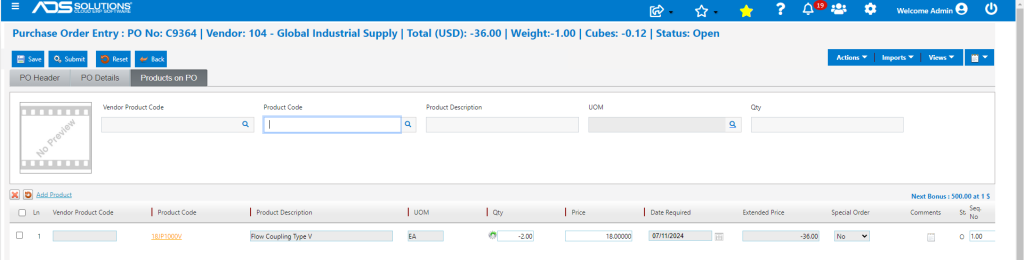
- Enter a PO for the Qty to be returned to the Vendor; the return Qty should be entered as negative.
- PO No C9364 with Qty of -2 EA of Product 18JP1000V.
- Save and Submit the PO.
Receive the Negative PO
- Receipt of the negative PO will take the 2 defective items out of inventory and create an Unconfirmed AP entry.

Create a Negative Voucher
- Now that the PO has been received, create a negative voucher to “pay” the vendor.
- Select the negative PO and receiver.
- Create negative voucher ZZ10624.
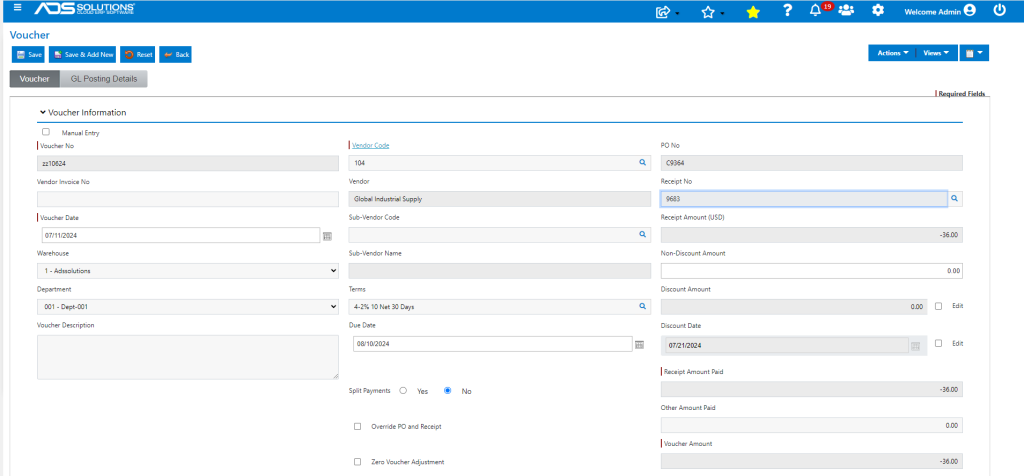
- To receive credit for this voucher, select the voucher to offset other AP items due to the vendor.
GL Posting
- Negative PO Receipt.
- Debits Unconfirmed AP and Credits Inventory.

- Creation of Negative Voucher.
- Debits AP and Credits Unconfirmed AP.
