
Accolent ERP is integrated with Fiserv, one of the largest payment processors globally. By automatically processing Level 2 and Level 3 data, Fiserv optimizes interchange charges ensuring the lowest possible rate on every transaction. The payment acceptance will automatically be recorded in Accolent ERP. The integration allows payment acceptance by credit card or ACH/eCheck. Payments may also be taken remotely by including a Pay Now button in Invoice transmittal emails.
Taking ACH Payments
- To accept ACH/eCheck payments, users need to fill out and submit a credit application to Fiserv.
- Either ADS Solutions or Fiserv can provide users with these applications.
- Once the completed documents are sent to Fiserv, they will be reviewed and sent for approval.
- Once approved, a Fiserv ACH/eCheck account will be created for you, and you will be able to use the ACH/eCheck fields in Accolent ERP to accept payments.
- Payments taken by ACH/eCheck will automatically be posted to your bank account.
Using the Hosted Payments Page
- Payments taken outside of Accolent ERP (e.g., from a “Pay Now” button in an invoice transmittal email or shopping cart), call Fiserv’s Hosted Payments Page (HPP).
- Because the HPP gets called from outside Accolent ERP, Fiserv will not allow ADS Solutions to request the HPP on behalf of users.
- You will have to request your HPP directly on Fiserv’s website.
- The HPP will be set up by Fiserv to have your logo and branding.
- Accolent ERP is integrated with the HPP through a webhook that will automatically update Accolent ERP when your customer clicks the Pay Now button and enters his credit card information.
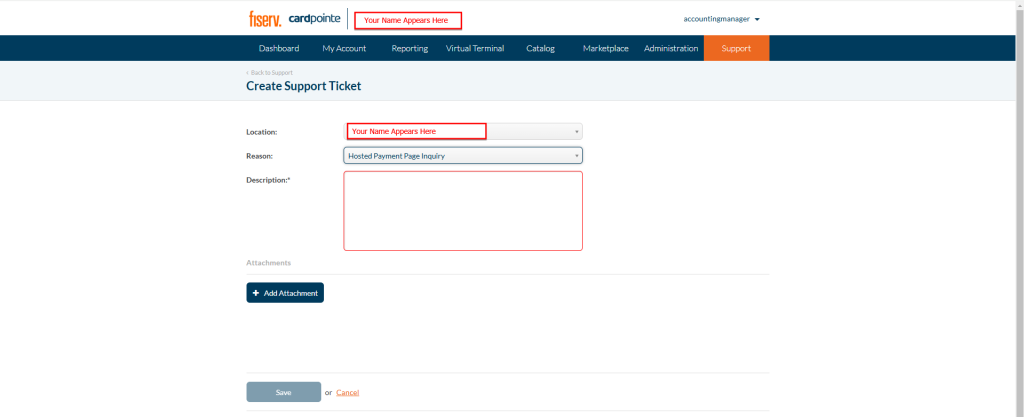
- To request the HPP, go to Fiserv, login to your account navigate to the “Support” tab and click “Create Ticket”.

- On the support ticket, under Reason select “Hosted Payment Page Inquiry”.
- Under Description enter a short description of the customized HPP you require.
- Then add your logo as an Attachment.
- Below are some quick links that give an Overview of the CardPointe HPP:
- For additional help with the HPP, you can reach out to CardPointe Support at cardpointesupport@Fiserv.com or by phone at 877.828.0720.
BOLT/Ingenico Terminals
- Accolent ERP is integrated with the full line of BOLT/Ingenico terminals available through Fiserv.
- All you have to do is go through Fiserv to request whatever terminals you want and they will be shipped to you.
- Terminals will need to be connected to the Internet either directly through a LAN port or with a switch through a computer on your LAN.
- Once connected and plugged in a terminal should show “Bolted” on the screen.
- Fiserv will then be able to access the terminal.