
The Implementation process for Advantage users switching to Accolent ERP consists of a number of sequential steps. It is very important that all the process steps be completed in sequence. The overall implementation plan broadly has 6 phases: (1) Initial Setup, (2) Data Conversion – Initial Import, (3) Training, (4) Testing, (5) Data Conversion – Incremental Import, and (6) Go-Live.Following this process can get most Advantage users live on Accolent ERP in a 6-8 week period. In order to accomplish this successfully, it is critical that a customer dedicate the right amount of time, personnel and resources to get this done.
Implementation Plan Overview
- ADS Solutions provides a package of implementation services for Advantage users that includes: data conversion, training, set up, and go-live assistance, designed to get Advantage users live on Accolent ERP within a period of 6 to 8 weeks
- To accomplish this goal, customers will need to dedicate the appropriate personnel and resources and follow the implementation process outlined
- The overall implementation plan has 6 phases: (1) Initial Setup, (2) Data Conversion – Initial Import, (3) Training, (4) Testing, (5) Data Conversion – Incremental Import, and (6) go-live
- During the Initial Setup, ADS Solutions will help the customer set up printers, email, and fax-by-email as well as any specific configuration settings needed
- In parallel with the Initial Setup, ADS Solutions will complete the Initial Import of the customer’s data. It is critical that access to the customer’s system is provided as soon as possible after the kick-off of the implementation as this affects the whole timeline
- The Initial Import will take about 2 weeks to complete and customer’s data will be put into the PreLive database and also copied to the Production database
- After the Initial Import is done, the customer should start the Training by functional area by watching the training videos and scheduling calls as needed with the Implementation Manager
- The Testing by functional area, using the PreLive database, should proceed a half step behind the training, and consists of entering test transactions into Accolent ERP on a daily basis both to verify the results and for end-users to familiarize themselves with the system
- The Training and Testing phases of the implementation process will be completely under the control of the customer and must be completed systematically and on schedule. Training and Testing should take 3 – 5 weeks to complete
- After Testing is complete, the Incremental Import will bring all the transactions entered between the Initial Date and the Incremental Date into the Production system and these can then be verified. The Incremental Import and verification should take about 1 week
- The customer will then be able to go live on Accolent ERP
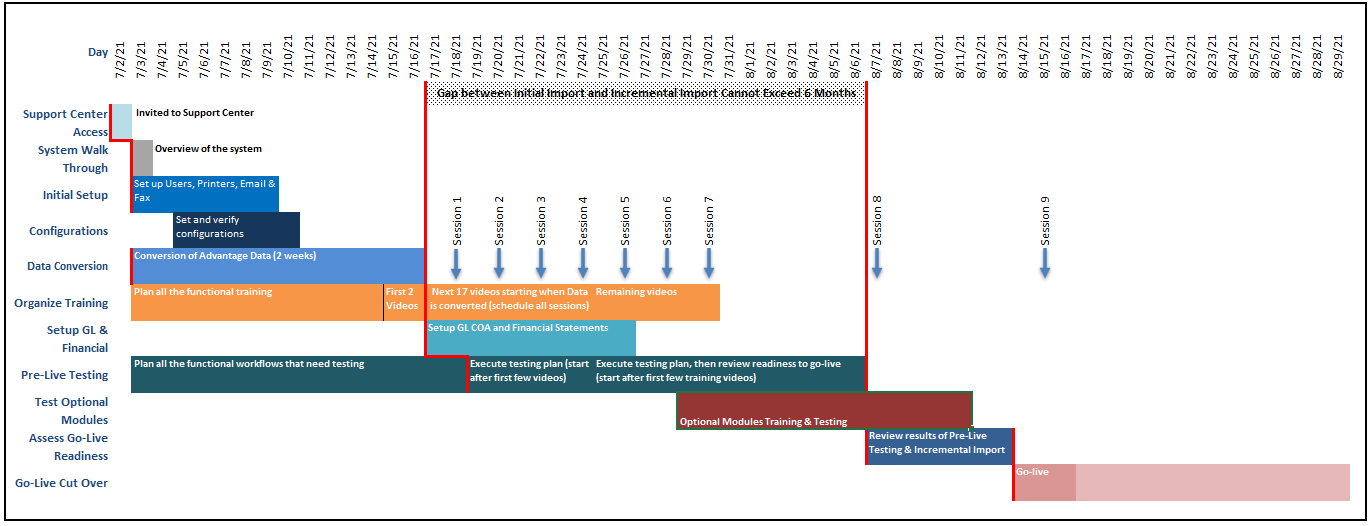
Initial Setup
- ADS Solutions will assist the customer with entering the right configurations into Accolent ERP including assistance with setting up the printers, email, forms, etc.
- Customer’s users should set up Accolent ERP and make any data changes that need to be preserved (e.g., users, roles, printers, master file changes) directly into the Production database
Data Conversion – Initial Import
- ADS Solutions will export the customer’s Advantage database as of a certain date (the “Initial Date”) to CSV files and then import these into Accolent ERP
- This will be the Initial Import as of the Initial Date and will be used to create a PreLive database which will have a URL of the form: https://customerprelive.accolenterp.solutions/accolent/login.aspx
- The Initial Import will include:
- All Value List files
- All Sub-Master files
- All Master files
- All Invoices for the 2-year period preceding the Initial Date
- All open transactions (Orders, Shipping items, Open POs) as of the Initial Date
- Inventory QOH and Avg Cost, Costs, AP Open Items, and AR Open Items as of the Initial Date
Verification of Initial Import Data
- Customer will need to verify the data and with ADS Solutions assistance, tie-out Inventory Valuation, AP Aging, and AR Aging
- ADS Solutions will correct any data import issues on the PreLive database
- When the data is verified, ADS Solutions will copy the PreLive database to the Production database, which will have a URL of the form: https://customer.accolenterp.solutions/accolent/login.aspx
Training and Testing
- At this point, end-users should begin training and entering transactions for testing/training purposes
- ADS Solutions will schedule several online training sessions, covering the following topics:
- Accolent ERP System Basics & Navigation
- Review of the Customer, Product and Vendor master records
- Review of Customer Pricing methods
- Review of Product Costing
- Review of Quotes, Orders, Ship Confirms, and Invoice transactions
- Review of Purchasing and PO Receiving transactions
- Review of Special Order Processing
- Review of Warehouse Transfers & Physical Inventory
- Review of General Ledger, Accounts Receivable, and Accounts Payable
- Review of Reports and Forms Design Tools
- Review of Reports Center, Settings, and Utilities
- ADS Solutions will help Customer’s personnel identify various types of test transactions that Customer’s personnel should enter for training and testing purposes
- Customer’s users will use only the PreLive database for any test transactions (i.e., no changes to the Production database except those intended to be preserved)
- The training and testing phase is expected to take between 3 and 5 weeks
Data Conversion – Incremental Import
- On a date about 3-5 weeks after the Initial Date (the “Incremental Date”), ADS Solutions will do an import (the “Incremental Import“) to update the Initial Import
- The Incremental Date is very important as this will be the date of the customer’s Starting Balance Sheet that will go into Accolent ERP
- The customer will need to plan on running all final reports and financial statements in Advantage as of the Incremental Date
- Using the database saved as of the Incremental Date, ADS Solutions will (a) delete all the open transactions in the Production database and then (b) export from Advantage and then import the Incremental Import directly into the Production database
- The Incremental Import will include:
- All changes to the Sub-Master files in Advantage between the Initial Date and the Incremental Date
- All changes to the Master files in Advantage between the Initial Date and the Incremental Date
- All Invoices created between the Initial Date and the Incremental Date
- All open transactions (Orders, Shipments, Open POs) as of the Incremental Date
- Inventory QOH and Avg Cost, Costs, AP Open Items, and AR Open Items as of the Incremental Date
- The Advantage database as of the Incremental Date will be the starting point for Accolent ERP
Verification of Incremental Import Data
- Once the Incremental Import is completed, the customer will need to verify the data and with ADS Solutions’ assistance tie-out Inventory Valuation, AP Aging, and AR Aging
- The Incremental Import and data verification is expected to take no more than a few days and then, ADS Solutions will turn the updated Production database over to Customer
- This will be the “Live Date”
Starting Live Operation
- Prior to the Live Date, ADS Solutions will have completed a review with the customer’s personnel to get the customer ready to start live operation on Accolent ERP system
- On the Live Date, the customer will enter the GL Starting Balances as of the Incremental Date and set the Accounting Start Date as the Incremental Date
- The customer will need to manually enter the transactions that were created in Advantage between the Incremental Date and the Live Date into Accolent ERP
- These manually entered transactions will post to the GL and may be backdated, if desired, to the period between the Incremental Date and the Live Date
- All new transactions generated after the Live Date will be entered directly into Accolent ERP
- As of the Live Date, the customer will have immediate access to the 2 years of Invoice history that was imported
Note the Invoices prior to the Incremental Date are provided only in order to create Sales history in Accolent ERP. These will not be live records and will not have all supporting files (e.g., payment records). Any data other than sales history preceding the Incremental Date that is needed for reference purposes should be obtained from the Advantage system reports
Following these steps carefully will ensure that the customer’s Advantage database is successfully converted over to Accolent ERP. If done correctly the whole process can easily be completed in 6 – 8 weeks.