
Accolent ERP allows for charging a Customer interest on invoices that are outstanding past the due date based on the terms allowed that Customer. If the system is set up to charge interest, interest will accrue on the unpaid balance after the due date. Interest is recomputed daily in the database and updated to the AR Aging Balance shown on the Payment Receipt screen for the Customer. However, interest accruals are not posted to the General Ledger until the Invoice is paid.
Initial GL Posting
- Customer 120123 is set to charge interest.
- The Customer’s terms are 1 – Net 30.
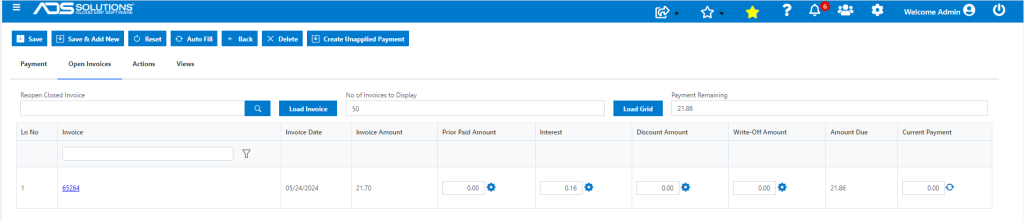
- Invoice 65264 of 5/24/24 for Customer 011 is overdue and shows Interest of $0.16 as of 7/8/24 on the Payment Receipt screen.
- This is calculated as Invoice Amount x Days Overdue / 30 Days x Interest Rate = $21.70 x 15 / 30 x 1.50% = $0.16.
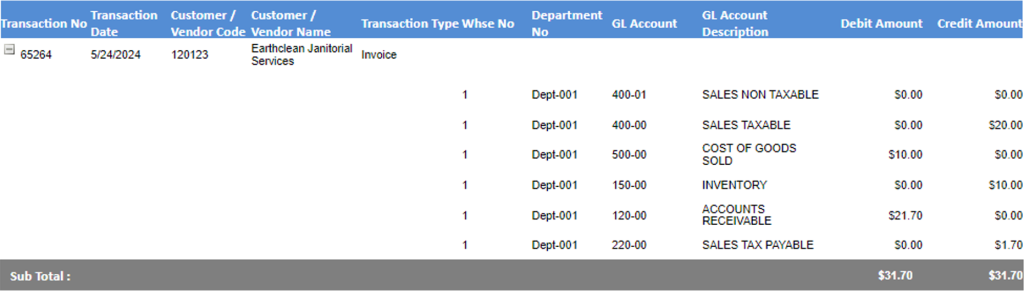
- Look up GL Posting of 65264.
- On the Sales side, the transaction posting is:
- Debit AR = $21.70, Credit Sales = $20.00, Credit Sales Tax Payable = $1.70
- No posting is made initially for Interest as invoice is within terms.
Interest Accrual
- Invoice 65264 was due on 6/23/24.
- Interest on Invoice 65264 accrues and is updated daily after 6/23/24.
- The accrued interest due is shown on the AR Aging and Payment Receipts screen, but this is not posted to the GL.
- This is done in order to prevent the recording of income or creating receivables for amounts that may never be recovered.
- The recording of interest income happens only when the AR item is closed reflecting receipt of payment.
Posting of Interest on Taking Payment
- Interest Income is not posted to the GL until the Invoice is paid and the AR item closed.
- As long as the Invoice is open (i.e., with an unpaid balance due), interest will continue to accrue on the outstanding balance.
- However, the accrued interest will not post to the GL.
- On 7/8/24, take payment 20003 for $21.86 on 65264, which includes the interest amount $0.16.
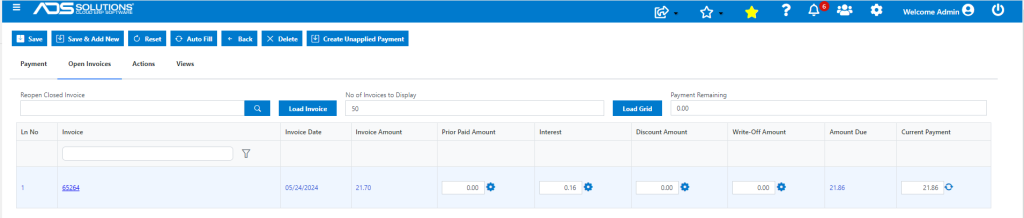
- The GL Posting of the payment records interest income.

- If the payment was for $21.70, (i.e., excluding interest) the user could:
- Either keep the interest balance as an open invoice (i.e., a partial payment of $21.70 on an amount due of $21.86), or
- Write-off the interest balance.
- If the decision is to write-off the Interest enter the payment amount of $21.86, then:
- First enter the write-off for the interest of $0.16,
- Then select the GL Account for the write-off (typically interest income).
- The GL Posting will be to:
- Debit Cash = $21.70, Debit Write-Off GL Acct selected (e.g., Interest Income) = $0.16, Credit AR = $21.70, Credit Interest Income = $0.16.
- This will close the invoice and not record any net interest income or expense.