
Accolent ERP allows for billing customers for Freight and/or Labor. The amounts entered on the order for Freight and/or Labor will be billed to the customer. The GL Posting of the order when invoiced, will record the amounts charged as Freight and/or Labor Income. Freight and/or Labor are typically non-inventory products. As such, the costs of providing the Freight and/or Labor will be picked up as period expenses that will be recorded when paying the freight vendor’s invoice and/or through payroll.
Add Freight and Labor
- Create order 66000 for customer 011.
- Extended price of goods is $146.52 plus sales tax of $12.45.
- Freight and/or Labor may be added to the order on the Shipping Details tab, if desired, or more typically may be added during order fulfillment.
- For example, enter $50.00 in Freight and $100.00 in Labor to the order.
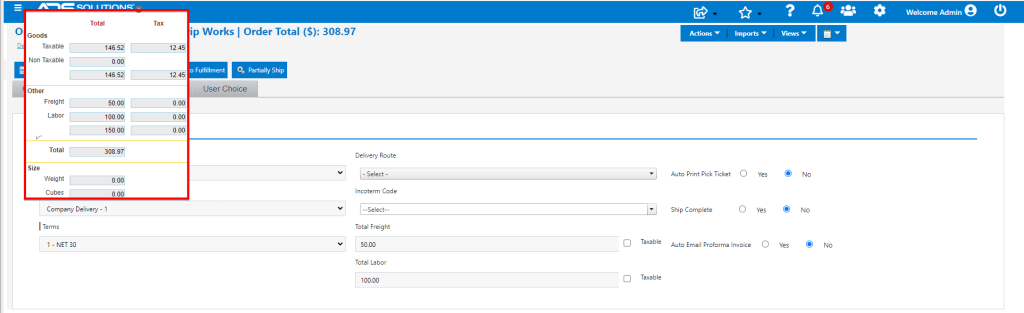
- The default setting for whether the Freight and Labor charges are taxable is made on the State screen.
- Go to Settings > Value Lists > States, select the State that controls from a sales tax jurisdiction perspective.
- If the State is a Tax by Origin State, this will be the State of the Warehouse.
- If the State is a Tax by Destination State, the tax jurisdiction will depend on the Customer’s State and whether user has nexus there.

- The default Freight and Labor settings on the State may be overridden on the order by checking or unchecking the taxable checkboxes.
Move to Fulfillment
- In fulfillment, the Pack and Ship screens allow for the goods to be packed and then shipped through various common carriers or regional carriers.
- If this option is used, the freight amount will be assigned by the carrier based on the weight/dimensions and the service selected. The freight amount and shipper details will automatically populate into the order.
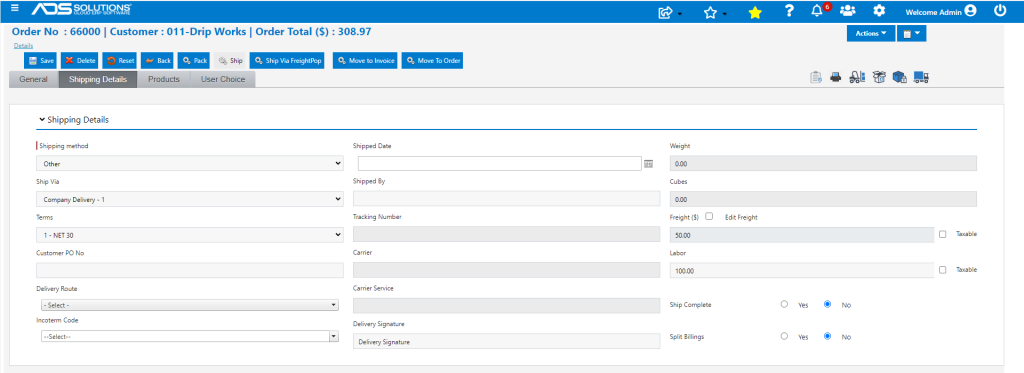
- Alternatively, the freight and/or labor amounts can be entered directly on the Shipping Details tab.
Move to Invoice
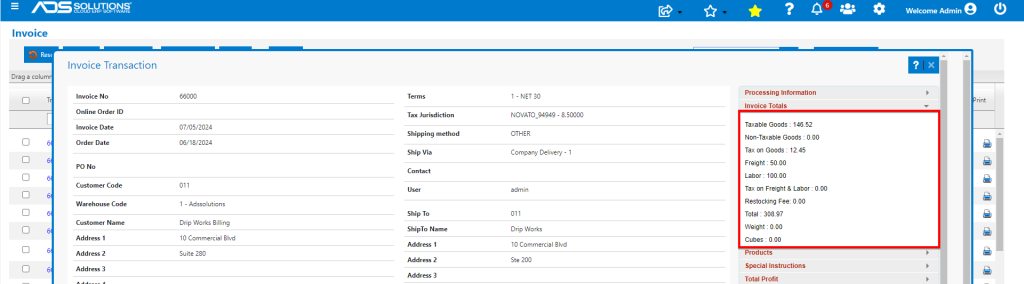
- Move order from fulfillment to invoice when goods are shipped.
- The Customer will be billed for Freight and Labor and these will not be taxed.
GL Posting
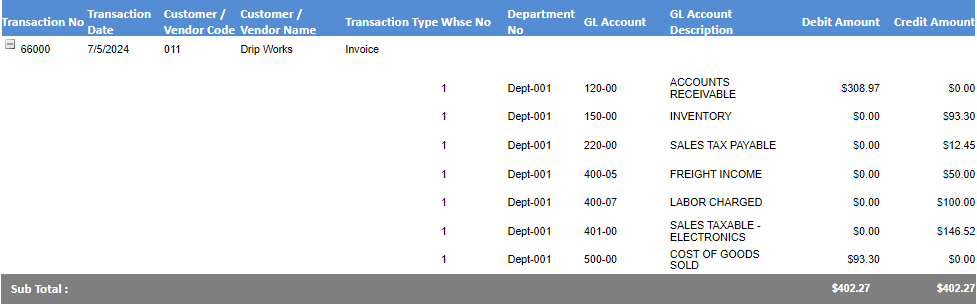
- Freight and Labor are non-inventory products, so no costs are recorded with an invoice.
- The transaction will record total sales of $308.97, and there will be no costs posted in respect of the costs of Freight and Labor.
- Costs will be recorded as period expenses when Accounts Payable entries are created for the Freight vendor’s invoice and the Labor component will be picked up as part of Payroll Expense.
Other Options
- If it is necessary to record freight and/or labor costs on each order, these will both need to be made notional inventory products.
- Starting a month with zero quantity of these notional inventory products will allow the usage over a month to be tracked.
- Each order will then reduce inventory by the cost of freight and/or labor charged.
- Then creating a manual inventory adjustment to re-zero the negative quantity at the end of the month will debit Inventory and credit the corresponding period expense.