
Accolent ERP provides Bill of Materials (“BOMs”) or Kits that can be used to create assembled or manufactured products. In addition to raw materials, labor is also typically a component of the assembly or manufacturing process to produce the manufactured product. To include the cost of the labor in the cost of the manufactured product, labor needs to be set up as an inventory product. By making labor an inventory product with a cost, its usage in the assembly or manufacturing process will be able to be tracked. Periodically the labor costs assigned to the assembly or manufacturing process and included in the cost of the manufactured product will be offset against the period expense for payroll.
Set up Labor Product
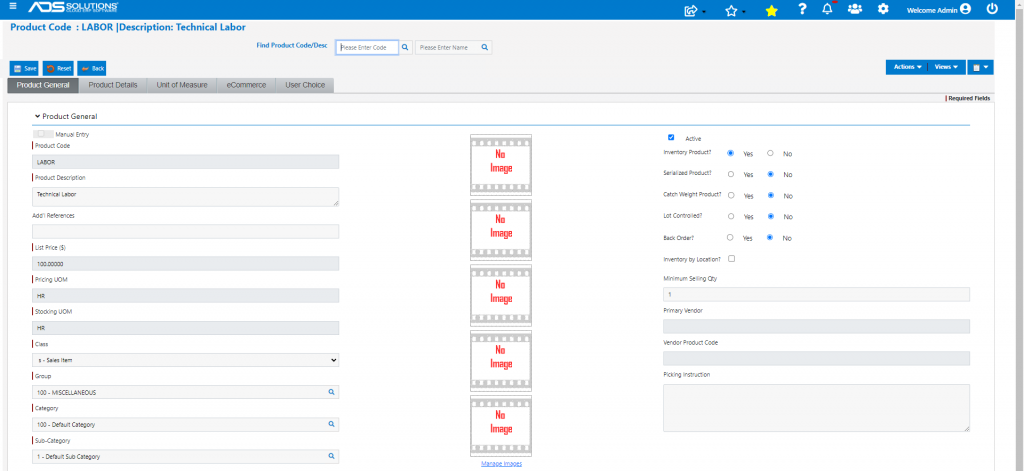
- Create an Inventory product for each category of labor (e.g., LABOR) associated with Kits or BOMs
- Set the Back Order radio button as No
- For example, price LABOR at e.g., $100/HR and set fully-burdened cost at e.g., $48.50
- Determine whether LABOR should be subject to sales tax or not
Set up Kits or BOMs
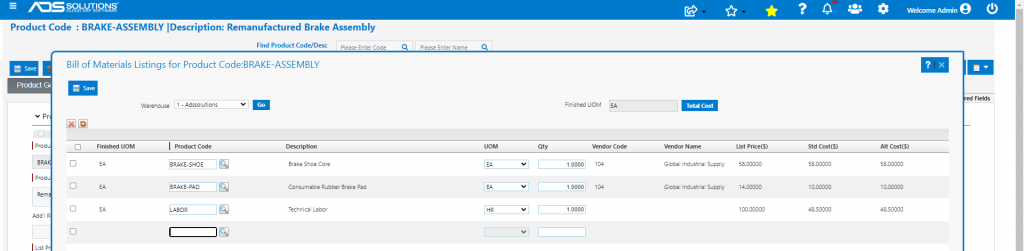
- Set up Kits or BOMs that include the LABOR product
- This is the BOM for a manufactured product with a LABOR component
Tracking Labor Hours Used
- Start a month with a zero balance in LABOR
- At the end of each month the QOH balance of the LABOR product will be negative reflecting the HRs of LABOR charged to Kits or BOMs that month
- Go to Inventory/Products > Products > Adjust Inventory
- Use the Manual Inventory Adjustment screen to adjust the LABOR balance for hours included in cost of completed BOM products
- In this case, Adjust QOH to -34 to cover the LABOR on products in process or quotes
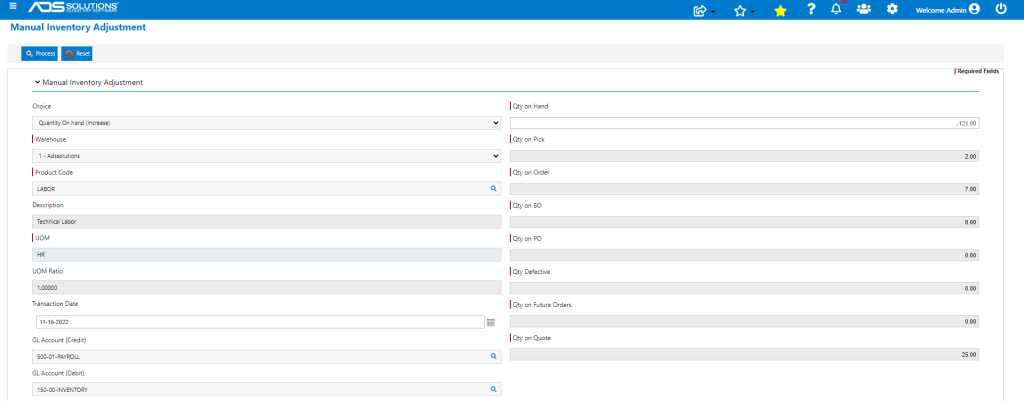
- The GL posting will be to debit Inventory (to bring QOH x Fully-burdened Cost back to zero) and a credit to payroll expense
- In effect this will reduce the payroll period expense by the fully-burdened cost of LABOR already charged to COGS or carried in inventory as part of the cost of a finished Kit or manufactured BOM
Other Options
- This approach can be used to create as many labor category products as needed (e.g., LABOR-INSPECTION, LABOR-FINISHING, LABOR-ASSEMBLY)
- This allows creation of reports to determine absorption of different LABOR categories into the inventory cost