
ADS Solutions’ online ADS Support Center portal allows you to enter support requests for help with issues in Accolent ERP or implementation. Once you sign up for Accolent ERP, you will receive an email inviting you to create an account in Support Center. Entering support requests into Support Center is the best and quickest way to report an issue and get assistance.
Support Center
- In the ADS Support Center users (e.g., Joe Smith) are referred to as Customers and companies that subscribe to Accolent ERP (e.g., ABC Supply Co.) are referred to as Organizations
- When you sign up for Accolent ERP, your users and company will be entered into ADS Support Center
- All Customers will receive an email invitation from ADS Support Center to create an account with your username as your email address and a password that you enter
- Once the ADS Support Center account has been set up you can enter support requests
- To enter a support request, you can go to: https://adssolutions.atlassian.net/servicedesk/customer/portal/
- You can also access the ADS Support Center from the link on ADS Solutions’ website: adssolutions.com > Support > Support Center Portal; then select Accolent ERP Support Center Login
Changing Your Password
- If you need to change your password, go to Support Center
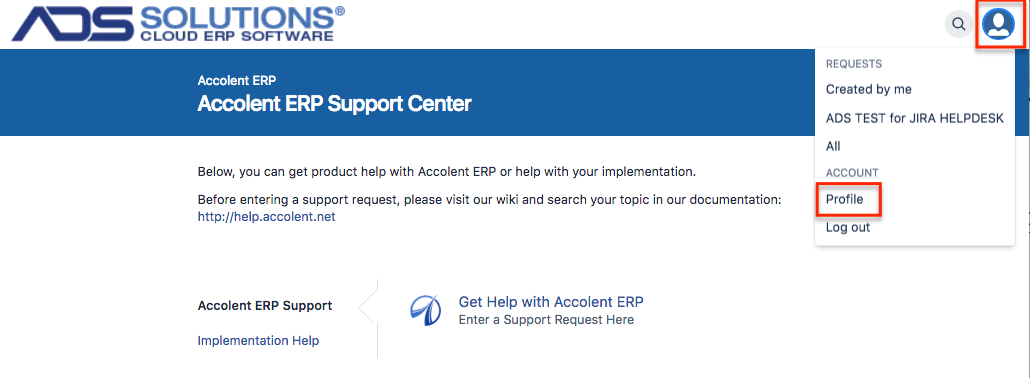
- In the upper right hand corner on the login screen, click on the person or avatar icon, then choose Profile from the drop-down menu
- This screen allows you to change various account details
- Under Password, click the link to Change password
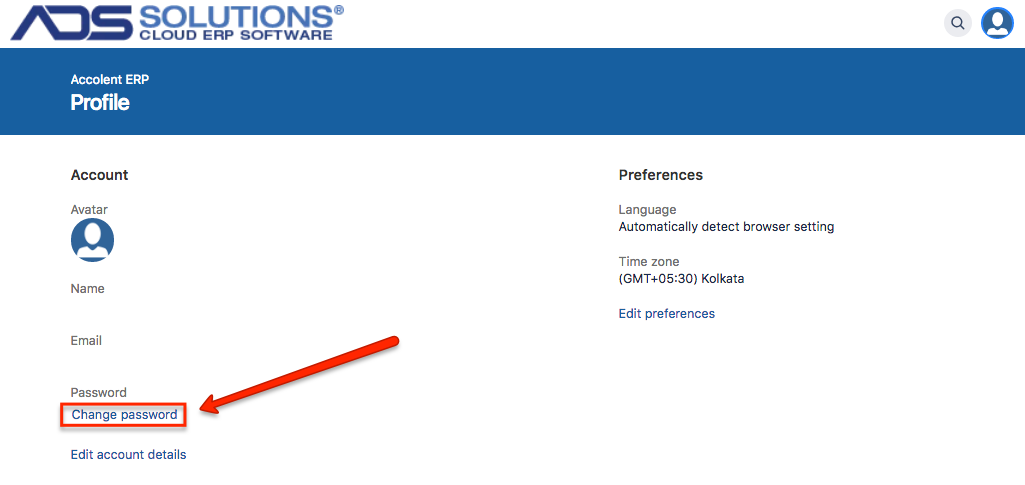
- This will let you change your password