
Accolent ERP can accept any UOM (unit of measure). Every UOM that is used in the system has to be added once to the Dynamic Lookup screen. After it has been added to the Dynamic Lookup the system will recognize it as a valid UOM.
Dynamic Lookup
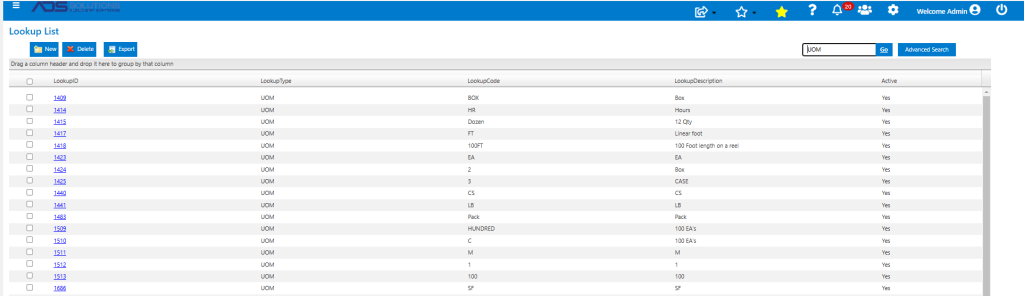
- Go to Settings > Value Lists > Other Value Lists (A to L) > Dynamic Lookup.
- Enter “UOM” in the search bar and click Go to see all the UOMs already in the system.
Add a New UOM
- To add a new UOM not on the Lookup List, click New.
- For example, add a unit of measure for 10 Gallons.
- Use Lookup Type of “UOM” or search for allowed types.
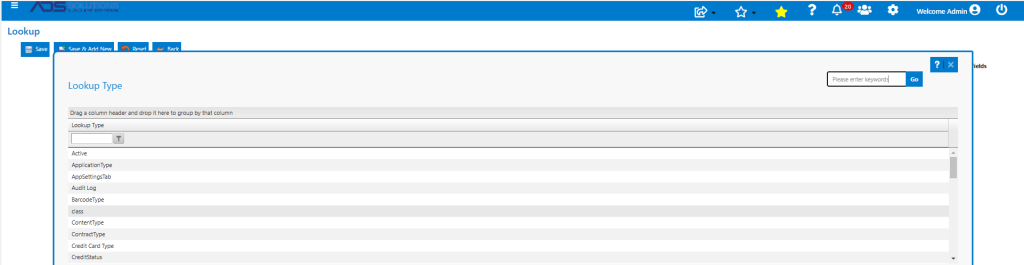
- Enter a Lookup Code – this is the code for the UOM.
- Add a Description.

- Then Save to create the UOM.

- The new UOM is now available to use on a product in the system.
Adding Other Dynamic Lookup Types
- The same process can be used for entering other user-defined variables e.g., User Choice field labels or Landed Cost Types.
