
Accolent ERP posts deposits or prepayments taken on orders to a Customer Deposits Liability-type General Ledger Account. Deposits or prepayments booked to the Customer Deposits account do not show up in or affect Accounts Receivable Aging. Once the order is invoiced, the Customer Deposits balance is moved to Accounts Receivable as a payment on that Invoice.
Set up Customer Deposits GL Account
- The GL Account Customer Deposits must first be set up in the Chart of Accounts.
- Then select this GL Account in the Warehouse GL Account Defaults.
Prepayment in Full of an Order
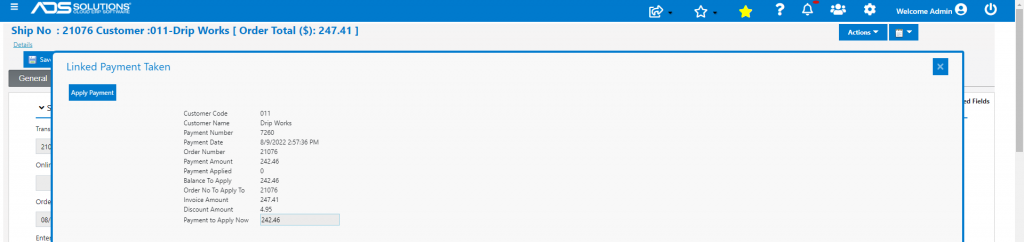
- Create Order 21076 for $247.41 for a customer that has terms of 2% 10 Net 30.
- Take payment in full in advance on receipt 7260 for $242.46 net of payment discount of $4.95.
- This is the GL Posting through the Payment Receipts Journal.

- Once order 21076 is moved to fulfillment then to invoice, the opportunity is given to apply the deposit previously taken.
- The transaction is invoiced and shows as Paid.

- The invoice is posted to the GL through the Sales Journal.
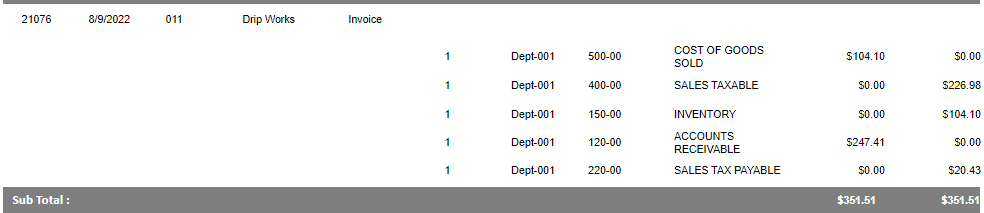
- The Payments Receipt Journal also moves the Customer Deposits balance to Accounts Receivable and applies it to the invoice.

- Because the invoice was prepaid in full, the transaction will not appear in the AR Aging at all.
- At any time, go to the Customer > Views > Customer Deposits Report to see the list of Customer Deposits.
- In this case the Credit of $242.26 to Customer Deposits on receipt 7260 and the subsequent Debit when the Invoice is created and the payment applied, will both show up.

Take a Deposit on an Order
- Create order 21077 for $197.92 for the same Customer.
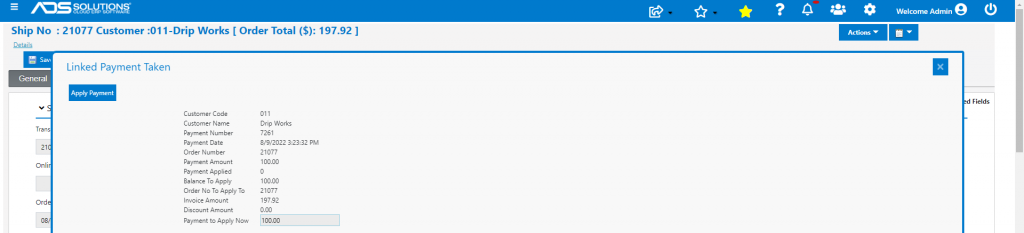
- Take prepayment of $100 on receipt 7261.
- The GL Posting is through the Payments Receipt Journal.

- Once the order is moved to fulfillment then to invoice, the option comes up to apply the payment taken – Note there is no discount because this a partial payment.
- When invoiced, the transaction is posted to the GL by the Sales Journal.
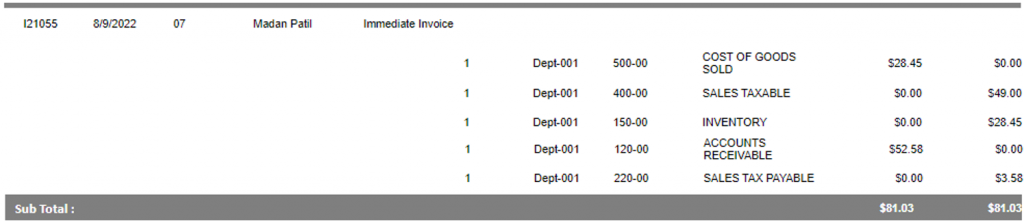
- Also, the Payment Receipts Journal moves the Customer Deposits balance to Accounts Receivable and applies it to the invoice as before.
- In this case, no payment discounts are given since the invoice hasn’t yet been paid in full.

- Also in this case, since the AR entry is still open both the invoice and the $100 Deposit appear in the AR Aging.
