
Accolent ERP allows for Sales Orders for special order items to be automatically linked to POs to create linked Special Orders. The POs for these Special Orders can be partially received and invoiced for items delivered. The process is exactly the same as that for partially receiving non-special order POs.
Create Special Order
- Create Sales order 67605 for special order products.
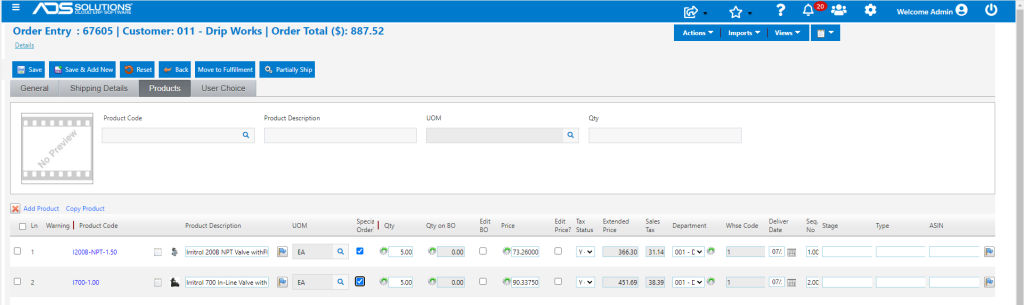
- Move to fulfillment and select special order options.

- Save to auto create the linked PO No C9496, with SPO links 4842 and 4843 and back order 67605-1.
Partially Receive the Linked PO
- Now partially receive PO C9496 which is linked to BO 67605-1.
- Receive 4 EA of I200B-NPT-1.50.

- Automatically strips off the received items from BO 67605-1 to create BO 67605-2.
- Moves 67605-2 to fulfillment and allows printing of Pick Ticket.

- Open order 67605-2 in fulfillment – reflects the items partially received on PO C9496.

- Fulfill and invoice 67605-2.

Remaining PO and Back Order Items
- PO No C9496 shows 1 EA of I200B-NPT-1.50 and 5 EA of I700-1.00 as Open and 4 EA of I200B-NPT-1.50 as Received.
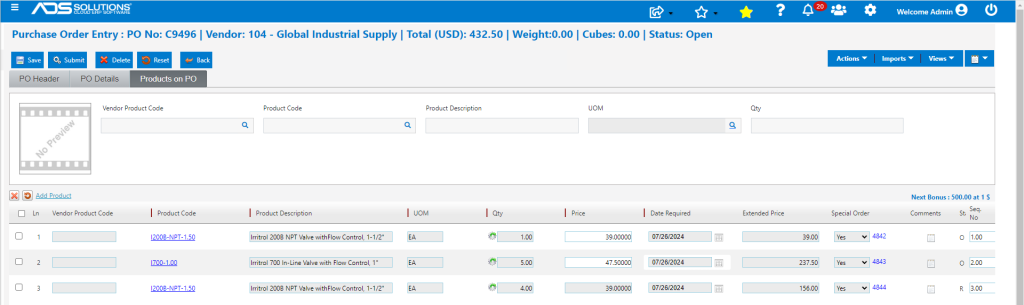
- The BO 67605-1 shows 1 EA of I200B-NPT-1.50 and 5 EA of I700-1.00 as Open.
