
Accolent ERP allows entry of general comments against each of the Customer, Vendor and Product master records. Users can also categorize the comment with a type (e.g., Accounts Receivable). These comments will create an ongoing record and are always available on the master record. By entering consistent comment types, these records can be easily searched by type.
Customer, Vendor and Product Comments
- The Customer, Vendor and Product master records all allow the entry of general comments.
- These are similar to the Internal Notes on Transactions and may be used to keep an ongoing series of comments that don’t print anywhere but are organized chronologically and available for users to review and/or add to.
- These comments are accessed from the Notepad icon on the master record.
- The master record comments all have a user-entered type/topic so they can be searched easily. Types could be things like: AR Comments, General Comments, etc.
- There are also comments that are entered automatically by the system to log changes. These will appear as Entered by: System Message. These comment entries cannot be deleted.
Customer Comments
- Access from the Comments menu on the Customer record.

- Click on Customer Comments.
- Enter a Comment and assign it a user-defined Type.
- The user entering the Comment and when will automatically be added when the Comment is saved.

- By entering a Type that is a standard topic, the Comments can be easily searched.
- For example, if AR personnel always use the Accounts Receivable type, their comments can be quickly found.
Vendor Comments
- Access from the Comments menu on the Vendor record.

- Click on Vendor Comments.
- Enter a Comment and assign it a user-defined Type.
- The user entering the Comment and when will automatically be added when the Comment is saved.

Product Comments
- Access from the Comments menu on the Product record.
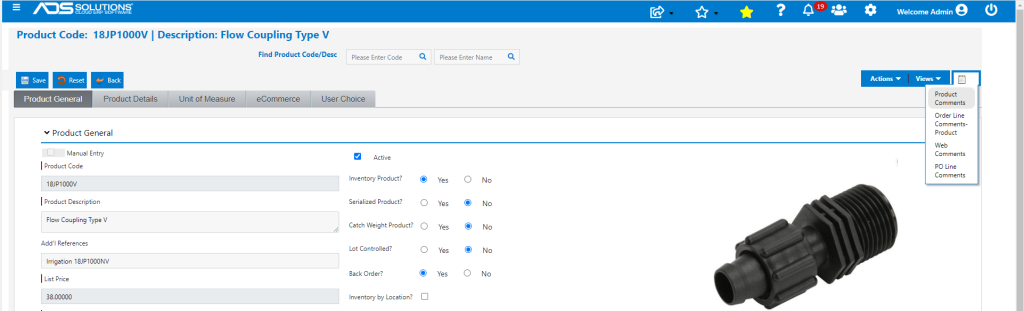
- Click on Product Comments.
- Enter a Comment and assign it a user-defined Type.
- The user entering the Comment and when will automatically be added when the Comment is saved.
