When entering a price on a Purchase Order, Accolent ERP compares the entered price to the specified existing Cost of the product. If the entered price is higher/lower than the specified existing Cost, a pop-up screen offers the option to automatically update the specified Cost and Prices for the product. Accolent ERP keeps multiple costs for each product in each warehouse, and the selection of which Cost to update is configurable.
Existing Product Cost
- Look up the Costs for Product Code I2711ASV
- Accolent ERP tracks multiple costs for each product for each warehouse.
- Typically for a particular product and warehouse:
- Standard Cost represents the overhead-burdened normal business cost,
- Alternate Cost represents the replacement cost (i.e., PO price),
- Special Cost represents a one-off negotiated price that though tracked, may not be replicable, and
- Average Cost represents the accounting cost which is calculated internally by the system.

Application Default Settings
- On the Settings > Application Defaults > Purchasing/Vendors, use setting V102-1 to specify which Cost to default in as the PO price.
- For example, select Alternate Cost.
- If the specified Cost (in this case, Alternate Cost) is zero, the system will instead use the Last PO Price, which is the price on the most recent PO for this product, purchased by this warehouse from this vendor.

Existing Product Pricing
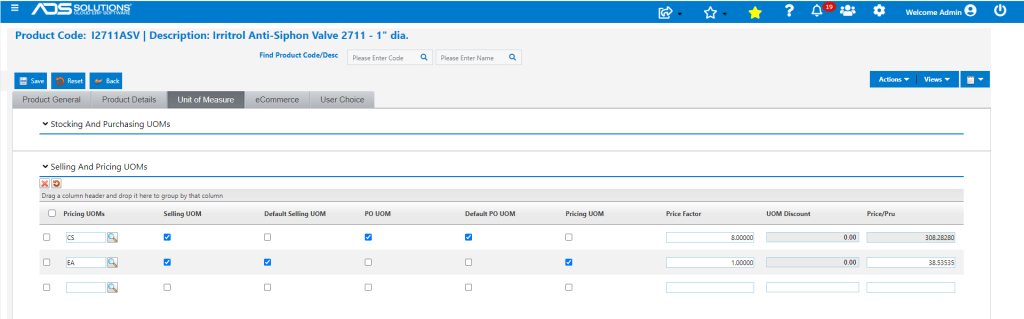
- Look up the current Pricing defined for this product
- Two UOMs, EA and CS, are defined; List Price is $35.00 for EA
Create a new PO
- Create a new PO No C9363, the system will default in a PO price of $19.80/EA ($158.40/CS) equal to the specified Alternate Cost.
- Override the default to enter a price of $21.80/EA ($174.40/CS) – which is a 10.1% increase.
- The PO Cost Update screen pops-up and gives various automatic update options.
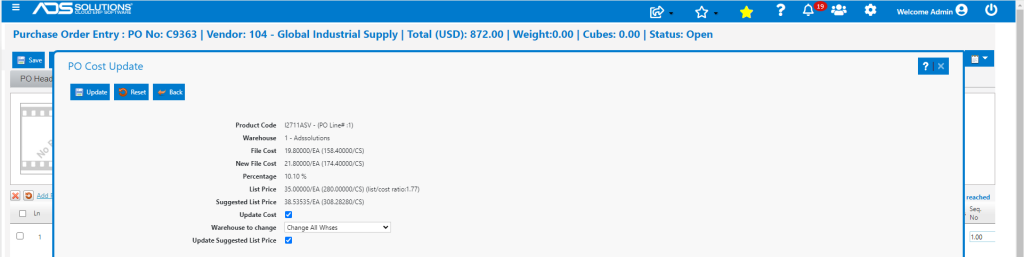
- Options:
- Update Cost – updates the Cost selected in the Application Defaults; in this case Alternate Cost.
- Warehouse to change – updates costs at just this warehouse or all selected warehouses.
- Update Suggested List – updates List Price and other UOM Prices by the same percentage as the cost increase.
- For example, select Update Cost, select Change all Warehouses and Update List Price.
- Then click Update.
Costs and Prices Updated
- Alternate Cost updated to $21.80 for all Warehouses.

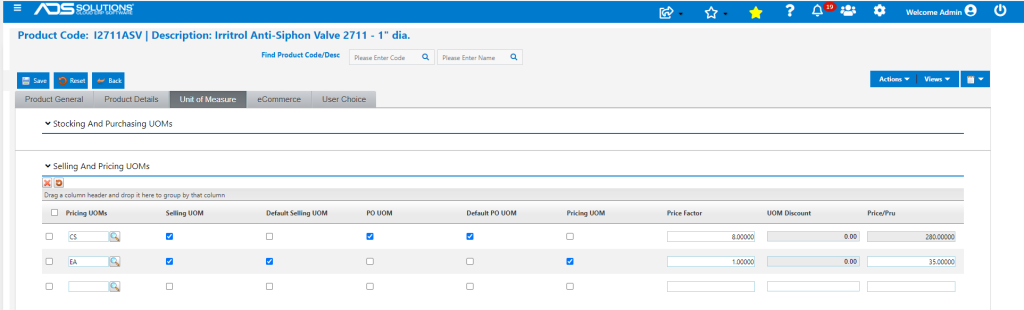
- List Price and prices for other UOMs also updated.
- New List Price = $35.00 x 1.10101 = $38.53535 for EA.
- New price for CS = $38.53535 x 8 = $308.28280.