
Accolent ERP provides system-generated or user-entered transaction numbering in order entry and PO entry. The preferred transaction numbering approach can be set up as a system default. If set to user-generated, the user can at any time uncheck the Manual Entry checkbox to use a system-generated number or vice versa.
Set Application Defaults for Orders
- Go to Settings > Application Defaults > select Sales tab.
- Set SO103 to a value of NULL for system entry or 1 for Manual Entry.

- Create an order, the default transaction numbering is a system-generated number.
- These will be released sequentially.
- If an order is started but abandoned, the system will not reissue the abandoned number but will release the next available number.
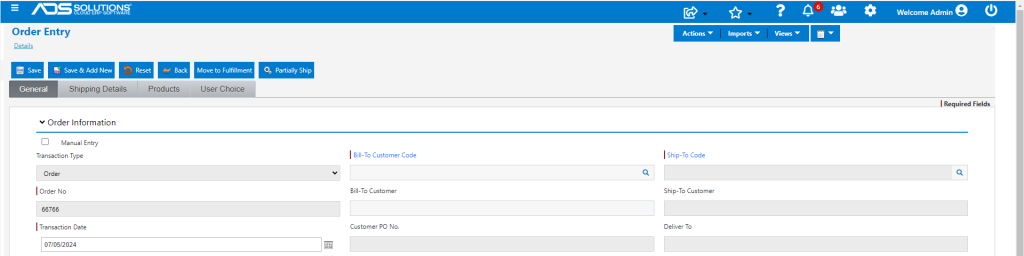
- The system also shows a Manual Entry checkbox that will be unchecked by default; checking will allow for a manual entry number.
- Note: manually entered transaction numbers should not contain any special characters.
Set Application Defaults for POs
- PO numbering works exactly the same way as order numbering does.
- Go to Settings > Application Defaults > select Purchasing/Vendors tab > select V101.
- A value on V101 of 2 defaults a system-generated number or a value of 1 defaults a manually-entered number.

- Create a PO, the default transaction numbering is a system-generated number.
- These will be released sequentially.
- If an order is started but abandoned, the system will not reissue the abandoned number but will release the next available number.
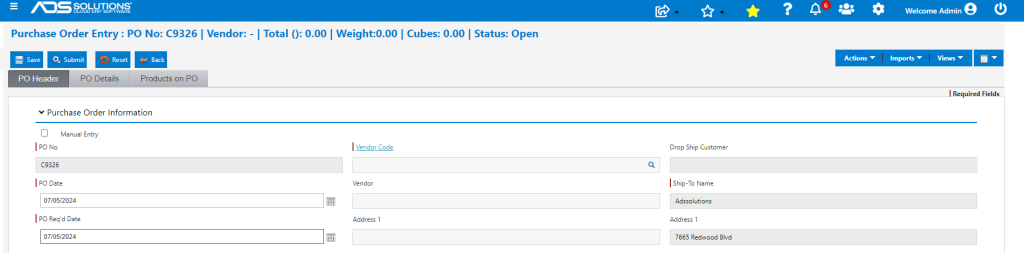
- The system also shows a Manual Entry checkbox that will be unchecked by default; checking will allow for a manual entry number.
- Note: manually entered transaction numbers should not contain any special characters.