
Accolent ERP allows for recording a bounced check and entering a Bank Charge, if desired, to offset any service fees charged by the Bank in connection with the returned check. The Bank balance will be automatically reduced by the amount of the bounced check plus the amount of the service fee charged by the Bank. The Customer’s account will also reflect the amount owed in respect of the bounced check and the reimbursement of the service fees charged.
Receive and then Deposit Payment
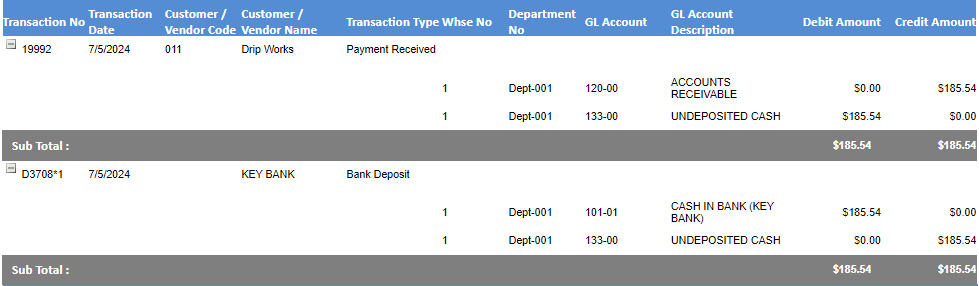
- Go to Receivables and take a payment 19992 for $185.54 to pay invoice 66344.
- Create Deposit D3708 for this check to Bank 1.
- This is the GL posting for the payment receipt and deposit.
Record the Bounced Check
- To record the check as returned unpaid, go to GL > Manage Bank Accounts > Bank Deposits > Create Returned Check.
- Select Customer 011, and then lookup/enter the Payment No 19992 for $185.54 to be reversed.
- Enter a Bank assessed return check service charge of $20.00.
- Enter the Service Charge GL Account you want the Bank service charge recorded to – in this example 506-00 Bank Charges.
- Note, this is only a temporary GL Account and will be reassigned from 506-00 to the Customer’s AR account once the Manual Invoice is created.
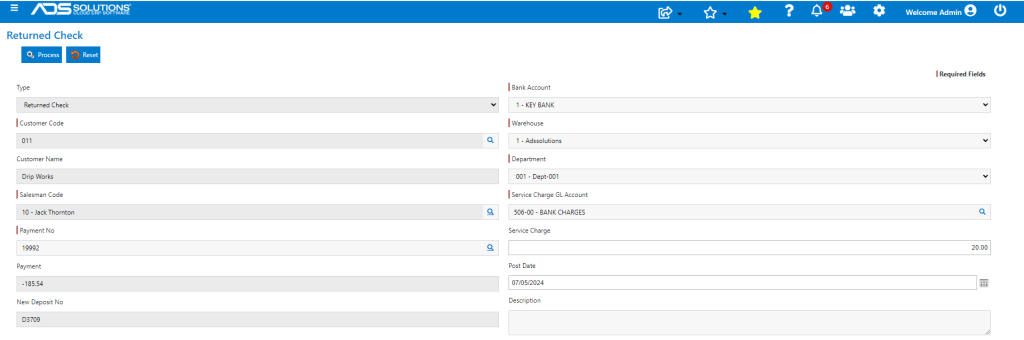
- Click Process to see the summary of transactions completed automatically.
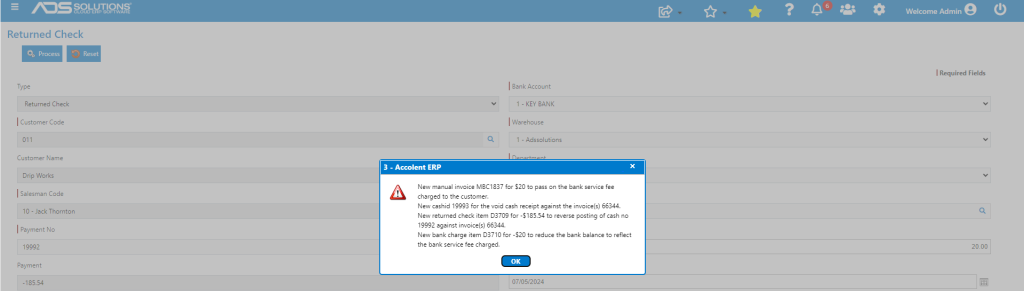
- Several entries are created automatically.
- Original payment receipt was 19992; created new payment receipt 19993 to reverse payment 19992.
- Original Deposit was D3708*1; created new bank deposit D3709*1 to reverse deposit D3708*1.
- Created new Deposit D3710*1 to reduce bank balance for the Bank Charge of -$20.00.
- Created new Manual Invoice MBC1837 to pass on the $20.00 bank service fee to increase the Open AR for the Customer.
- This is the GL posting for the series of transactions for the Payment Receipts Journal and the Sales Journal.
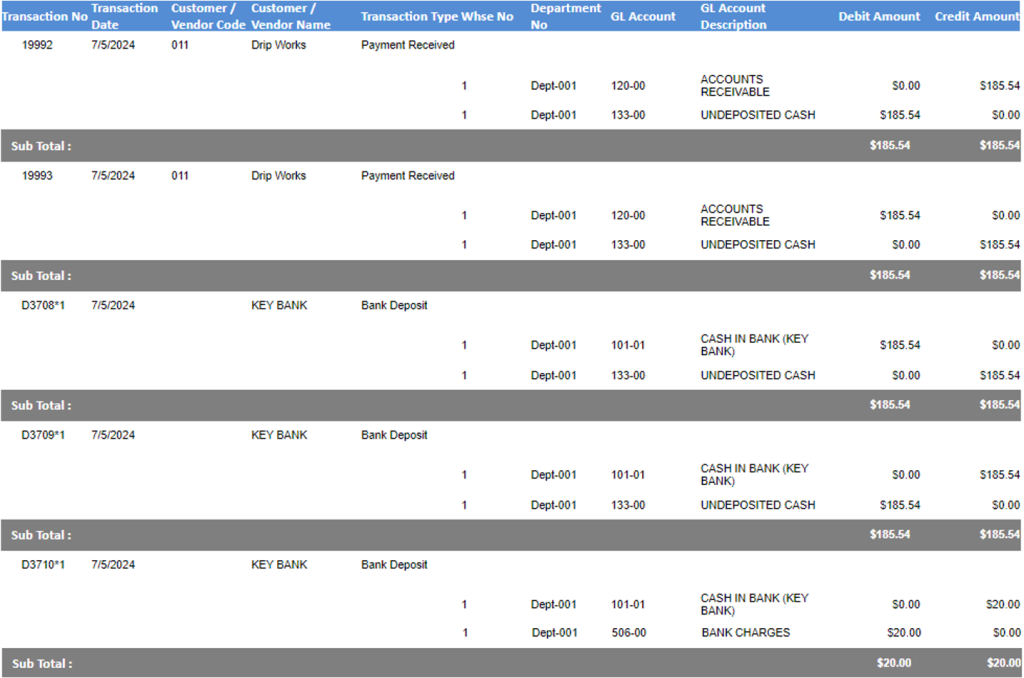

- The original payment receipt and deposit are reversed, a new deposit reduces the bank balance for the amount of the Bank Charge, and a new invoice for the Bank Charge amount is added to the Customer’s Accounts Receivable.
- Payments show the original payment and the subsequent voided payment.

- Deposits show the original and reversed deposit. Bank Charge reduces bank balance.

- AR Aging for Customer 011 shows the new manual invoice MBC1837 for $20 bank service charge and Invoice 66344 for $185.54 is now shown as open (i.e., unpaid).
