
Accolent ERP users should have a financial close process every month-end to tie-out the financial statements to the supporting files for Accounts Receivable, Accounts Payable and Inventory Valuation. There are many possible reasons for these balances to go out of sync including things like manual adjustments, GL Adjustments, using the bulk imports while in live operation, balances not initialized correctly, etc. For these reasons, monthly tie-outs are critical requirements that must be performed and are part of accounting best practices. Unfortunately, though critical, these tie-outs are often skipped since they can be very labor-intensive and time consuming to do properly. ADS Solutions has added three AI-powered bots that will perform these tasks for users.
AI-Bots to Perform Financial Statement Tie-Outs
- Go to Reports > Reports Center, select General Ledger > Reconciliation.
- Open Reconciliation Reports, No 11556.
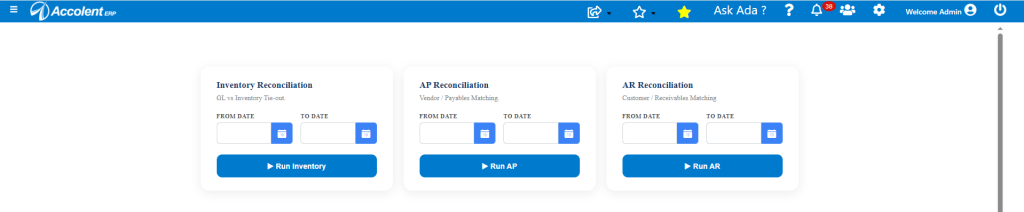
- Each of these AI-bots will perform the reconciliation for its own files.
- The reconciliation for any of these, (e.g., Inventory Valuation) works as follows:
- Enter the date range, typically a month (e.g., January 2026).
- Click the Run button.
- The AI-bot will then download as CSVs, all the transactions posted in January, to the Inventory GL as well as all the Inventory Valuation entries.
- Note that GL Postings will be by transaction, whereas the inventory ledger entries will be by transaction line. This is what makes the reconciliation difficult.
- All the entries in the 2 CSV files will be matched by the AI-bot by date, by transaction number and by amount.
- This is typically done in a few seconds, and the output generated.
- The output will be a CSV file that will list all matched transactions, all partially matched transactions and all unmatched transactions.
- The partially matched and unmatched transactions will then need to be investigated and addressed.
Reconciliation of January 2026 Inventory
- The output CSV will have several tabs for the GL Transactions, the Inventory Transactions, a working Data tab and the Final Report tab.
- The GL Transactions and Inventory transactions inputs are standard reports that can be separately downloaded if required.
- The Final Report contains several sections:
- Reconciliation Summary that shows the overall results – in this case, 142 transactions matched, 3 transactions partially matched with a discrepancy of $0.82 to be investigated. It also breaks out where the partial matches were (i.e., only in GL and only in Inventory).
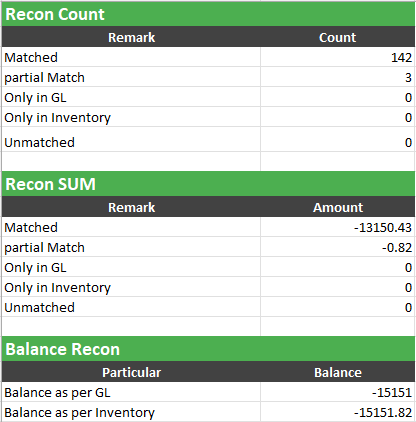
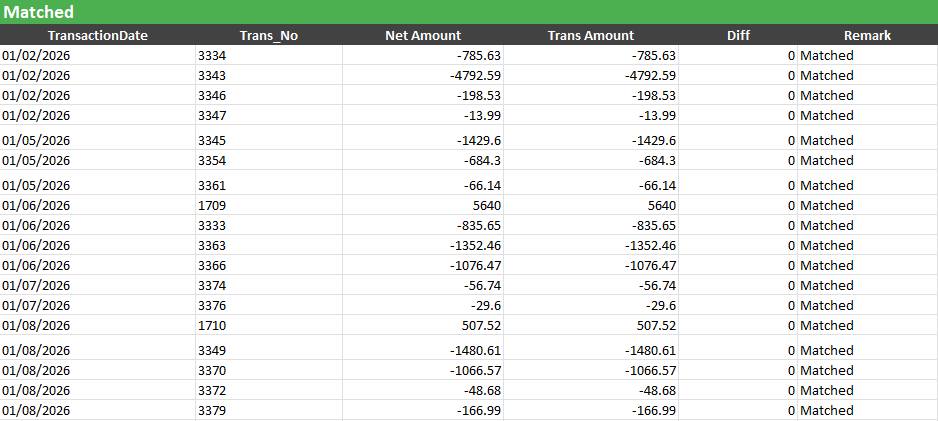
2. The Matched transactions that passed the 3-way matching algorithm – in this case, 142 transactions.
3. The Partial Match and the Unmatched transactions – in this case, 3 and 0 transactions respectively.
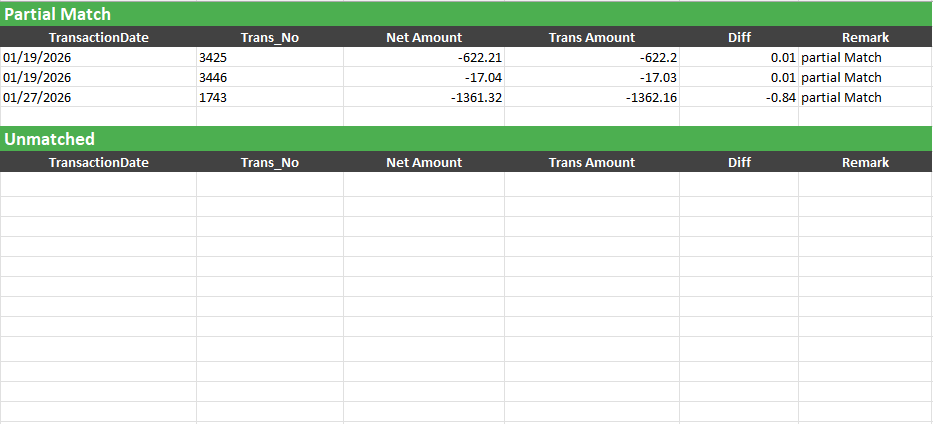
- The Partially Matched and Unmatched transactions can then be investigated to determine the causes of the discrepancy and addressed.
Reconciliation of January 2026 Accounts Receivable
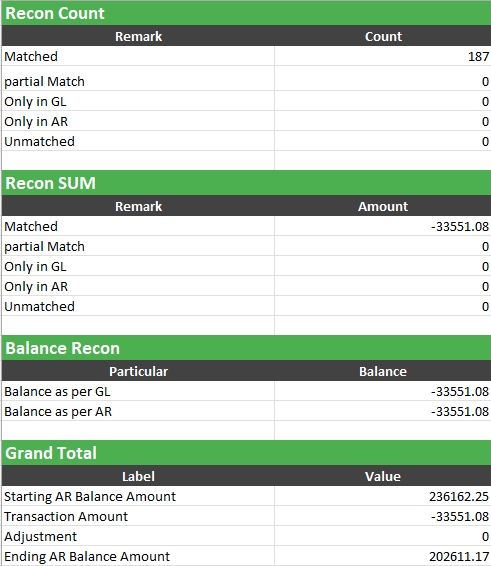
- Following the same steps, the tie-out of Accounts Receivable for January 2026 can be similarly performed.
- The Reconciliation Summary shows all transactions were successfully matched:
Reconciliation of January 2026 Accounts Payable
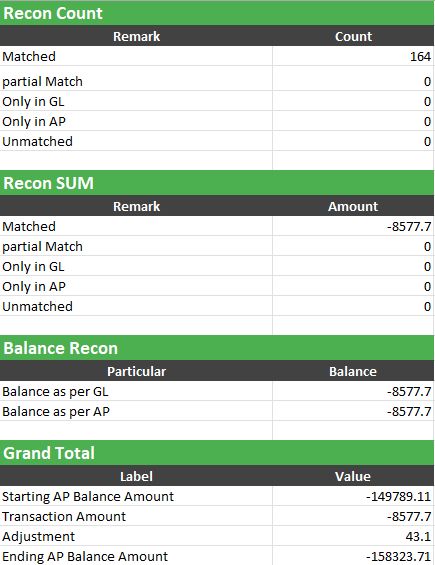
- Following the same steps, the tie-out of Accounts Payable for January 2026 can be similarly performed.
- The Reconciliation Summary shows all transactions were successfully matched:
Regular Financial Statement Tie-Outs
- Use of these AI-bots on a regular basis will substantially reduce the time needed to do the matching and should greatly improve the quality of the financial statements.