
Accolent ERP has integrated Fiserv’s Surcharge API which can be used by Accolent ERP users to offset credit card transaction expenses. The Fiserv Surcharge API complies with state laws that prohibit credit card surcharging in certain states. Merchants using surcharging are required to notify all customers that a fee will be applied if they pay by credit card. The fee is used to offset credit card fees and must not exceed the cost to the merchant of accepting credit cards.
Setting Up Surcharging
- Accolent ERP users wishing to use surcharging must contact Fiserv and enroll in the Merchant Surcharge Program. You will be issued a Merchant ID (MID) that allows for surcharging.
- In Accolent ERP go to Settings > System > System Configuration and set ID 301 to Y to enable the Fiserv Surcharging and on ID 302 enter the Fiserv Surcharge MID.

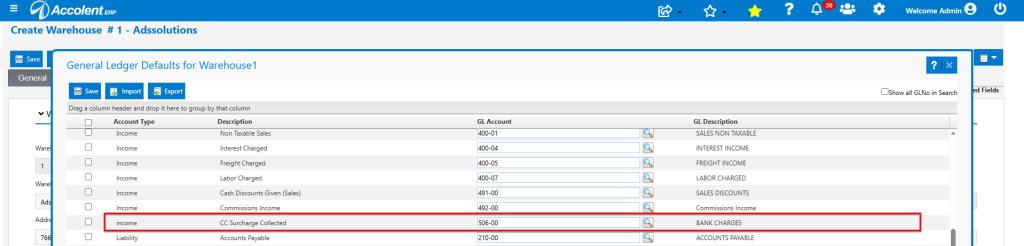
- Set up the GL Account in the Warehouse GL Account Defaults that the surcharge will be posted to.
Taking Card-Not-Present Payments
- Create order 92478 for $159.78.
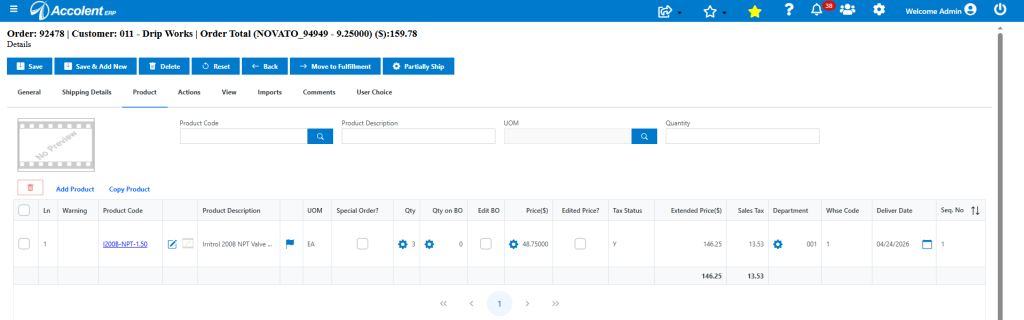
- Then go to Actions > Take Payment.
- The order is for $159.78 and the early payment discount is $3.20 so the net payment is $156.58.
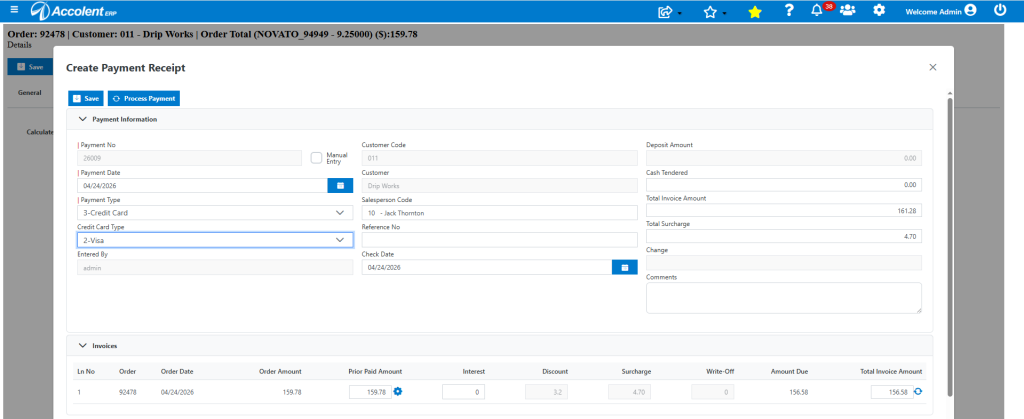
- Click Process Card and enter credentials.
- Once the Token Code is issued, click Pay.
- The Approval notes that a 3% Surcharge of $4.70 was added to the payment net of discount of $156.58 for a total payment of $161.28.
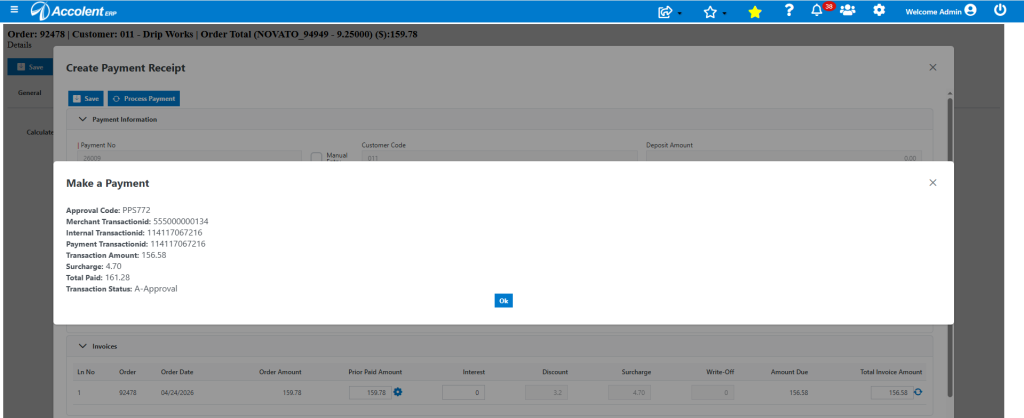
Payment Receipt Created
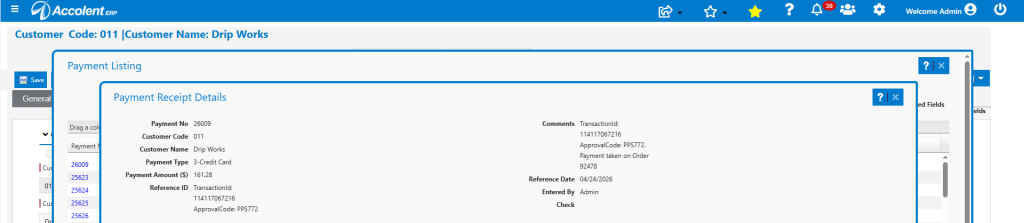
- Payment receipt 26009 was created for $161.28 including the surcharge which will be used to offset the interchange fee.
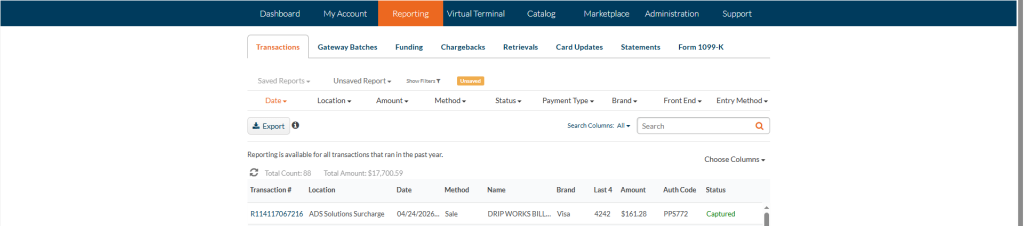
- The payment shows up in the Fiserv dashboard identified as a Surcharge payment.
General Ledger Posting
- The GL Posting is as follows:

- Note that the Surcharge will be posted to the GL account set up in the Warehouse GL Defaults.
Invoice order and Apply Payment
- When order 92478 is moved to fulfillment then invoiced, the payment may be applied against the Accounts Receivable.
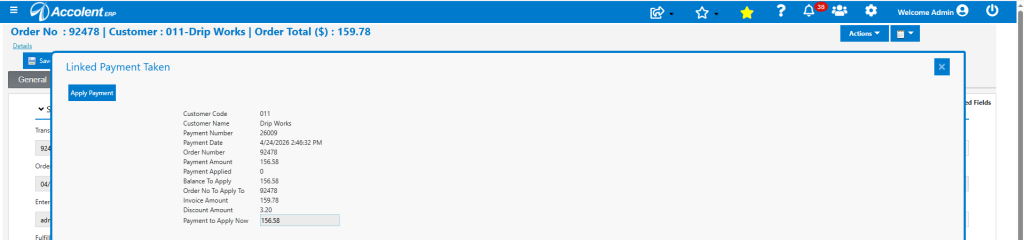
- The Invoice is now paid in full.
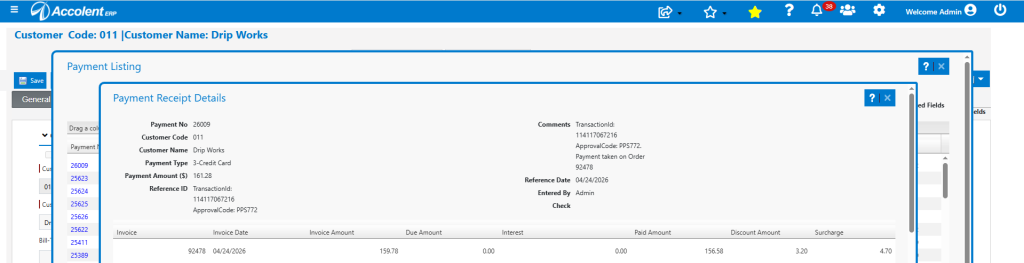
- The surcharge of $4.70 collected is available to offset the merchant’s credit charge interchange fees.
Taking Card-Present Payments
- Taking card-present payments works in exactly the same way as card-not-present payments.
- A surcharge-enabled terminal is required. Contact Fiserv to see the full line of integrated Bolt terminals available.
- Once a surcharge-enabled terminal is connected, card-present transactions will calculate and collect the surcharge.
Taking Payment from Other Screens
- Accepting Credit Card payments from the List Payment Receipts screen or from the Self Service Portal or Payment Portal work the same way.
Rules for Surcharging
- See the Fiserv surcharge documentation here. Fiserv requires a separate MID to collect surcharges.
- To collect credit card surcharges to offset interchange fees, you must comply with a hierarchy of rules from card networks (Visa, Mastercard), state laws, and federal regulations.
- Please contact a professional advisor directly to ensure compliance. The following summary is provided only as a guide.
Universal Card Network Rules
- Regardless of location, major card brands mandate specific operational steps:
- 30-Day Notice: You must notify the card networks (Visa and Mastercard) and your merchant acquirer in writing at least 30 days before you begin surcharging.
- Credit Cards Only: Surcharging is strictly prohibited on debit cards, including “signature debit” transactions where a customer chooses “credit” at the terminal.
- No Profit allowed: Surcharges can only be used to recoup actual processing costs; they cannot exceed your Merchant Discount Rate (MDR) or the network caps.
- Maximum Caps:
- Visa: Capped at 3% (as of April 2023).
- Mastercard: Capped at 4%.
- Separate Line Item: The surcharge must appear as a clearly labeled, separate line item on the customer’s receipt.
Mandatory Disclosure Requirements
- You are required to provide clear, upfront transparency to customers:
- Point of Entry: A sign must be visible at the store entrance notifying customers of the surcharge policy.
- Point of Sale (POS): Disclosures must be at every checkout location (physical or online) before the customer finalizes the payment.
- Receipt: The receipt must display the exact dollar amount of the surcharge.
State-Specific Restrictions (as of 2026)
- State laws often override network rules, and some states have specific bans or “all-in” pricing requirements:
- Prohibited: Surcharging is currently illegal in Connecticut, Massachusetts and Maine
- “All-In” Pricing States: In California, New York, Minnesota and Virginia, laws effectively require any surcharge to be “baked into” the advertised price. You cannot list a base price and then add a surprise fee at checkout.
- Lower Caps: Some states have tighter caps than the card networks. For example, Colorado caps surcharges at the lower of 2% or the actual processing cost.