
Accolent ERP has a complete Bill of Materials (BOM) functionality for use in assembly or other light manufacturing operations. The manufactured BOM Product can be defined in terms of an unlimited number of components specified on the product’s BOM List. Once a Batch is created to manufacture a quantity of the BOM Product, components may be added or removed freely as needed. When the manufacturing process is completed, the Batch may be finished and the results recorded.
Create BOM Batch
- This is the BOM List for BOM product BRAKE-ASSEMBLY.
- NOTE: If labor is intended to be added to the cost of a BOM or Kit Product, the LABOR product will need to be an inventory item, so that replenishing the inventory quantity or resetting it back to zero will offset the cost of the labor incurred in payroll. See this wiki: Cost of Labor in Assembled Products.
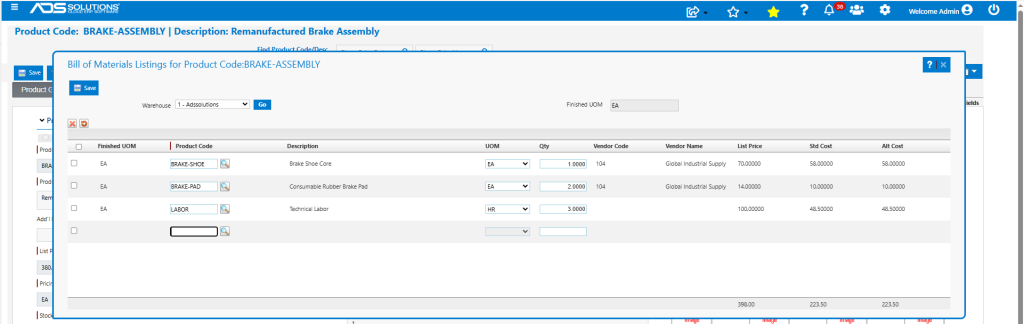
- These are the current values in the system for the components.

- Search for components to make 2 EA of BRAKE-ASSEMBLY.
- This pulls up the BOM List for BRAKE-ASSEMBLY, and any products may be added using the blank row at the bottom of the grid. Products may also be deleted and/or the Qty Required changed.
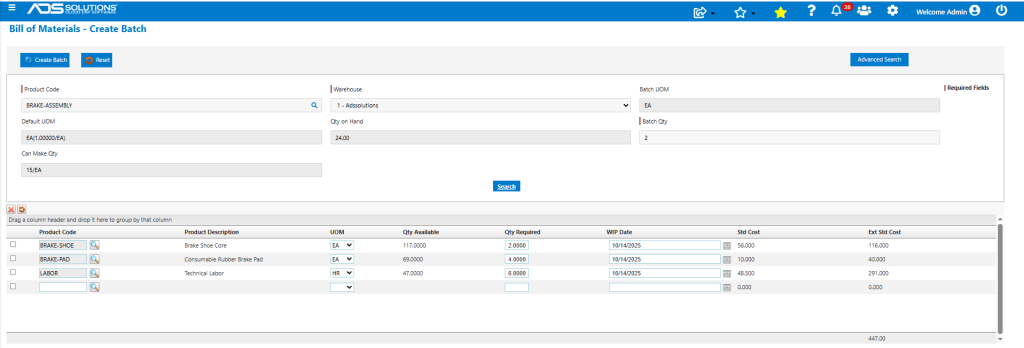
- Click Create Batch to create Batch 475, which now shows on the List Batches screen.
- This is the GL Posting for Batch 475 that occurred upon clicking Create Batch.
- The Batch cost is [(2 x $65.21795) + (4 x $10.13007) + (6 x $50.00)] = $470.96.

Edit BOM Batch
- Open Batch 475 from the List Batches screen and this brings up the Edit Batch screen from which products may be added or removed.
- The first three rows are now locked, since inventory of the components has already been reduced and posted to the General Ledger; however, there is a blank row at the bottom of the grid that can be used to add or remove products or change quantities.

- Assume, for example, that 2 EA of the original BRAKE-PADS were found to be defective and need to be replaced and an additional 0.5 HR of LABOR is required.
- These changes may be made directly on the screen.
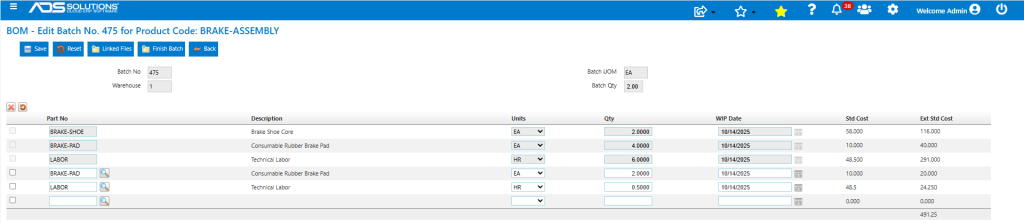
- When done, click Save to record changes to the inventory of the components and post the additional rows to the General Ledger under Batch 475.
- The additional 2 EA x BRAKE-PADS and 0.5 HR x LABOR increase the cost by: [(2 x $10.13007) + (0.5 x 50.00)] = $45.26.

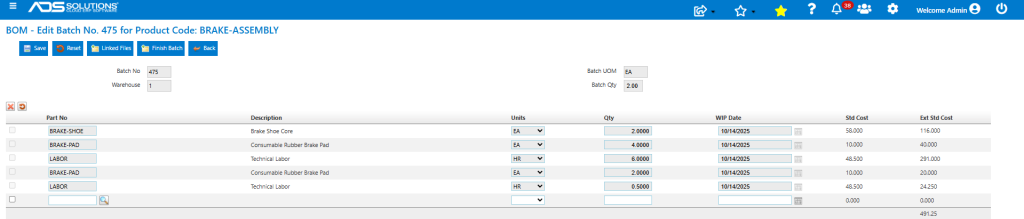
- Once posted, these additional rows will also be locked.
- However, the blank row at the bottom of the grid allows this process to be performed again if needed.
- NOTE: To remove locked rows for items that were already posted, a new row should be added with negative quantity.
Finish BOM Batch
- When done, open Batch 475 and click the Finish Batch button.
- Then check the Finish Batch checkbox and enter the Finish Qty and Waste Qty.
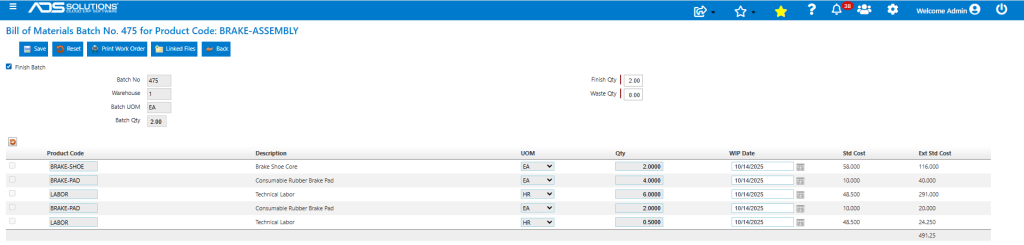
- Then Save to complete.
- This is the GL Posting associated with Finish Batch.

- The total cost of the 2 EA x BRAKE-ASSEMBLY reflects the sum of the two postings: ($470.96 + $45.26) = $516.22.
- This increases the Average Cost of BRAKE-ASSEMBLEY to [(24 x $240.10625) + $516.21632] / 26 = $241.49101.

- Inventory of the components is decreased as follows:
- BRAKE-SHOE by 2 EA

-
- BRAKE-PAD by 4 EA + 2 EA = 6 EA

-
- LABOR by 6 HR + 0.5 HR = 6.5 HR
