
Accolent ERP includes an Invoice form 102 Variation that shows on the invoice the prior payments plus discounts taken as of the datetime that the invoice was printed. Since payments can be taken and recorded at any time, the datetime stamp on the invoice is an important reference as the invoice will not include any payments made or recorded in the system after this datetime. The invoice will show under the label Payments/Credits only the aggregated total of all prior payments plus discounts taken, and it will not include any amounts charged as interest on overdue balances. For a more detailed listing of payments as well as any interest charges use the Statement Form.
Select Invoice Variation
- Typically, invoices only show the goods purchased.
- To show payments on invoices, go to Settings > Printing & Sending > Forms Setup, then for 102 Invoice.Form select Variation 102 – Invoice_Template(With Payment Details) then Save.
- Invoice Forms will now show a row in the summary for Payments/Credits.

Create Invoice then Take Payment
- Create invoice no 83188 on 8/25/25 for $3,736.35 for Customer 011.
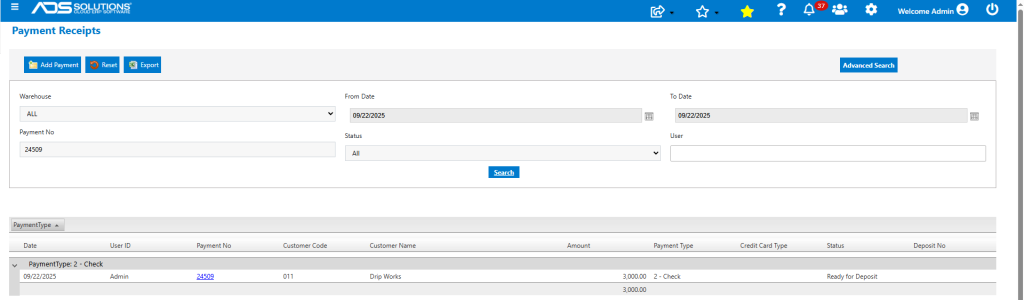
- Take payment no 24509 on 9/22/25 for $3,000.00 by check 305420.

- The payment is now recorded in the Customer’s Accounts Receivable record.
Printed Invoice Shows Payment
- After taking payment of $3,000, print invoice no 83188.
- The displayed datetime stamp is the as of date for the printed invoice which shows the payment of $3,000.
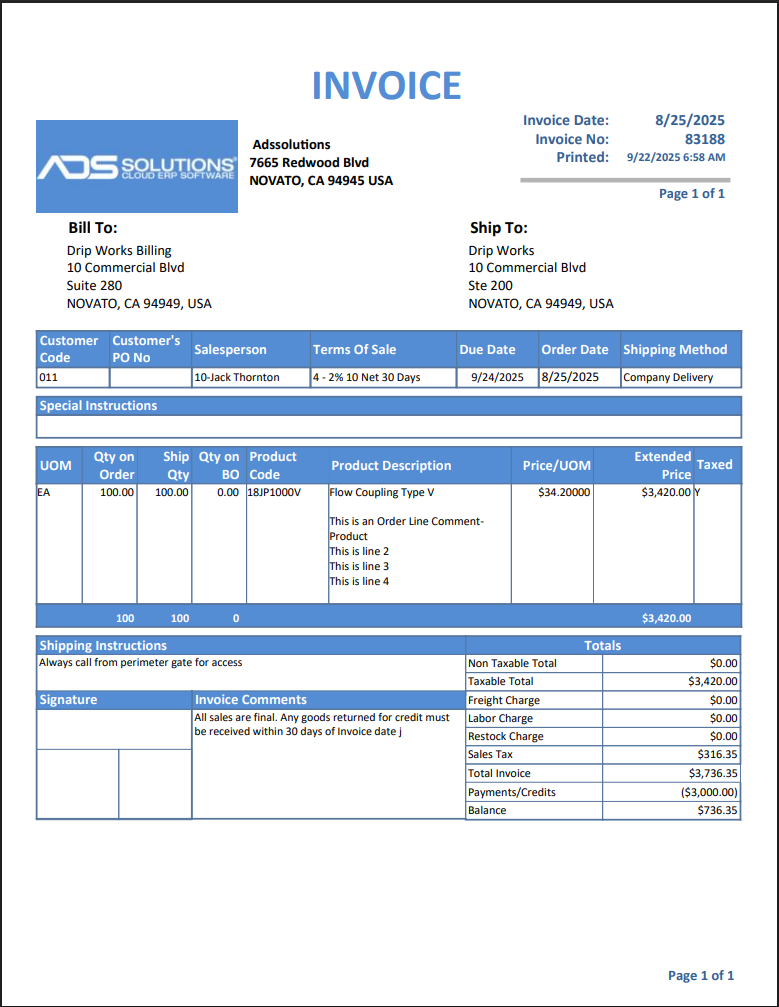
- If desired, any caveats that the invoice balance (i) reflects only payments recorded prior to the printed datetime stamp, (ii) does not show available but unearned payment discounts, and (iii) does not include interest charges on overdue balances, may be entered as Invoice Comments.