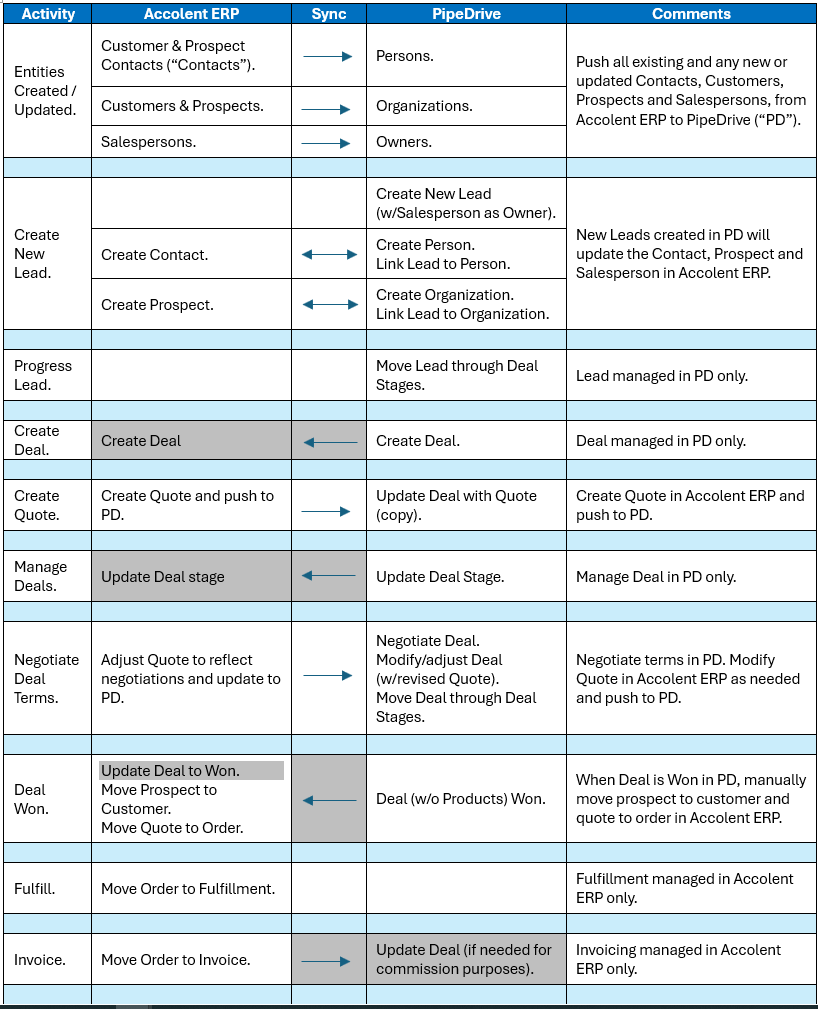
Accolent ERP is integrated with PipeDrive (PD), a widely-used CRM system, through APIs. The integration links the following Accolent ERP fields: Contacts, Customers/Prospects and Salespersons with respectively Persons, Organizations and Owners in PD. The integration is designed to accommodate a typical Salesperson CRM workflow which is laid out below but, different workflows can be accommodated if desired. Initially all the linked Accolent ERP records are pushed to PD. Thereafter the integration ensures that these records will be kept in sync between the two systems. See this wiki Using PipeDrive with Accolent ERP for how the integration can be used by salespersons. Note that the integration with PipeDrive is an optional module that needs to be enabled and requires initial implementation as well as a subscription in order to use it.
Fields
- There are several fields in Accolent ERP that are linked to their corresponding fields in PD. However, it is important to note that there are differences between the fields usage and behavior between the two systems.
| Accolent ERP | PipeDrive | Description/Comments |
| Contact | Person | The Contact and Person fields work the same way in each application to record contact information of individuals. |
| Customer or
Prospect |
Organization | A Prospect represents a potential Customer. A Prospect can be made with as few as 4 values: Prospect Code/Name, Salesperson, and Contact. Customers require much more information – which will need to be obtained during the process of closing the deal/converting the Prospect to a Customer. Generally, Accolent ERP Prospects & Customers are similar to PD Organizations. |
| Salesperson | Owner | A Salesperson should be an Accolent ERP user (but need not be) with a unique email address. Generally, Accolent ERP Salespersons are similar to PD Owners. |
| N/A | Lead | There is no equivalent entity in Accolent ERP for a PD Lead. The closest Accolent ERP equivalent is an unqualified Prospect, but this is not a separate record from the Prospect record. |
| Deal | Deal | Deals may be integrated. if desired. This will increase the scope of the integration. Generally, Accolent ERP Deals are similar to PD Deals. |
| Sales Stages | Sales Stages | Sales Stages may be integrated. if desired. This will increase the scope of the integration. Generally, Accolent ERP Sales Stages are similar to PD Sales Stages. |
API Integration
- Initially there is a manual sync of data from Accolent ERP to PD. Thereafter there is an API Integration that keeps the data in sync between the two systems.
- When an Owner in PD creates Persons in PD, these are pushed to Accolent ERP as Contacts.
- When an Owner in PD creates Organizations in PD these are pushed to Accolent ERP as Prospects. Note that a Prospect in Accolent ERP minimally requires a Prospect Code/Name, a Salesperson and a Contact. If an Organization to be pushed to Accolent ERP does not have a linked Owner (Salesperson) and Person (Contact), the Prospect will be created from the back end but will not be able to be saved from the UI until the Salesperson and Contact are linked.
- When an Owner edits/updates, Persons, Organizations or Owners in PD, these edits are pushed to the corresponding Contacts, Prospects or Customers, or Salespersons in Accolent ERP.
- As Contacts, Prospects or Customers, or Salespersons are edited/updated in Accolent ERP these edits are pushed to the corresponding Persons, Organizations or Owners in PD.
- Owners in PD create Leads which don’t have any effect on Accolent ERP.
- Owners in PD create Deals which don’t currently have any effect on Accolent ERP. Deals may be added to the integration, if desired.
- Owners in PD update Deals’ Sales Stages which currently don’t have any effect on Accolent ERP. Sales Stages may be added to the integration, if desired.
- When needed, a Salesperson can create a Quote in Accolent ERP for a Prospect. Then, through the integration, the Salesperson can link the Quote as a PDF to the Deal in PD. The Salesperson will have to select the appropriate Deal in PD since the Deals are currently not integrated.
- When an Owner in PD marks a Deal as Won this will currently have no effect on Accolent ERP, since Deals are not integrated. Accordingly, the Salesperson will have to go into Accolent ERP and (i) convert the Prospect to a Customer and (ii) move the accepted Quote to an Order.
- When an Owner in PD marks a Deal as Lost this will currently have no effect on Accolent ERP, since Deals and Sales Stages are not integrated. Any Quotes created for the Prospect in Accolent ERP will expire in due course or may be deleted.
Workflow
- The workflow is displayed by activity below. The greyed-out flows are not included but may be added, if desired.