
Accolent ERP is integrated with Power BI, a Microsoft business intelligence and data visualization product that allows the creation of complex reports and dashboards. We have created several powerful Power BI dashboards that directly access your Accolent ERP data. These Power BI dashboards provide much deeper access to your business data than can be achieved using static reports and can reveal important insights into your business. The Accolent ERP data delivered to Power BI is automatically refreshed daily. To use the Power BI dashboards, contact ADS Solutions and we will enable them on your system.
Power BI Integration
- In order to make business intelligence capabilities more accessible to Accolent ERP users, we have created several Power BI dashboards.
- To get access to these Power BI dashboards contact ADS Solutions, and we will purchase one or more Microsoft Power BI Pro users for you. We will also set up the sync to automatically push data from your Accolent ERP database to Power BI every day.
- Using the Power BI users, you will be able to go to your Power BI workspace and access the Power BI dashboards that we have already created.
Power BI Dashboards Available
- All our Power BI dashboards are extremely powerful and include several views, drill-ups and drill-downs and filters.
- There are currently 7 Power BI dashboards available:
- Sales by Customer
- Sales by Group, Category and Sub-Category
- Sales by Salesperson
- Inventory Valuation
- Last 52 Weeks Products Sold by Week
- Trial Balance by GL Account
- Trial Balance by GL Transactions
- We have the following Power BI dashboards under development which will be released soon:
- Inventory Management
- Income Statements
- Balance Sheets
Functionality of Power BI Dashboards
- All the Power BI dashboards display multiple data relationships.
- All include the ability to display data for multiple years to analyze trends.
- All results can drill up or down to get to additional layers in the data.
- All elements in the dashboard will re-populate for different data drill ups or drill downs.
- To see what the Power BI dashboards can do, look at these wikis: Power BI Inventory Valuation Dashboard and Power BI Sales by Salesperson Dashboard.
Power BI Pricing
- To access the Power BI dashboards we have created, you will need at least one Power BI Pro user.
- We will purchase these Power BI users for you and will directly pass on the Microsoft charges. Currently, Microsoft charges $9 per month per Power BI Pro user.
- We need these users to be on our domain: adssol.onmicrosoft.com so that we can push daily updates to your data, datasets, reports and dashboards to your Power BI workspace. Your Power BI usernames will have the form: acccolenterp@adssol.onmicrosoft.com, where CN is your company name plus a numeric indicating your specific Power BI user.
- In addition to the per user charge from Microsoft, there is an Accolent ERP SaaS charge covering the use of, maintenance of, and daily data refreshing of the Power BI dashboards. Contact us to learn more.
Accessing Power BI
- Once set up, to access the Power BI workspace, go to the Accolent ERP Reports > Reports Center and click on the Power BI button.

- You will be redirected to https://app.powerbi.com/home.
- You will then log in with the Power BI User credentials we provide you.
- This is the Power BI workspace:
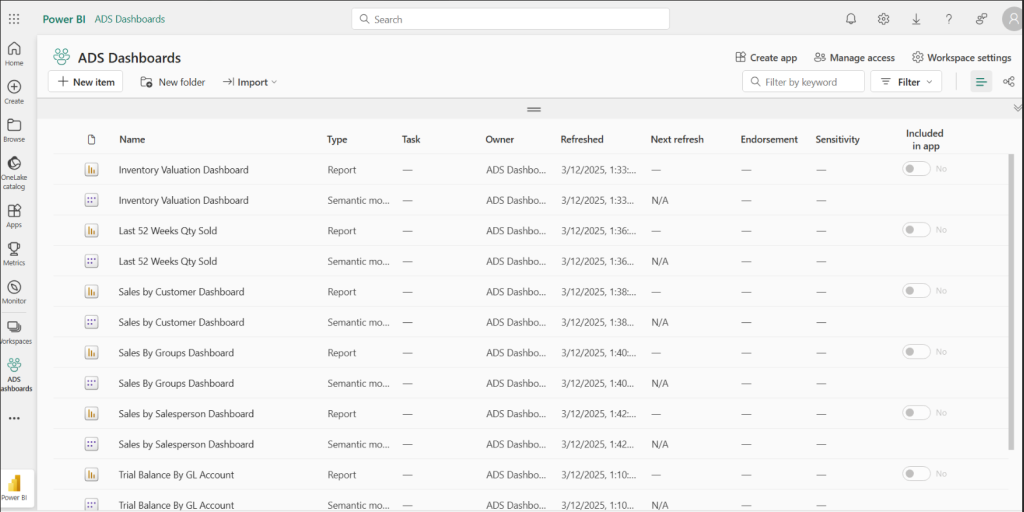
- In the Power BI workspace, you will see the preconfigured datasets and dashboards that we have already created using your Accolent ERP data.
- The datasets will be continually updated from Accolent ERP.
- You will also see any reports that we have created for you.
- You can also create your own reports based on the datasets. Any such reports can be saved and/or published and shared with others.
Custom Power BI Reports and Dashboards
- We can develop custom datasets and Power BI reports or dashboards for you as chargeable Professional Services.
- Reports using the existing datasets are relatively easy to make.
- Creating new dashboards and custom datasets are progressively bigger undertakings.