
Accolent ERP supports EDI (Electronic Data Interchange) between an Accolent ERP user (“Accolent user”) and its Trading Partners (“TPs”) in conjunction with a “VAN” (Value Added Network) such as SPS Commerce. The VAN’s function is to translate CSV files into/from EDI Forms and transport these between the parties. Accolent ERP is able to work with any VAN to support the Accolent user’s desired EDI flow.
Configuration
- Accolent EDI is an optional module which involves an additional subscription fee
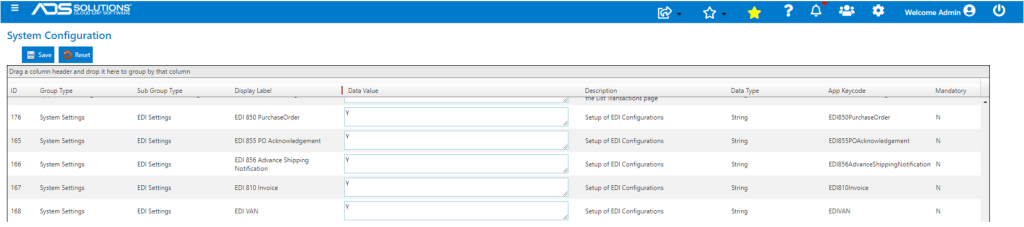
- These are the EDI Configurations that have to be set on the configurations screen to enable EDI:
- EDI 810 Invoice — Y|N,
- EDI 850 Purchase Order — Y|N,
- EDI 855 PO Acknowledgement — Y|N,
- EDI 856 Advance Shipping Notification — Y|N,
- EDI VAN — Y|N.
FTP (File Transfer Protocol) Server
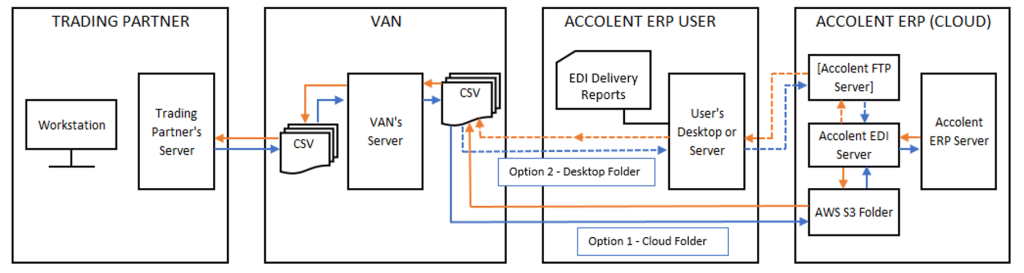
- With a VAN that delivers/picks-up files to/from a User’s Desktop folder an Accolent ERP FTP server will be required:
- Needed for both incoming and outgoing communications, and
- Will take files from User’s Desktop folder and upload to Accolent ERP Cloud Platform for incoming and vice-versa for outgoing.
- A Cloud-based VAN (e.g., SPS Commerce) delivers/picks-up files directly to/from an Amazon S3 bucket and so, no Accolent ERP FTP Server is required.
VAN Functions
- The function of the VAN is to first map the TP’s documents and Accolent ERP documents to/from standard EDI forms, this is a one-time exercise.
- Then on an ongoing basis the VAN will pick up documents from specified folders, convert them from the originators format to EDI documents, transport them (via FTP), and then convert them again from EDI documents into the recipient’s format.
- In this way, each party sends/receives documents in their own formats.
EDI Flows
- This is the most typical EDI project flow:
-
- The VAN will set up incoming and outgoing folders on a server/workstation of each TP which will accept files to from or to Accolent ERP and similar folders in S3 for files to be delivered to or from Accolent ERP.
- The VAN will do a one-time mapping of each CSV file that a TP and Accolent ERP uses to/from a specific EDI Form.
- When a TP uploads a PO, the VAN will convert this to EDI 850 and then convert this to Accolent ERP’s CSV format and deliver it to the Incoming EDI Folder in AWS S3.
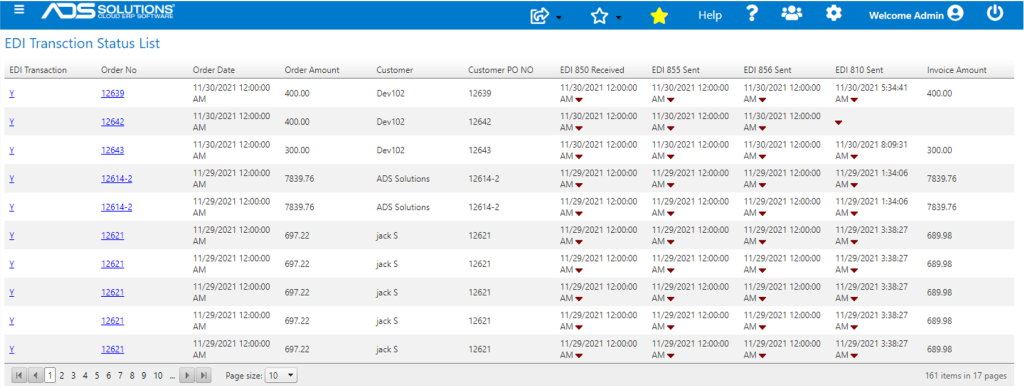
- Accolent EDI will import the TP’s PO into Accolent ERP as an order which will be: (i) flagged as an EDI Transaction and (ii) recorded and tracked on the EDI Transaction Status List screen.
- When the order is moved to shipping, it will automatically create a PO Acknowledgement CSV Template and drop it in the Outgoing EDI Folder for the VAN to deliver to the TP.
- When the order is packed it will automatically create an Advance Shipping Notification CSV Template and drop it in the Outgoing EDI Folder for the VAN to deliver to the TP.
- When the shipment is moved to invoice, it will automatically create an Invoice CSV Template and drop the CSV file in the Outgoing EDI Folder for the VAN to deliver to the TP
- The VAN will provide a reporting tool that will show status of all the files delivered, or picked up.
- Accolent ERP can support many other EDI flows (e.g., EDI 867 Product Transfer and Resale).
- Please discuss any other flows needed with ADS Solutions.
EDI Flow Chart
- Below is a functional representation of EDI flows:
EDI Transaction Status List
- The EDI Transactions Status List screen shows all EDI transactions by order no with date & time status was changed.
- From the EDI Transactions Status screen EDI forms can be manually downloaded if desired.
EDI Forms
- Accolent ERP EDI forms are flat CSV files.
- They contain multiple fields, some of which may be mutually defined by Customer and its TP.
- Accolent ERP supports these EDI Forms: EDI 850 Purchase Order, EDI 855 PO Acknowledgement, EDI 856 Advanced Shipping Notification and EDI 810 Invoice.
- If required please contact ADS Solutions Support to get the detailed CSV forms.
- Additional EDI Forms and transaction flows can be added, if needed.
EDI 850 PO
- EDI 850 Purchase Order originates from a TP and specifies the goods the TP is seeking to purchase.
- An EDI 850 contains the following information:
- PO No
- Customer Code
- Customer Name
- Ship-To Customer Code
- Ship-To Customer Name
- Product Code
- Product Description
- UOM
- Unit Price on PO
- Quantity Ordered
- Requested Ship Date
- Requested Delivery Date
- Shipping Carrier
EDI 855 PO Acknowledgement
- EDI 855 is used to confirm the receipt of an EDI 850 Purchase Order and contains additional information on whether the purchase order was accepted or rejected.
- If the original EDI 850 purchase order was not accepted as is, and the supplier made some changes to it, then the EDI 855 Purchase Order Acknowledgment will also specify those changes.
- An EDI 855 includes the following information:
- PO No
- Expected shipment and delivery dates
- Customer Code
- Customer Name
- Ship-To Customer Code
- Ship-To Customer Name
- Order No
- Product Code
- Product Description
- UOM
- Unit Price
- Unit Price on PO
- Quantity Ordered
- Quantity to Ship
- Quantity on Back Order
- Expected Ship Date
- Expected BO Date
EDI 856 Advanced Shipping Notification
- EDI 856 is an advance ship notice (ASN) that provides information on products to be shipped — including packing list and tracking codes.
- EDI 856 ASN form includes the following:
- Order No
- Customer Code
- Customer Name
- Ship-To Customer Code
- Ship-To Customer Name
- PO reference
- Ship-To Address
- Product Code(s)
- Product Description(s)
- Quantity Ordered
- Quantity Shipped
- Quantity Back Ordered
- Shipment Packaging Type
- Shipment Weight by Package
- Shipment Dimensions by Package
- Shipping Carrier
- Shipping Carrier Service
- Tracking No
- Shipping Instructions
EDI 810 Invoice
- EDI 810 Invoice includes the following information:
- Invoice number
- Date of invoice
- Customer Code
- Customer Name
- Ship-To Customer Code
- Ship-To Customer Name
- PO reference
- Ship-To Address
- Shipping Date
- Carrier
- Carrier Service
- Payment terms
- Product Code(s)
- Product Description(s)
- UOM
- Unit Price
- Discounts Applied
- Quantity Ordered
- Quantity Shipped
- Other Billing and Shipping Details