
Accolent ERP is delivered as a software-as-a-service (SaaS) solution. This means you pay only one annual subscription fee which covers the use of the software, all upgrades and maintenance as well as the hosting. In contrast, with on-premises software solutions, you buy a perpetual license to use the software, purchase a server and then install the operating system (O/S) and the software. Then you pay annual fees to the software publisher to maintain the software. In addition, you pay an IT specialist to update, patch and maintain the server and its O/S. Periodically you have to purchase software updates and maintain/fix/upgrade the server.
Comparing SaaS and On-Premises Costs
- Comparing SaaS subscription fees to on-premises costs is a classic lease versus buy calculation.
- The main difficulty is in ensuring you have captured all the elements of each option so you can make a meaningful comparison.
- With a SaaS subscription this is easy, there is only one annual fee.
- With an on-premises solution there are multiple costs to be accounted for:
- The upfront costs are: (i) purchase of the software, (ii) purchase of the server and (iii) set-up and configuration of the server.
- The ongoing annual costs are: (i) software maintenance costs, (ii) software system upgrades, and (iii) O/S updates and maintenance and fixing of the server.
- There will also be tax differences between a SaaS subscription model and an on-premises model.
- In the SaaS model, the whole amount of the subscription fee is deductible as an annual operating cost.
- In the on-premises model the maintenance fees and update charges will be deductible while the software and hardware will be depreciated over some assigned life – typically 3-5 years.
A common mistake users make is to try to compare the SaaS subscription fee to the on-premises maintenance costs. This will always give you the wrong answer, as it misses many significant on-premises costs!
On-Premises Costs
1. Upfront Purchase Costs
- You have to purchase perpetual licenses to use the software and the database; for most ERP software this is priced by the user and typically ranges from $2,500 to $3,500 per user.
- You also have to purchase a server and the server O/S, which is often sold separately from the server; for an ERP system for 10 users, a server and O/S will typically cost about $6,000.
- In addition, the complexity of today’s hardware typically requires an IT Specialist to properly set up and configure the server properly; this can cost $1,500 to $2,500.
- For a 10-user system, these total upfront costs can run from $32,500 to $43,500.
2. Annual Software Maintenance Costs
- ERP software providers charge annual maintenance fees which cover fixing bugs and updating the software.
- Some databases like the D3 database that Advantage ran on (but not Microsoft SQL Server) also charge annual maintenance fees.
- Annual maintenance fees are typically 20%-25% of the initial upfront purchase price.
- For a 10-user system, annual maintenance would be between $5,000 and $8,750.
3. Software Upgrades
- On-premises software systems are upgraded at least once every 6-12 months.
- Typically, these upgrades must be purchased and will need installation and testing by an IT Specialist.
- It is usually required that you remain within at most two versions of the current version in order to receive support; this typically means you will have to purchase at least every second major upgrade or so.
- Most on-premises system upgrades cost between 10% and 20% of the software cost, but there is also a significant IT cost to install, test and deploy major software upgrades.
- For a 10-user on-premises system the upgrades could cost between $2,500 and $7,000 and be required every 2 years, in order to stay current.
4. Annual Hardware Maintenance Costs
- Hardware and O/Ss need to be continually maintained and updated, for example, to apply all of the endless O/S patches.
- In addition, when hardware elements, such as hard drives, routers, switches, etc., fail, there are costs for the hardware replacement and an IT Specialist’s time to perform these fixes.
- Also, in the on-premises model you are responsible for security, and this means that your IT Specialist has to manage and monitor all sorts of security measures (e.g., firewalls, VPNs, anti-virus software, anti-malware software, O/S security patches) and system backups – in today’s environment this is no small undertaking.
- Finally, there is the cost of remediation and data recovery in the event of a security breach. We all hope this will not happen, but with Ransomware as prevalent as it is, there is a significant probability that over a 5-year period you will incur the very large cost of recovering from a major breach.
- Depending on extent and severity, these remediation and data recovery charges can easily exceed the initial cost of the system.
- It is almost impossible to know exactly what the right IT costs will be, but for a 10-user on-premises system, you should expect at minimum 1-2 hours of an IT Specialist’s time per month.
5. On-Premises Costs Example
- Based on the assumptions outlined above, below are some estimates for a 10-user on-premises system.
- Note that though described as “One-Time,” both software and servers have finite lives.
- Because of technology changes, software has a practical 5–7-year life, even if continually maintained.
- Similarly, servers fail and become impossible to maintain after 3-5 years.
| Description | Cost | Frequency |
| Purchase of Server and Database Licenses | $30,000 | One time. Upfront. |
| Purchase of Server and O/S | $6,000 | One time. Upfront. |
| Setup and Configuration of Server | $2,000 | One time. Upfront. |
| Annual Maintenance of Software and Database | $6,000 | Annual. |
| Software Upgrades, Installation and Testing | $5,000 | Every two years. |
| Hardware Maintenance, Updates and Backups | $1,800 | Annual. |
| Security Breach Remediation and Data Recovery | Unknown | Unknown. |
Accolent ERP SaaS Subscription
- Unlike the on-premises model, a SaaS Subscription entails a single annual payment that covers: (i) the use of the software, (ii) the use of the Cloud Platform, (iii) maintenance of the software, (iv) all upgrades to the software, and (v) all maintenance of the Cloud Platform.
- For 10-users, the Accolent ERP List Price is $18,000 per year; however, we offer substantial discounts for multi-year contracts.
- With a SaaS subscription you have the flexibility to upsize, downsize or quit at any time. This is extremely powerful in a volatile economic environment or for a business that is growing rapidly.
- In addition, the Cloud Platform is automatically monitored, maintained, backed up and updated, so you don’t have to arrange and schedule an IT Specialist to come in and do this.
- You are also substantially more secure with SaaS software running in AWS Public Cloud than with any on-premises server, greatly reducing the risk of any security breaches.
- In addition, a SaaS solution offers only a website to users with no direct access to the database; so, even if a password is compromised, a hacker cannot get access to the database.
- And if there is a security breach, we can restore your system and data from automatic snapshot backups.
Net Present Value Comparisons
- The estimated cashflows for the two different models are as follows:
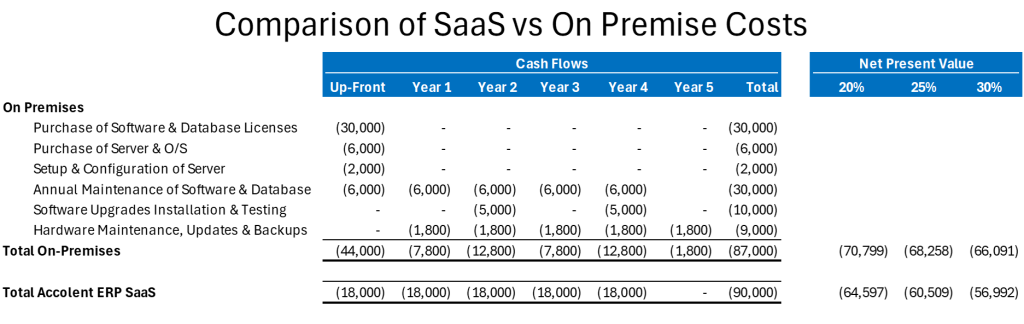
- Because the cashflows for the different models occur at different times, these should be discounted at your business’ weighted average cost of capital (‘WACC”).
- For small private businesses, the WACC can be high – you should discuss what your WACC is with your financial advisor.
Conclusion
- When calculated correctly, SaaS subscription costs, on a NPV basis, are comparable to the all-in costs of an on-premises model.
- However, SaaS solutions offer much greater flexibility to upsize, downsize or quit at any time.
- In addition, SaaS solutions are much easier for users to implement and reduce reliance on outside IT Specialists that may be hard to schedule.
- With a SaaS solution users always have the most current version of the functionality without having to schedule, test and deploy an upgrade every couple of years.
- Also SaaS solutions running in the AWS public Cloud are much more secure than any on-premises server.
- Moreover, SaaS solutions even if penetrated don’t give hackers access to the database; in contrast, on-premises systems once breached allow the hacker to access the domain controller and then get root access to every server and software application installed in the domain.