
Accolent ERP allows users to send emails from the application in two different ways. Accolent ERP can pass your emails to your SMTP server, and you will be responsible for sending these. Since the security and configuration issues for sending email using your SMTP credentials can be challenging, Accolent ERP can also send emails using Amazon SES. Amazon SES is a simple and effective way to ensure email deliverability. To send emails using Amazon SES you may be asked to verify the sending email address and authenticate the sending domain.
Sending Transactional Emails from Accolent ERP
- Accolent ERP allows users to send transactional emails in the following ways:
-
- Accolent ERP can pass off emails to your own SMTP server. The emails will then be sent from your domain using your own SMTP settings. There is no charge for this method. However, many users struggle to get their SMTP settings to work correctly particularly if the email providers such as gmail perceive the set up to be insecure.
- Accolent ERP can send your transactional emails through Amazon SES using accolent.solutions as the sending domain. The emails will come from an email address like: YourCompanyName@accolent.solutions, where “YourCompanyName” is entered in the Email From field. The emails will be sent through our SES Account. We will charge you a flat rate for this email sending method, payable annually upfront.
- Accolent ERP can send your transactional emails through Amazon SES using your own email address. To do this you will have to go through the email verification process to register your email with Amazon to confirm that you own it. The emails would then come from an email address like: Invoices@YourCompanyName.com, where this email address is verified with Amazon. We recommend you also authenticate the emails so they’re not blocked by ISPs or marked as Junk. The emails will be sent through our SES Account. We will charge you a flat rate for this email sending method, payable annually upfront.
Sending Marketing Emails from Accolent ERP
- Marketing email settings in Accolent ERP are separate from transactional email settings.
- Sending marketing emails is complex as it typically involves big email blasts (e.g., > 50,000 names), and there is a risk you could get blacklisted as a spammer.
- If you are on a shared IP address and get blacklisted, this blacklisting will affect all other users on that shared IP address.
- Given these issues, if you want to send marketing emails you will have to either use your own SMTP settings or you can create your own email marketing account with Amazon SES or other email platform (e.g., SendGrid).
- Depending on what you are doing, you may want to consider a dedicated IP as the sending IP address.
- We cannot aggregate and send marketing emails from our SES account using our shared IP address.
Sending Emails Using Your Own SMTP Settings
- You will have to set up and test your own SMTP settings.
- These SMTP settings need to be set up in the Configuration screen.
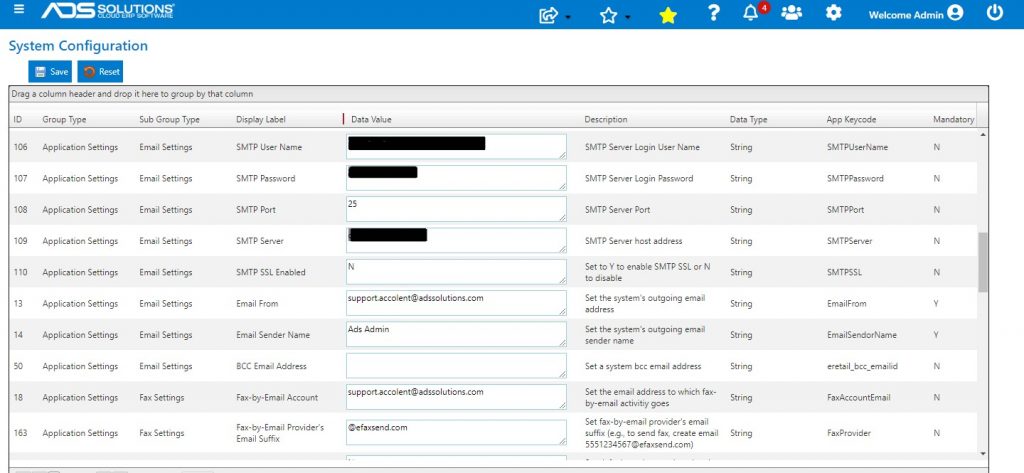
Amazon SES
- Amazon SES is an email platform that provides an easy way to send and receive email.
- You can send emails through our SES account using our sending domain accolent.solutions or using your own email address.
Sending through SES from an Accolent.Solutions Email Address
- The domain https://accolent.solutions is an AWS verified and authenticated domain, so AWS will automatically manage the SPF and DKIM settings for any emails originating from https://accolent.solutions as the sending domain.
- To get this going, you will have to notify us that this is what you want to do, and we will send you a sales proposal to sign.
- Accepting the Sales Proposal means you agree to comply with the AWS Service Terms (https://aws.amazon.com/service-terms/) and the Amazon Acceptable Use Policy (https://aws.amazon.com/aup/) and the ADS Solutions SES Account Usage Contract available on our CustomerZone website.
- No verification is required from you.
- You will configure the From Email setting as an email address like: YourCompanyName@accolent.solutions, where “YourCompanyName” is entered in the Email From field.
- Domain names are case-insensitive so, you can send from accolent.solutions or ACCOLENT.solutions also.
- Email addresses are case sensitive, so YourCompayName@accolent.solutions is different than YourCompanyName@ACCOLENT.solutions
Sending Email through SES from Your Own Email Address
- Amazon SES can also send emails on your behalf that will come from your own email address or domain.
- To get this going, you will have to notify us that this is what you want to do, and we will send you a sales proposal to sign.
- Accepting the Sales Proposal means you agree to comply with the AWS Service Terms (https://aws.amazon.com/service-terms/) and the Amazon Acceptable Use Policy (https://aws.amazon.com/aup/) and the ADS Solutions SES Account Usage Contract available on our CustomerZone website.
- Then you will have to go through the Amazon SES verification process
- Once you accept the Sales Proposal, send us the email address you would like to send emails from – it should be in the form: Invoices@yourcompanyname.com
- We will submit the sending email address to Amazon SES and you will receive a verification email to confirm that you own the email address.
- The verification email will look like this:
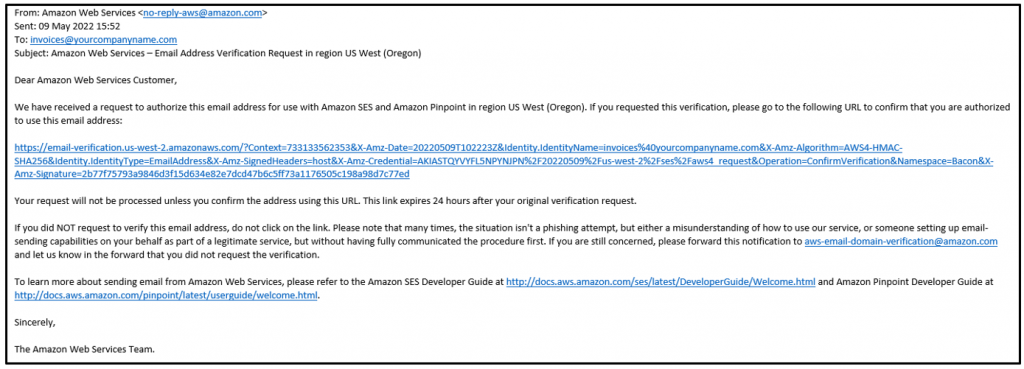
- After you verify the email address, we recommend that you authenticate that you are the owner of the sending domain.
- Authentication is not required, but many ISPs refuse to forward unauthenticated emails or your unauthenticated emails may automatically be flagged as junk by email providers
- You can authenticate emails by SPF or DKIM.
- To use SPF, you will need to add a TXT record to your DNS server. See this documentation: https://docs.aws.amazon.com/ses/latest/dg/send-email-authentication-spf.html
- To use DKIM, you will need to create a public-private key encryption. See this documentation: https://docs.aws.amazon.com/ses/latest/dg/send-email-authentication-dkim.html
- Once you complete verification and authentication, you will be able to send transactional emails from Accolent ERP through our SES Account.