
Accolent ERP allows for the refunding of Customer Credit Memos (or Unapplied Cash) rather than more typically applying these against an open Accounts Receivable balance. First create a Credit Memo then, once created, the Credit Memo may be refunded in cash, by check or to a credit card.
Create Invoice and Credit Memo
- Create Invoice I77275 for $111.32 and collect payment in cash of $109.09 net of discount on receipt 22624.
- Create Credit Memo CMI77275 and an Other Charge to offset the payment discount.
Create a Customer Refund
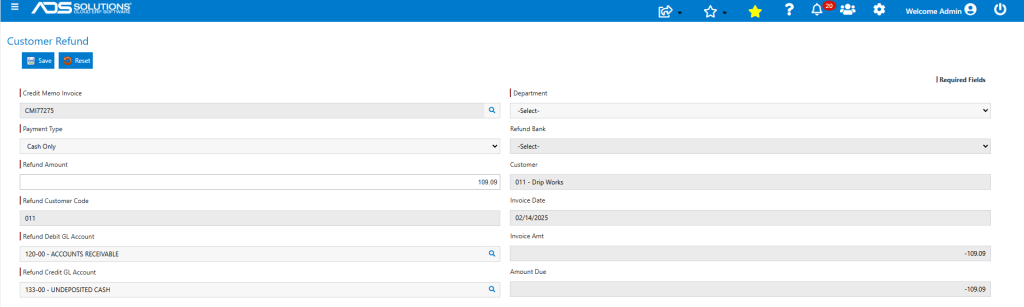
- Go to Sales > Credit Memos > Create a Customer Refund.
- Select Credit Memo CMI77275 to be refunded.
- Select Payment Type of Cash.
- No need to select Refund Bank since this is a cash refund.
- The GL Accounts will default in.
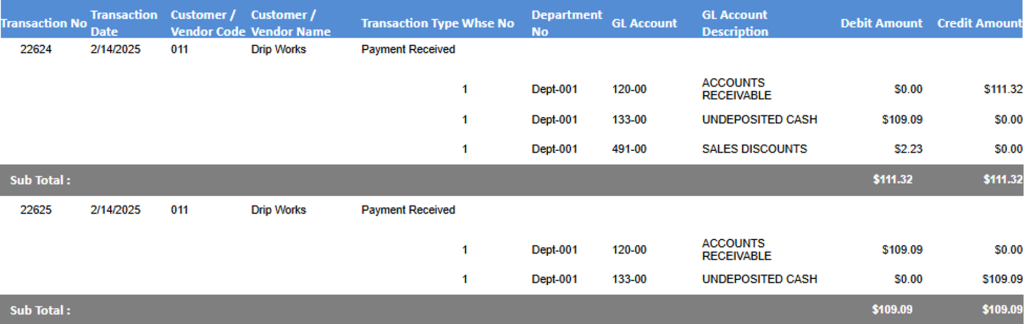
General Ledger Posting
- Look up GL Posting in Payment Receipts Journal.
Customer Account Updated
- Go to Customer > Collections.
- Both Invoice I77275 and Credit Memo CMI77275 show as paid.
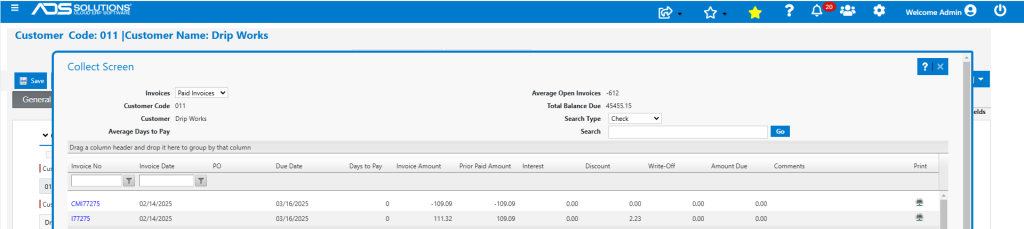
- Similarly, both payment receipts 22624 and 22625 show up.
