Accolent ERP uses the Min/Max reordering methodology. The Min value represents the reorder point, and the Max value represents the targeted stock level after reordering. The difference between the Max and the Min is sometimes referred to as the EOQ (Economic Order Quantity). The Min and Max values may be maintained manually or automatically by the system. The Min and Max values are used by the Accolent ERP Inventory Replenishment report to identify products that need to be reordered together with suggested reorder quantities.
When to Reorder?
- There are two basic approaches to reordering: (1) Reorder Point Method or (2) Periodic Stock Replenishment Method.
- Reorder Point Method – run replenishment every day or every second day, and reorder all products at or below the Min value (which is the Reorder Point). This allows products that are running low and hit their reorder points to be continually reordered. This allows different items to be restocked at different times and at different rates.
- Periodic Stock Replenishment Method – run replenishment on a set cycle and reorder all products up to the Max value. Typically, vendors will be divided into groups and each group will be run on a set cycle. For example, divide the vendors into Group 1, Group 2 and Group 3 which will be run respectively on (say) the first Monday, the second Monday and the third Monday of a month. Each product from a particular vendor will be restocked (in this example) every 28 days. The disadvantage of this method is that each vendor is run on a 28-day cycle and stockouts between one run and the next may not be addressed.
How much to Reorder?
- There are two recognized ways to calculate the amount to reorder: (1) Min/Max and (2) Theoretical EOQ.
- Accolent ERP’s Inventory Replenishment uses the Min/Max inventory ordering methodology which is widely used and is viewed as more practical and more intuitive than the theoretical EOQ calculation which requires several difficult-to-get inputs.
- Both the Min/Max and the theoretical EOQ calculation use the same Min value as the reorder point.
Theoretical EOQ Calculation
- This is the theoretical EOQ calculation:
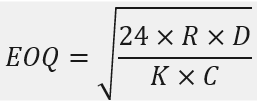 _____________________
Where R is Replenishment Cost, D is Monthly Demand, K is Inventory Carrying Cost and C is the Unit Cost
- The Replenishment Cost (often referred to as the “R” cost) is the cost of reordering.
- The “R” cost is calculated as the sum of the costs of generating, issuing and receiving a PO and paying the vendor, divided by the number of pieces ordered.
- Typically, the “R” cost will be somewhere between $1 and $5 per piece ordered.
- The Carrying Cost of Inventory (often referred to as the “K” cost) is the cost of maintaining stock in the warehouse.
- The “K” cost is calculated as the sum of the annual costs of put-away, physical counts and shrinkage of the inventory plus the costs of the warehouse rent, utilities, and overhead, plus the opportunity cost of the investment in inventory, all divided by the average cost of the inventory.
- Typically, the “K” cost will be somewhere between 16% and 25%.
- If these costs are correctly estimated, the EOQ calculation generates the lowest total cost of inventory of a product per piece.
- The EOQ value for a product divided by the use rate/day should determine the vendor reorder cycle for this product; however, this theoretical reorder cycle may not be practical for a vendor that supplies multiple product lines and specifies minimum order values.
- Given this and the difficulty of correctly estimating the “R” and “K” costs, many prefer the Min/Max approach which sets the reorder quantity as equal to the number of days before another PO is typically placed for this vendor (i.e., the reorder cycle) multiplied by use rate/day.
Min/Max Inventory Reordering
- With the Min/Max reordering approach, the reorder point for a product is when the quantity falls below the Min Qty level.
- For a quantity below the Min Qty, the Inventory Replenishment report will suggest reordering a quantity sufficient to get back to the Max Qty level.
- The difference between the Max Qty and the Min Qty is sometimes referred to as the EOQ value.
- The Min Qty and Max Qty values may be maintained manually or automatically by the system.
- If manually maintained, the user just enters the Min Qty and the Max Qty.
- If the Min Qty and Max Qty are to be maintained by the system, they will be calculated as follows:
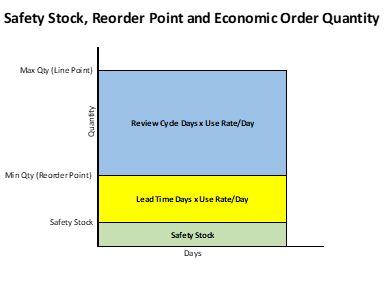
- Min Qty = [Safety Stock Qty + (Lead Time Days x Use Rate/Day)].
- Max Qty = [Min Qty + (Review Days x Use Rate/Day)].
Product Reordering Settings
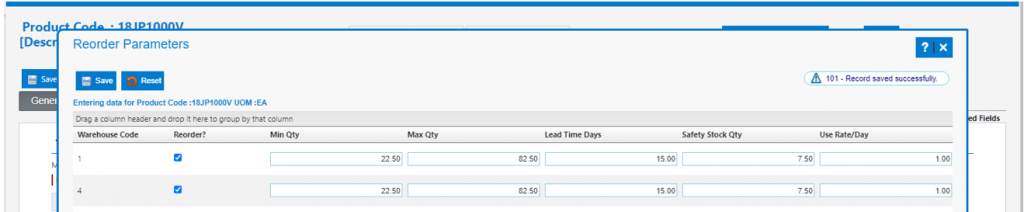
- To use the inventory reordering for any product, the Reorder? checkbox on the product needs to be selected.
- The Reorder Parameters screen on the product also has to be populated.
- If the Manual Min/Max approach is used, Min Qty and Max Qty can be entered directly and then need to be reviewed periodically and adjusted to ensure they are correct.
- If the Automatic Update of Min/Max is selected, then the Min and Max Qty values are calculated from Lead Time, Safety Stock, and Use Rate/Day.
- Lead Time is the period in days between submitting a PO to the vendor and receiving the PO.
- Initially, Lead Time in days will be entered by the user.
- If left blank the Lead Time will default to the Lead Time set up on the Primary vendor for this product.
- Safety Stock is the buffer quantity held to prevent out-of-stocks.
- Safety Stock is expressed as a percentage of the quantity that will be sold over the Lead Time.
- Initially, Safety Stock will be entered by the user.
- If left blank the Safety Stock will default to 50% of the Lead Time Qty.
- Use Rate/Day is the average quantity of the product sold per day.
- Initially Use Rate/Day will be estimated and entered by the user in stocking UOM sold /day.
- If left blank the Use Rate/Day will default to 1.0 (in stocking UOM) per day.
- Lead Time is the period in days between submitting a PO to the vendor and receiving the PO.
Vendor Reordering Settings
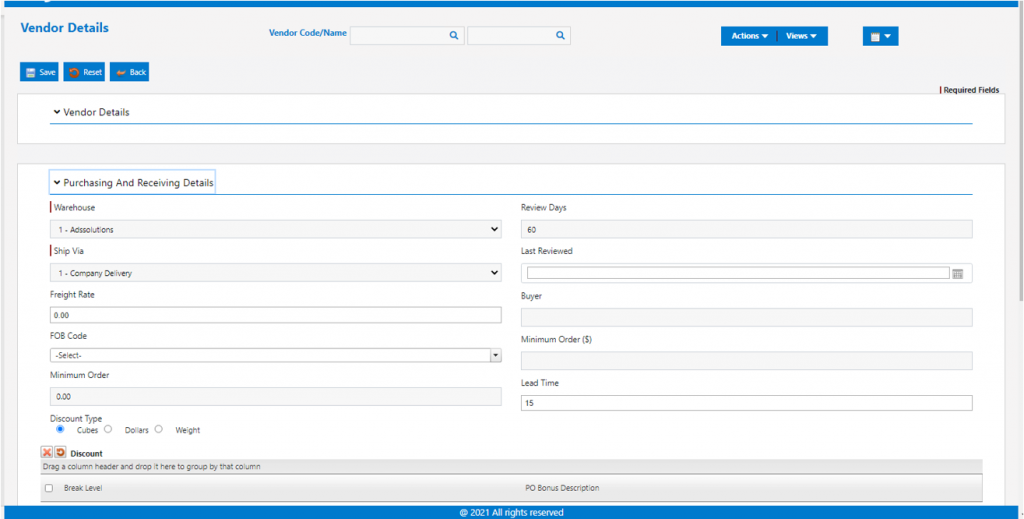
- Set the Lead Time, Review Days, and Minimum Order value (if any) on the vendor.
- Lead Time is the overall average period of time in days (across all products from this vendor) that it takes for a PO submitted to this vendor to be received.
- Review Days is the frequency in days at which POs are created for this vendor.
- The best practice is to periodically create POs for the vendor on this cycle.
- This cycle period should be long enough to generate a PO that exceeds the vendor’s Minimum Order value and/or that provides the best terms or discounts.
- Minimum Order value in dollars represents the minimum PO the vendor will accept and or which generates the most favorable terms or discounts from the vendor.
Inventory Replenishment Report
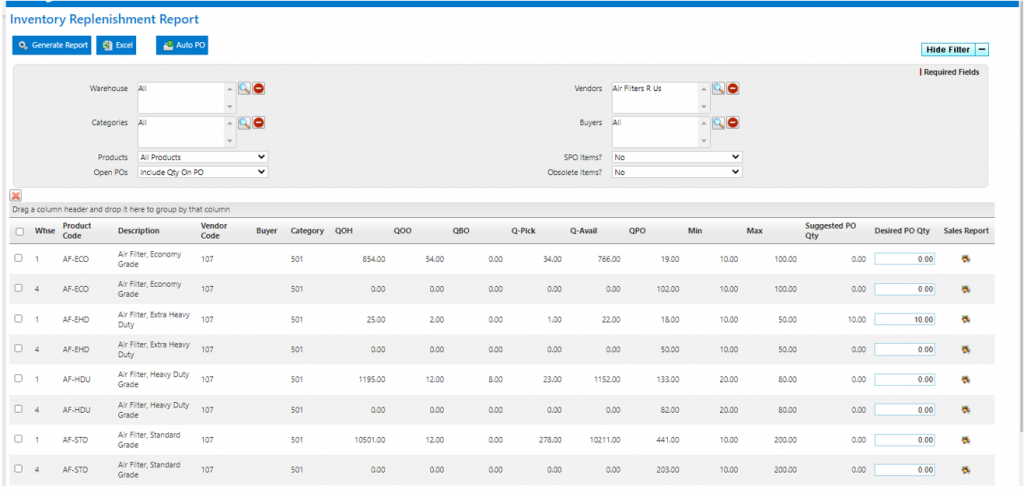
- The Inventory Replenishment report may be run to (i) identify products that need to be reordered (ii) generate suggested reorder quantities and (iii) auto-create the POs.
- If the Reorder Point Method is used, set the Products parameter (see below) to Only Products at or Below Min Qty.
- If the Periodic Stock Replenishment Method is used, set the Products parameter (see below) to All Products.
- The Inventory Replenishment report screen offers these parameters:
- Warehouse – Report on All or select.
- Categories – Report on All or select.
- Products – Show All Products (even those that have not fallen to their reorder points) or only Products at or Below Min Qty.
- NOTE if run for All Products, even products above Min Qty will show a Suggested Reorder Qty to get back to Max Qty.
- Open POs – Include Qty on PO (to reduce Reorder Qty by Qty on Open POs) or Do Not Include Qty on PO.
- vendors – Report on All or select.
- Buyers – Report on All or select.
- SPO Items – Include SPO items or not.
- Obsolete Items – Include Obsolete items or not.