
Accolent ERP allows for sales commissions to be calculated based either on gross sales or on profit. This is a global setting and should be set up once upfront for the system. Commission Types can be set up and assigned to Products, and a commission Profit Matrix set up for each Salesperson. The Profit Matrix defines the different commission rates that apply to different profit ranges. If commissions are paid on gross sales, the Profit Matrix can be set up with a fixed rate at all profit levels. If commissions are paid based on profit, the profit may be defined based on Standard Cost, Alternate Cost, Special Cost or Accounting (Average) Cost. Various commissions reports can be generated for specific date ranges by Salesperson. Then using the commissions reports, create vouchers and checks to pay salesperson commissions.
Global Setting for Commissions
- Sales commissions may be set up to be calculated based either on gross sales or on profit; to set this, go to Settings > Application Defaults > Sales > SO116-1.
- A null value on SO116-1 applies the commission rate to the extended price of the line item; a value of 1 applies the commission rate to the profit amount on the line item.
- If the selection is to calculate sales commissions based on profit, the profit may be derived using Standard Cost, Alternate Cost, Special Cost or Average Cost.
Commission Types
- Set up the allowed Commission Types as a value list.
- Go to Settings > Value Lists > Product Only > Commission Type.

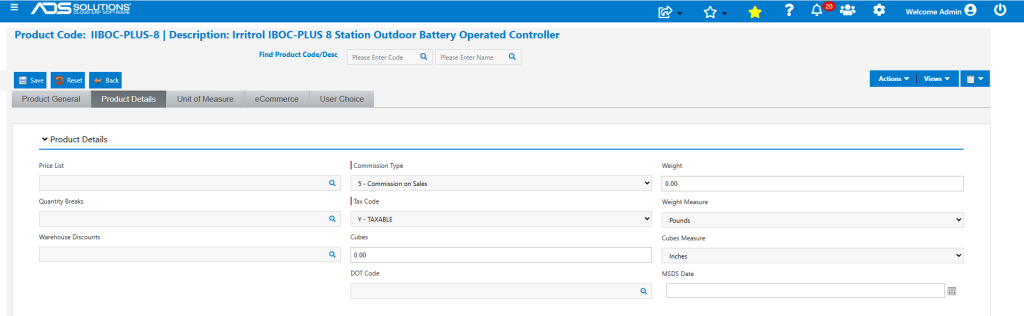
Set Commission Type on the Product
- Commission Types are assigned to products on the product master screen.
- Different products may be assigned to different Commission Types.
- The assignment of Commission Type may be done individually by product or for a selection of products, using the product master import utility.
Set Up the Profit Matrix
- Once the Commission Types have been assigned to products set up the Profit Matrix.
- Go to Customers > Salespersons and select a Salesperson.
- From the Actions tab dropdown, select Profit Matrix.
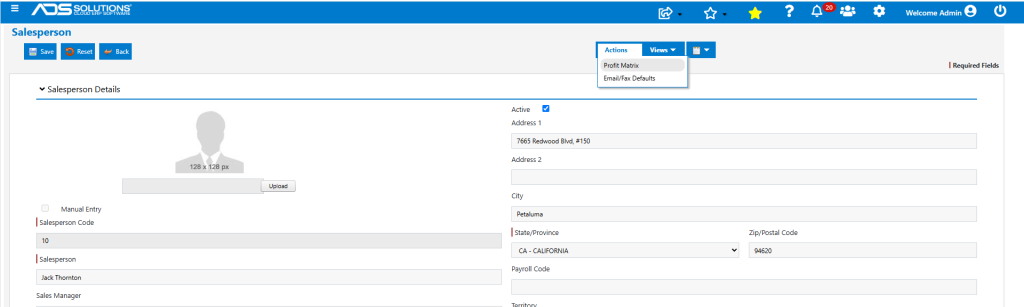
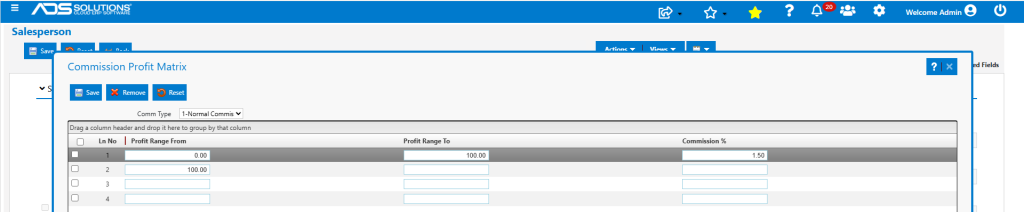
- A Profit Matrix for a particular Commission Type specifies the commission rates at different profit percentages.
- Select the Commission Type from the dropdown and enter the Profit Matrix ranges from lowest to highest.
- The Profit Matrix ranges should be continuous.
- If commissions are calculated based on sales, enter one line to cover the whole profit range.
- Then Save.
Commission Calculations
- When this product is put on sales order 78292, the commission will be calculated based on the extended price of the product at the rate defined in the Profit Matrix.
- Commission rate of 1.5% is applied to the extended price of $2,205.23 to give a commission of $33.08.

Commission Reports
- If the commission is calculated based on sales, use any commission report.
- If commission is calculated based on profit, there are commissions reports that calculate the profit by Standard Cost, Alternate Cost, Special Cost or Average Cost.
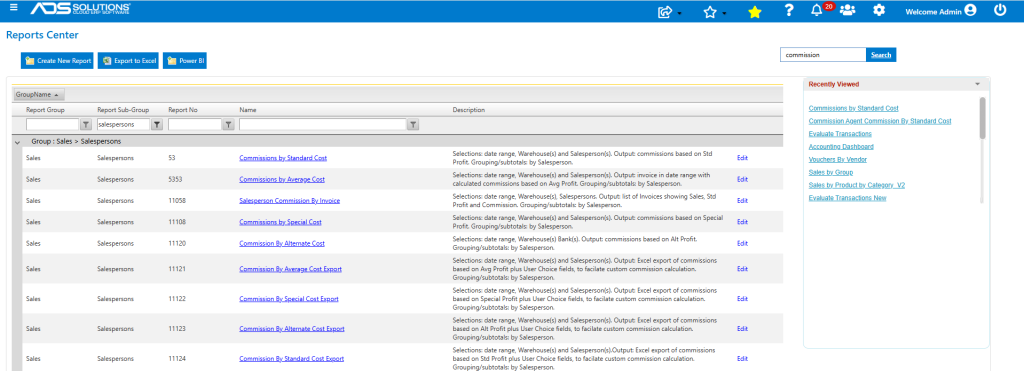
- There are also “Export” versions of these reports that have been formatted to allow for easy export to and manipulation in Excel.
- Using these “Export” versions, users can create logic for custom commissions plans that will then calculate based on the raw data.