Accolent ERP allows for charging interest on invoices for a particular Customer that are outstanding past the due date based on the terms allowed that Customer. There is a global setting to enable the charging of interest and a field for the rate of interest to be charged monthly, based on a 30-day month convention. The interest calculation is based on simple rather than compound interest as many states have laws prohibiting the charging of compound interest. Interest charges will not be separately invoiced but will be displayed on the Customer Statement.
Charging Interest Overview
- Accolent ERP allows the charging of interest for late payments.
- Typically charging interest must be specified in a contract or invoice terms.
- Most states do not set limits on how much interest may be charged but have usury laws that require that the amount should not be excessive.
- Courts in New York have ruled that 1.5 % per month meets the “not excessive” test and this is often looked to by other states.
- Many states also prohibit the charging of compound interest and/or collection of compound interest charges may not be unenforceable.
- Accolent ERP calculates interest based on simple interest only.
System Configuration
- Go to System > System Configuration.
- Set ID 98=Y to charge interest and 62=1.50% interest rate per month based on a 30-day month.
- Interest will be recalculated daily (through an SQL Job) for all overdue invoices.

Interest Calculations
- Interest on an overdue Invoice is calculated from the due date to the next Payment/Statement Date.
- The amount of interest is the starting balance multiplied by the number of days elapsed divided by 30 and multiplied by the monthly interest rate specified.
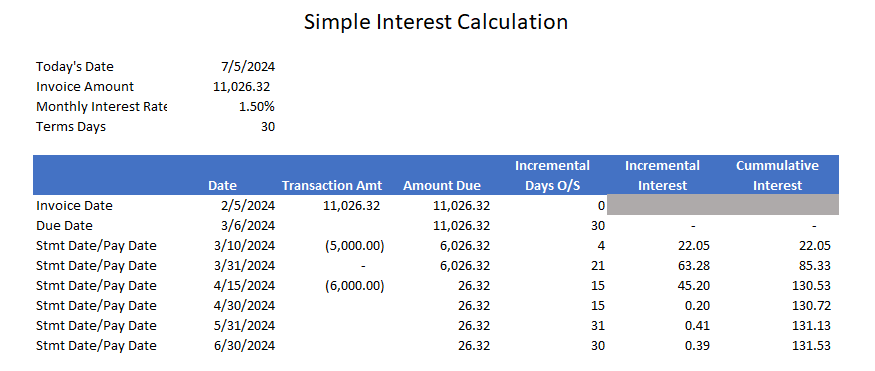
- In this example:
- Invoice Date is 2/5/24 with Terms of 30 Days, so Due Date is 3/6/24.
- Partial payment of $5,000 was made on 3/10/24, so the Amount Due of $11,026.32 was outstanding for 4 days. The interest is calculated as $11,026.32 x 4 / 30 x 1.50% = $22.05.
- As of the next statement date of 3/31/24, the Amount Due of $6,026.32 was outstanding for 21 days. The interest is calculated as $6,026.32 x 21 / 30 x 1.50% = $63.28 and cumulative interest = $85.33. This cumulative interest due will show on the 3/31/24 monthly statement.
- Partial payment of $6,000 was made on 4/15/24 so the Amount Due of $6,026.32 was outstanding for 15 days. The interest is calculated as $6,026.32 x 15 / 30 x 1.50% = $45.20. and cumulative interest = $130.53.
- As of the next statement date on 4/30/24, the Amount Due of $26.32 was outstanding for 15 days. The interest is calculated as $26.32 x 15 / 30 x 1.50% = $0.20 and cumulative interest = $130.72.
- And so on ….
Interest on Overdue Invoices
- Go to Receivables > Payment Receipts > Add Payment Receipt.
- Enter Customer 120123 and click on Open Invoices to open the grid of open invoices showing the interest due on each overdue invoice.
- Look at Invoice 65264 which has an interest due balance.
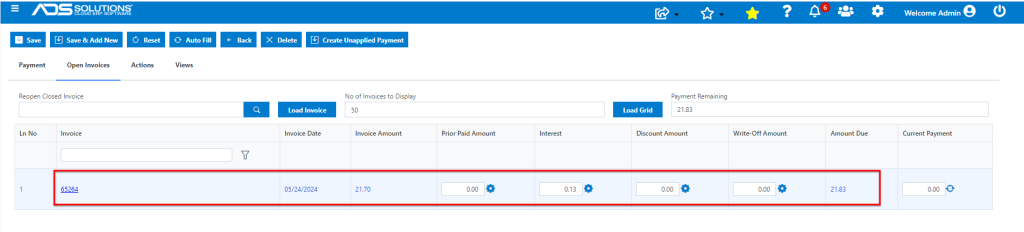
- Invoice 65264 was dated 5/24/24 for $21.70. Terms are 1-Net 30, so the Due Date was 6/23/24. Today’s date is 7/5/24 so 12 days have elapsed. Interest is calculated as $21.70 x 12 / 30 x 1.50% = $0.13.
- So, Amount Due = $21.70 + $0.13 = $21.83.
Reporting of Interest on Customer Statements
- The cumulative amount of interest on each overdue invoice is updated daily.
- The actual interest balance is continually shown on the Receivables > Payment Receipts > Add Payment Receipt grid for each customer for each invoice.
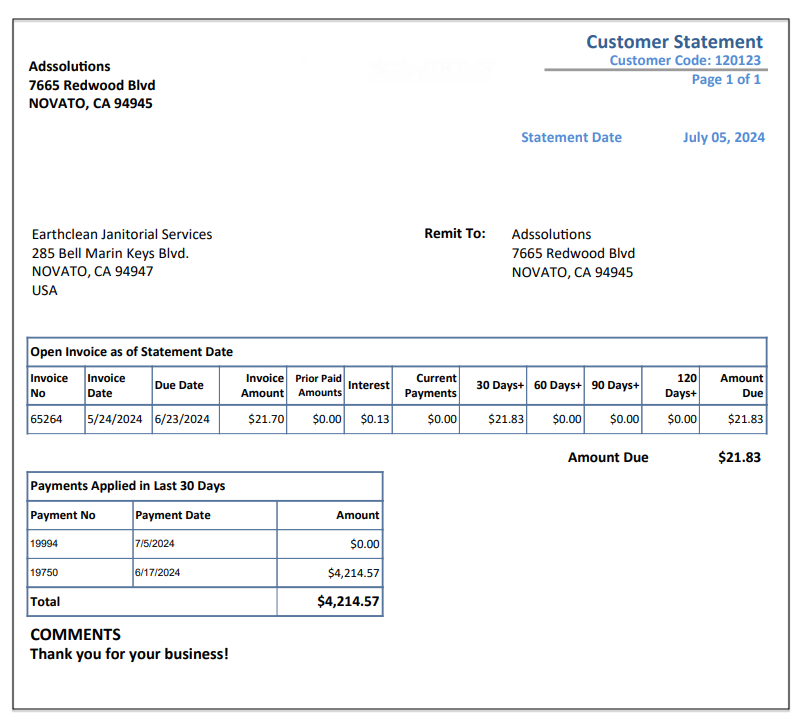
- Any time a Customer Statement is run, it will show the cumulative amount of interest due as of the date of the statement.
Exempting Customers from Interest Charges
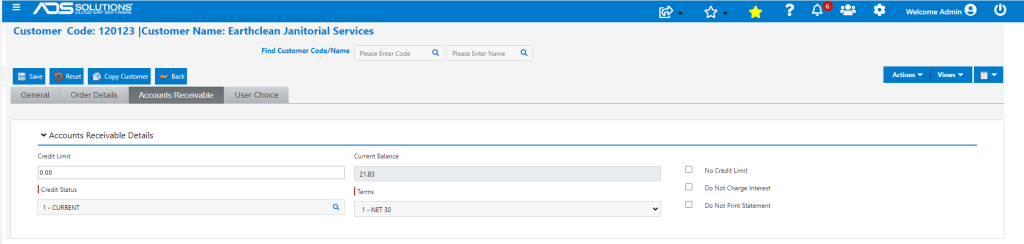
- If the global setting is to charge interest, the Don’t Charge Interest checkbox may be selected to exempt a customer from being charged interest.
- To exempt customers from Interest, go to the Customer and click on the Do Not Charge Interest checkbox