Accolent ERP allows user to select which Cost will be defaulted onto purchase orders (POs). Users can select from Standard Cost, Alternate Cost or Special Cost. Typically, Alternate Cost is used to store the replacement cost that should default onto POs. If the selected cost has a zero value, the system will look for the Last PO Price and use that instead.
Application Defaults
- Go to Settings > Application Defaults > Purchasing/Vendors.
- Set V102-1 as the Cost to default into purchase order entry.

Purchase Order Entry
- The logic for the default price on PO entry is as follows:
- For Product and Warehouse selected, get PO price from Cost table column specified in V102-1.
- The choices in V102-1 are Standard Cost, Alternate Cost and Special Cost.
- If the selected Cost is zero, then use the Last PO Price.
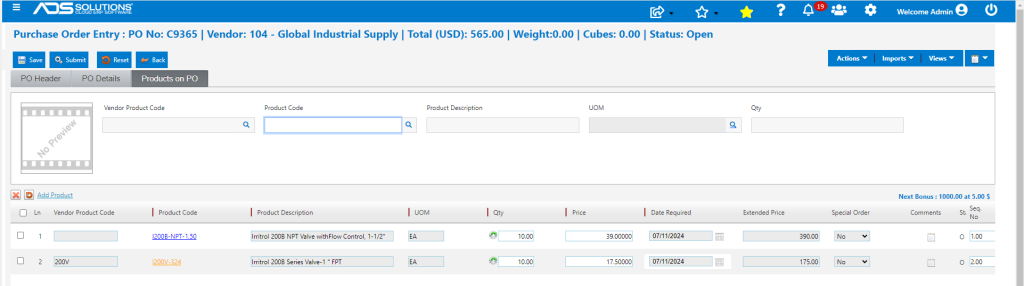
- Create PO No C9365 for Vendor 104.
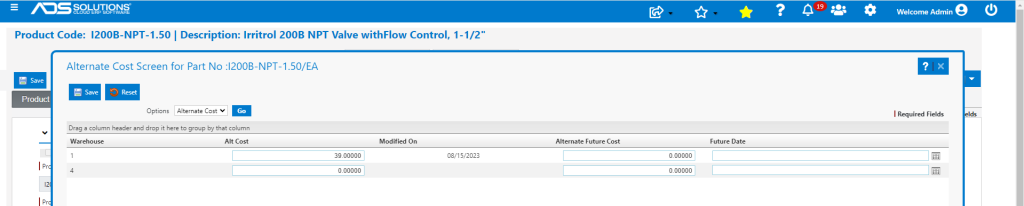
Alternate Cost on Products
- Alternate Cost for Product I200B-NPT=1.50 is set to $39.00, which is the price on PO No C9365.
- Alternate Cost for Product I200V-324 is set to $0.00.

PO History on Product
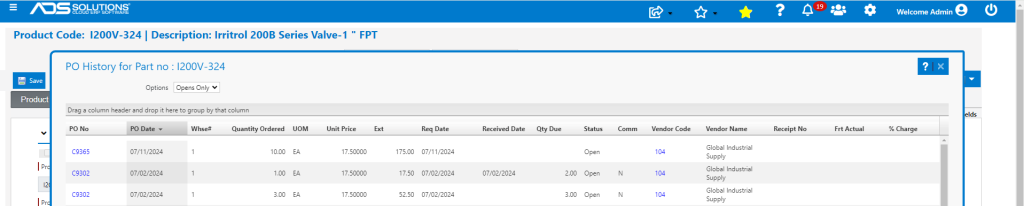
- Go to Views > PO History for product I200V-324.
- Sort most recent first.
- The last PO Price was on C9302 for $17.50, which is the price on PO No C9365.