
Accolent ERP includes a comprehensive Warehouse Transfer (WT) capability. All Warehouses that transfer goods to other Warehouses are Sending Warehouses and marked as Internal Vendors. Similarly, all Warehouses that receive transfers of goods from other Warehouses are Receiving Warehouses and marked as Internal Customers. Sending and receiving WTs are very similar respectively to processing orders and PO Receipts. The tracking of internal WTs is done through an asset-type GL Account for Internal Warehouse Transfers that is set up on the Warehouse GL Defaults.
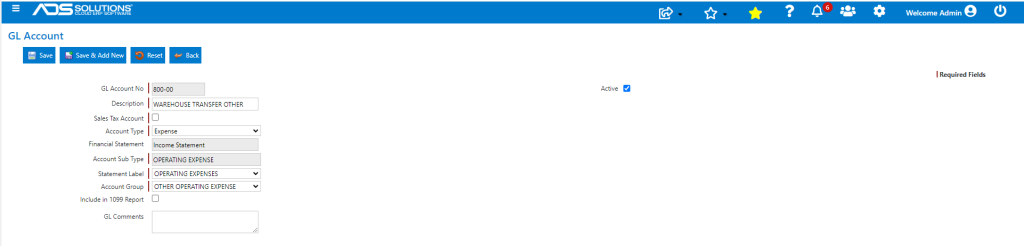
GL Account for Internal Warehouse Transfers
- The Internal Warehouse Transfers GL Account will allow reconciliation of all outgoing and incoming WTs (credits).
- The Internal Warehouse Transfer GL Account is an Asset-type account.
- In a consolidation of all warehouses, the account balance should be zero.
- On each warehouse the balance of the Internal Warehouse Transfers GL Account will reflect whether that warehouse is a net sender (debit balance) or a net receiver (credit balance).
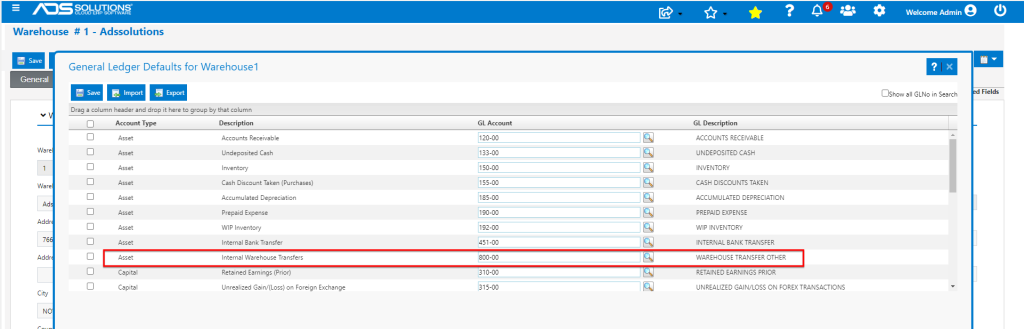
Set Warehouse GL Defaults
- Set the GL Defaults for each warehouse (e.g., for Warehouse 1).
Create WTR
- Create WTR1394 from Whse4-Receiving to Whse1-Sending
- WTR1394 is created using the Alternate Cost for the products in the Receiving Warehouse.
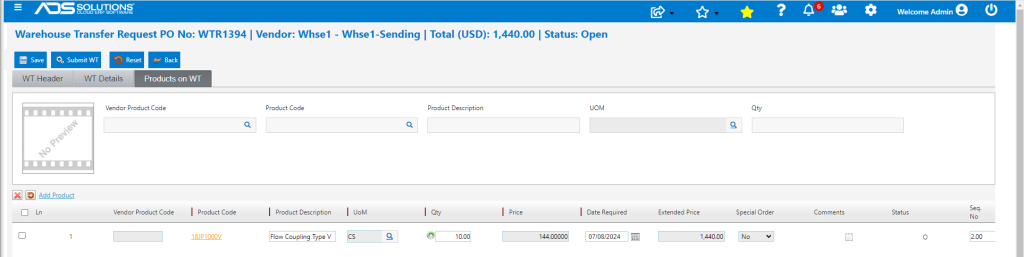
- Submit WTR1394 automatically creates WTS1394 as a sales order on the Sending Warehouse.

Process WTS
- WTS1394 is initially created taking the price and cost of the products from WTS1394.
- However, at the time of invoicing, WTS1394 automatically makes the prices and costs equal to the Average Cost of the products in the Sending Warehouse.
- Because price and cost are the same, there is no margin created in the Sending Warehouse.
- GL Posting under Sales Journal for Sending Warehouse.

Receive WTR
- Once WTS1394 is invoiced, WTR1394 is able to be received.
- WTR1394 is repriced to the same price and cost of WTS1394 which is based on the Average Cost of the products in the Sending Warehouse.
- Receive WTR1394 in the Receiving Warehouse.

- GL Posting through PO Receipts Journal for Receiving Warehouse.

Warehouse Transfers Record
- The GL Transaction Details report for GL Account 800-00, can be used to tie-out all WT transactions.
