
Accolent ERP provides a sales tax table to record the sales tax rates by applicable tax jurisdictions. Using the sales tax table, users can enter a combined sales tax rate for a particular location and, if desired, break this down into split sales tax jurisdictions to record the component rates for State, County, City and Local taxes. These are referred to as split sales tax jurisdictions.
Combined Tax for a Jurisdiction
- If you have nexus in a particular tax jurisdiction you can enter the applicable combined rate to charge for transactions in that jurisdiction.
- For example, if you have nexus only in San Francisco, CA, you might enter the combined rate of 8.625%

- More typically though, sales tax jurisdictions have to be entered more granularly than this.
- Sales tax rates vary depending on different locations within San Francisco.
Split Tax Jurisdictions
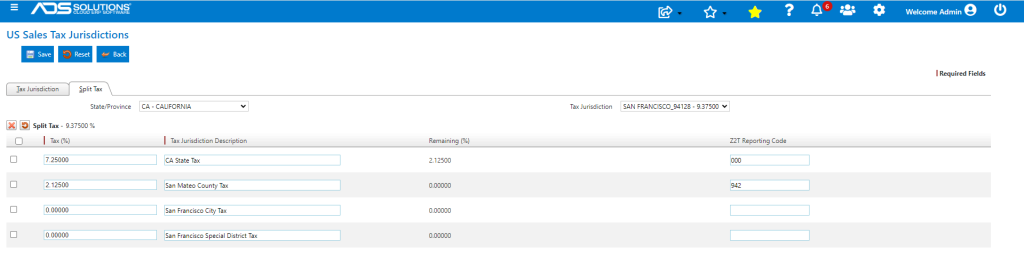
- For example, in San Francisco Zip Code 94128 which is in San Mateo County has a combined tax rate of 9.375%.
- The Sales Tax rate for any jurisdiction is made up of components for State (CA) tax, County (San Mateo), City (San Francisco) and Local (San Francisco Special District Tax).
- In this case the breakdown is CA State Tax is 7.25%, San Mateo County is 2.125%, San Francisco City Tax is 0.00% and San Francisco Special District Tax is 0.00%
- Sales Taxes do have to be paid to each of the component jurisdictions.
- Using the Split Tax screen these components can be entered.
Accolent ERP Sales Tax Integrations
- If you use the Accolent ERP integration with Avalara, sales taxes will automatically be recorded by split tax jurisdiction.
- Similarly, if you choose the option to import a tax table from Zip2Tax into Accolent ERP, the split tax jurisdictions will be made automatically.