
Accolent ERP allows users maximum flexibility in setting up the Income Statement. Setting up the Income Statement correctly is critical in order to perform meaningful analyses of the results of operations, results of marketing plans, cost controls, and advanced budgeting.
Income Statement Set Up
- To set up the Income Statement, go to GL > Financial Statement Set Up > Income Statement Set Up.
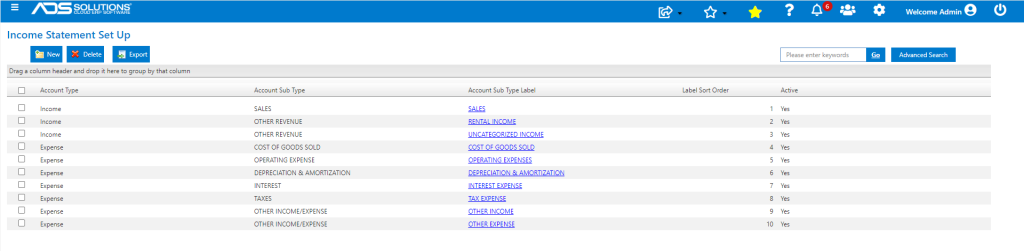
- The above table of Income and Expense Account Types is your high level account structure and is provided by Accolent as a “starter” configuration. You do not have to use it, you can of course construct your own, or modify this one to your own purposes.
- The Account Types give you a top to bottom structure that will result in certain standard sub totals such as Gross Profit, Earnings Before Interest Taxes and Depreciation & Amortization, Earnings Before Interest and Taxes, Income from Operations, and Net Income.
- The Account Sub-Types define the income and expense Account Groups under each Account Type that you will assign individual accounts in your Chart of Accounts to.
- You can have multiple of the same Account Sub-Type so long as you have a different Statement Label for each. For example, you can use the CURRENT ASSETS Account Sub-Type for Cash Accounts and another CURRENT ASSETS Account Sub-Type for Inventory.
- The Financial Statements total GL Accounts by Account Group and then the Account Groups total by Account Sub-Type.
- Once you have set up the structure, clicking on the blue hyperlink for each Statement Label brings up the following screen that shows all the Account Groups under each Account Sub-Type.
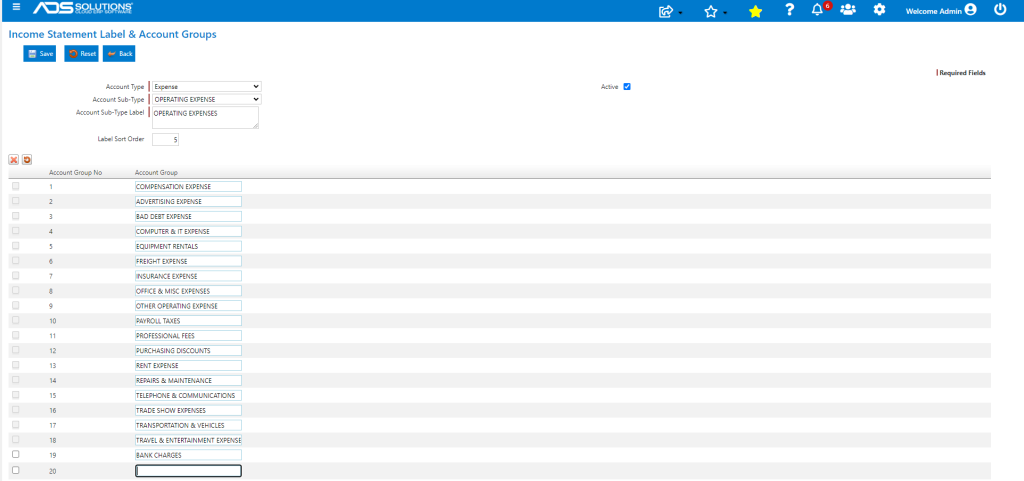
- You can sort these Account Groups in any order you choose by changing the Account Group No.
- You may want certain income items like Other Income or Non-Operating Income items to appear at the bottom of the Income Statement. You will need to make those accounts “expense” accounts and they will act as contra expense items (credits) in the Other Income\Expense section.