
Accolent ERP includes the ability to look up any transaction by Accounting Journal to see how it was posted to the General Ledger (GL). This is helpful when trying to confirm a specific GL Posting and/or for auditing purposes. All transactions are posted to the GL through the following Accounting Journals: Sales Journal (SJ), Payment Receipts Journal (PR), PO Receipts Journal (PO), Accounts Payable Journal (AP), Voucher Adjustments Journal (VA), Cash Disbursements Journal (CD) and the General Journal (GJ).
Evaluate Transactions
- Go to GL > Manage General Ledger > Evaluate Transactions.
- Enter a transaction date range and select an Accounting Journal.
- Select Sales Journal for example, select Detail view, then click Submit.

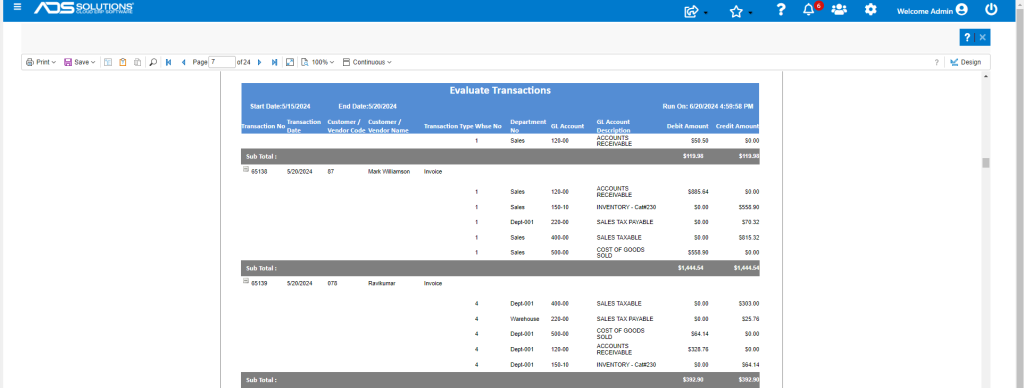
- This is the report which has 24 pages.
- It can be narrowed down by date range.
Search for a Specific Transaction
- A specific transaction can be searched for directly using the Search icon.
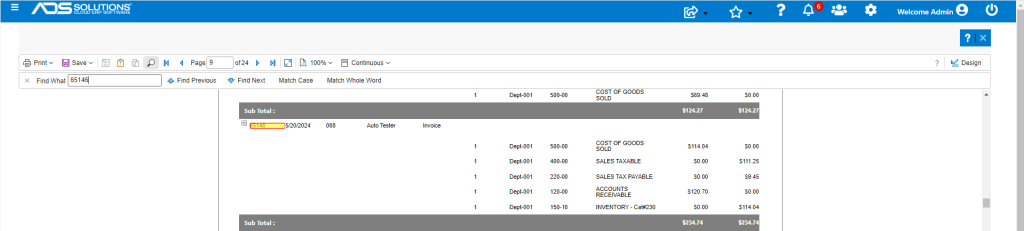
- This shows the specific General Ledger Accounts to which the transaction was posted