
Accolent ERP’s General Ledger is posted immediately upon a transaction being entered. The transaction is posted to the GL based on the transaction’s date. As such, closing a month or a fiscal year is simply a matter of verifying the transactions that were posted, and making any period adjustments or posting any GL Adjustments and then Closing. This provides for straightforward Accounting Close processes for end-of-month and end-of-year closings.
Period Close Processes
- To complete a period-end Accounting Close, first verify that all the transactions were posted correctly and to the correct month
- Then make any GL Adjustments that need to be made
- Then Close the period as described below
- Closing a Fiscal Year will make all the adjustments necessary to update the Retained Earnings account and zero out cumulative balances
End of Month Close
- Go to GL > Manage GL > Open/Close a Fiscal Period
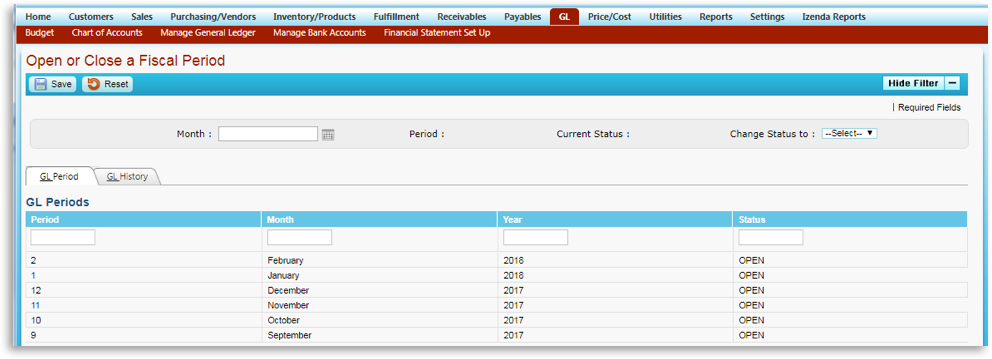
- Select a Month to Close
- Check that the all prior months are closed – the open/close marker should be thought of as a marker on a timeline that runs from the Accounting Start Date to the present: everything to the left of the marker is closed and everything to the right of the marker is open. Check whether prior month is closed – if yes continue; if no stop and close the prior open month(s); then start over
- Check that there are no unposted transactions from the month – if yes continue; if no stop and post unposted transactions; then start over
- When complete, set Status to CLOSED
- Once Closed, no further transactions may be posted to the month
End of Year Close
- Go to GL > Manage GL > Open/Close Fiscal Year
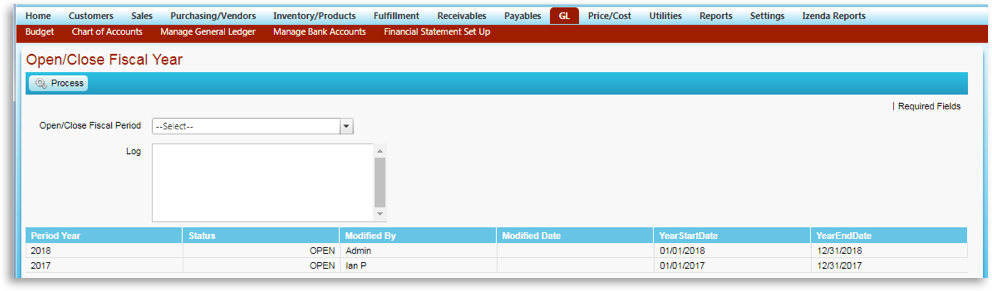
- Select a Fiscal Year to Close
- Make all end-of-year GL Adjustments (e.g., to record depreciation, to make accruals, to record shareholder distributions) first
- Then check that the first month of the fiscal year is closed – if yes continue; if no stop close the first month; then start over
- Check that there are no unposted transactions from month 1 – if yes continue; if no stop, open month 1 and post unposted transactions; then start over
- Loop through each month in sequence from month 1 through month 12 until all 12 months are closed
- Then click Process to Close the Fiscal Year
- Closing the fiscal year:
- Prevents any additional transactions from being posted to that fiscal year
- Adds the Income YTD balance to the Retained Earnings balance from the beginning of the fiscal year to get the Retained Earnings balance for the end of the fiscal year
- Zeros out the cumulative Income YTD account balance
- Zeros out all the year-to-date cumulative balances in the Income-type and Expense-type accounts
- Once Closed, the Financial Statements can be run